
- 1. Fields - how to pick a type?
- 2. publish_state ≠ status
- 3. Real-estate example - data design
- 3.1 Fill on the Panel (copy)
- 3.2 After Panel Save - what does the system do?
- 3.3 What you do in CMS
- 4. HTML hooks to keep
- 5. What may AI edit? (after you Saved the type)
- 6. Sample prompt for AI
- 7. Real-estate checklist
- 8. Common issues
Appifio Creator · Lesson AS20 · Custom types · Real-estate example
Panel Save · fields · taxonomy · real-estate site
Declare on the Panel so CMS updates both declaration files correctly - then ask AI to polish list/detail pages and filters.
Learning goals: Create a properties type, pick field types correctly, enable categories; know what the Panel creates; ask AI to edit HTML safely.
Prerequisites: AS19 · AS07 · Backend Advanced + CMS
Prompt: Aura Complete + Appifio Aura CMS + Storage - Complete AI Guide · Related: AS21 (AI declares the type)
1. Fields - how to pick a type?
| type | Widget | Use when |
|---|---|---|
string | text | Title, short address |
text | textarea | Long plain text |
html | textarea / wysiwyg | Formatted description |
number | number | Price, m², room counts |
enum | select | Fixed set: sale / rent |
boolean | toggle | Yes / no |
url | url | External link |
image | image | Cover image (upload in CMS) |
ref / array / datetime on the custom-type form. Many property kinds → enable Categories. Only a few fixed values → enum.2. publish_state ≠ status
Custom types use the system field publish_state (draft / published / private / trash) for the public site. Built-in blog uses status.
A custom field named status (e.g. “sold”) is a separate field - it does not replace publish_state. The Panel does not put id / slug / timestamps in the fields you declare (the system attaches those when saving an item).
3. Real-estate example - data design
| Need | How to declare |
|---|---|
| Listing of properties | Type code properties · data_file: properties.json |
| Sale / Rent | listing_type · enum: sale, rent |
| Apartment, land, condo… | Enable Categories → usually properties-categories.json |
| Price, area, rooms | price, area_m2, bedrooms · number |
| Description / image | description html · cover_image image |
3.1 Fill on the Panel (copy)
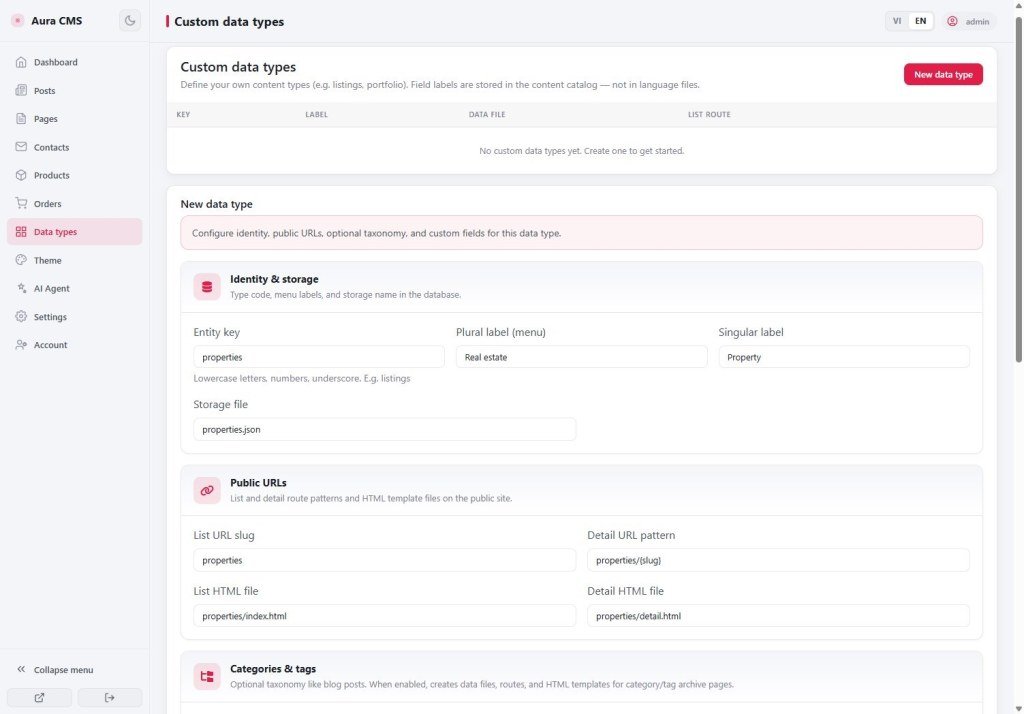
Label: Real estate
Data file: properties.json
List route: properties → properties/index.html
Detail route: properties/{slug} → properties/detail.html
✓ Enable categories
Fields:
title (string, required)
description (html)
listing_type (enum: sale, rent) required
price · area_m2 · bedrooms · bathrooms (number)
address · city (string)
cover_image (image)
Don’t use reserved codes: posts, products, pages, contacts, orders, blog, shop, cart…
3.2 After Panel Save - what does the system do?
(Same order as the AI docs - you don’t do this by hand if you already Saved on the Panel.)
- Update
__cms_manifest__.json(propertiesentity + hidden category entity if enabled) - Update
__cms_ui_contract__.json(de_properties_list/detail/ … keys +#de-item-listhook) - Create sample HTML:
properties/index.html,detail.html, (maybe)category.html - Attach the public list route
- Menu at
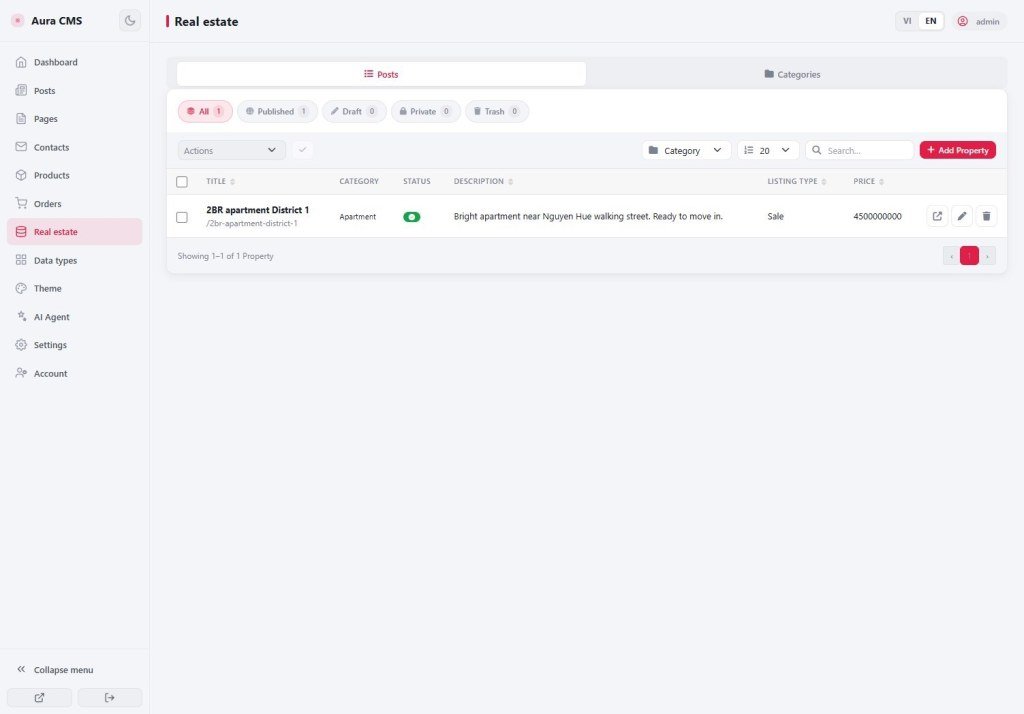
/cmsshows a Real estate item
The listings data file (properties.json) is usually created when you add the first item - it doesn’t have to exist at Save-type time.
3.3 What you do in CMS
- Categories: Apartment, Condo, Townhouse, Land…
- Add listings: sale/rent, category, price, image…
- Set
publish_state= published to show on the site
4. HTML hooks to keep
- List:
#de-item-list· body hasdata-aura-cms-rootanddata-aura-cms-entity="properties" - Detail:
#de-item-detail - Category page (if any):
#de-tax-item-list
5. What may AI edit? (after you Saved the type)
Edit: site HTML/JS (properties/index.html, detail.html) - grid, sale/rent filter, property-kind filter, price cards.
Don’t edit: platform admin UI under /cms.
await window.waitForAppStorage();

const mRes = await appifio_client.appifio_readFsFile('__cms_manifest__.json');
let manifest = mRes.data.content;
if (typeof manifest === 'string') manifest = JSON.parse(manifest);

const ent = manifest.entities.properties;
const dataFile = ent.data_file;

const r = await appifio_client.appifio_readList(
  dataFile,
  ['id','title','slug','listing_type','price','area_m2','city','cover_image','publish_state','category_id']
);
let items = (r.data.content || []).filter(p => p.publish_state === 'published');
// items = items.filter(p => p.listing_type === 'rent');

const catFile = ent.taxonomy?.categories?.data_file;
const cats = catFile
  ? (await appifio_client.appifio_readList(catFile, ['id','name','slug'])).data.content || []
: [];JSON.parse again after readList; filter with status; hardcode file names; writeFile the whole ledger on a public page; delete the #de-item-list hook.6. Sample prompt for AI
After Panel Save (recommended):
“CMS already has a properties type (Saved on the Panel). Read __cms_manifest__.json and __cms_ui_contract__.json, adjust properties/index.html + detail.html: listing grid, Sale/Rent filter (listing_type), property-kind filter (category_id), show only publish_state === published. Keep hooks #de-item-list / #de-item-detail. Don’t use Easy.”
Want AI to create the type (no Panel): see AS21 - must merge both declaration files exactly like the Panel.
7. Real-estate checklist
- CMS + Advanced + Aura prompt (+ CMS guide)
- Panel: create
properties+ fields from §3.1 + enable categories → Save - Add categories + a few published listings
- Ask AI to polish HTML (prompt in §6)
- Check list/detail URLs + filters + hooks still present
- Don’t enable Easy Prompt
8. Common issues
| Situation | Fix |
|---|---|
Can’t create code posts / products… | Reserved codes - rename (e.g. properties) |
| CMS has items but list is empty | Check publish_state (not status); read the correct data_file from the manifest |
| Layout looks good then CMS inject breaks | Restore #de-item-list / #de-item-detail and body attrs |
Next
AS21 - AI declares a custom type: merge manifest + UI contract like the Panel
Internal navigation (same language)
Appifio Creator · AS20 · Custom types · Real estate
