
Table of contents
Appifio Creator · Lesson AS06 · Intermediate · Aura series
Secrets & server functions
(send mail / payments…)
(send mail / payments…)
Keep service keys in the vault (Secrets) - do not paste them into HTML where anyone viewing source can see them.
Learning goals: Add a secret with the right UI; ask AI to call a server function; never expose keys in the browser.
Reading time: ~14 minutes · Previous: AS05, F04 · Next: AS07
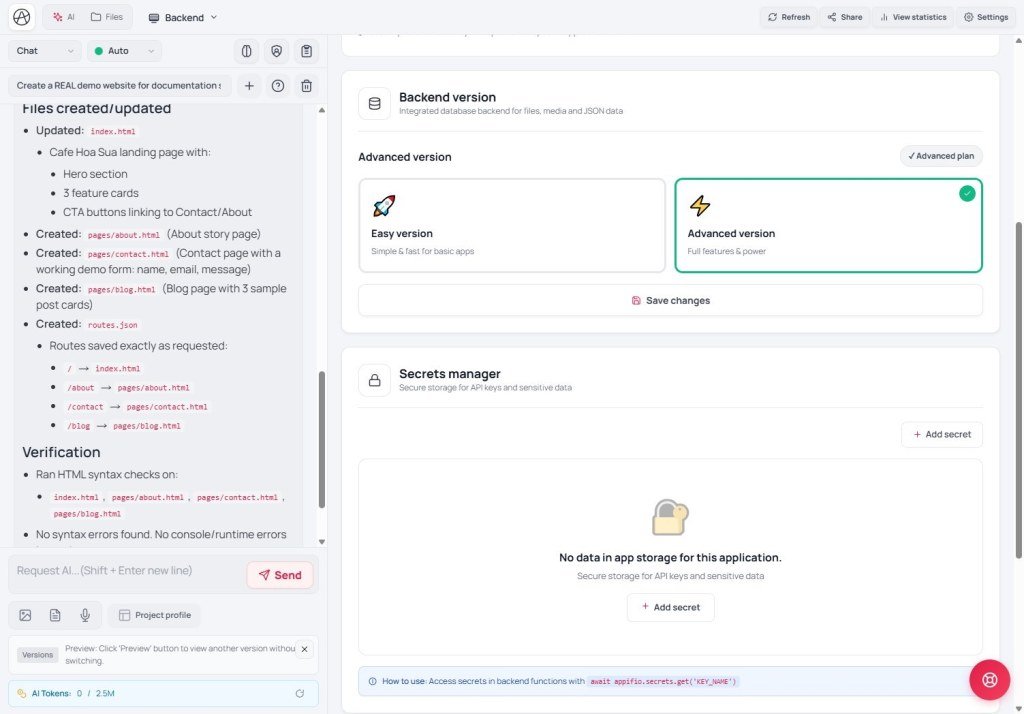
Secrets manager Add secret Backend Save changes
1. Secrets vault map
SMTP / payment / external API keys
→ Backend tab → Secrets manager → Add secret
→ Admin page clicks “Send test” / pay
→ Server reads the secret behind the scenes - visitor browsers never see the full value
2. Glossary
| Term | Meaning | Where you see it |
|---|---|---|
| Secret | A confidential value (API password, token…) | Secrets manager |
| Server function | Work that runs on the server (send mail…) using secrets safely | Admin pages AI builds |
| Value masked | UI may hide most of a saved secret | Secrets list |
3. Steps
- Backend → Secrets manager → Add secret - pick a memorable name (e.g.
SMTP_PASS) and paste the value. - Save with the Secrets UI button (not the same as the Creator toolbar).
- Coder mode: “Admin page with a Send test email button - use secret named … on the server; never print the secret in HTML.”
- Test on Changes while logged in as admin → then Save changes.
Common mistake: Asking AI to put the SMTP password straight into a page file → anyone viewing source can steal it.
3b. How do server functions run?
Admin page (logged in) → calls a function name (e.g. send test mail)
→ Server runs a file under backend/functions/
→ Function reads the secret from the vault (not exposed to the browser)
→ Returns JSON to the page
- Function files are created/edited by AI in the page-file store (needs admin rights) - you do not paste secrets into the function file.
- Each call has time / size limits (sandbox) - Coder detail: AM07.
- Function calls also have their own “Try again later” if you spam - do not hammer the button when it fails.
- If CMS security is tight: guests may be denied - keep calls on admin pages only (AS11).
The secret name in the UI must match the name the function reads (usually UPPER_SNAKE_CASE). Wrong name = cannot read even after Add secret.
4. Comparisons
- Vercel / Netlify env: same “environment variable” idea - Appifio stores them in Secrets manager.
- Bubble API Connector keys: similar private vault, not shown to visitors.
5. Limits & security
You can
- Safer mail, webhooks, payments
- Rotate a secret without editing HTML
Do not
- Do not ask AI to log secrets to the page console
- Do not share a Secrets screen publicly
6. Common issues
| Situation | Fix |
|---|---|
| Send mail failed | Correct secret name? Provider key still valid? |
| Guests can click the send-mail button | Keep it behind admin login; check page permissions |
7. Checklist
- Is the secret in Secrets manager, not in HTML?
- Are buttons that use secrets admin-only?
Next group · CMS
AS07 - Open CMS for the first time & owner account
Internal navigation (same language)
Appifio Creator · Aura series · AS06
