
Appifio Creator · Lesson K12 · Technical
Method A with / · Method B escaped backslash · Copy
MCP JSON config breaks because of one \ - the last K lesson: fill Extracted folder correctly and copy a safe path sample into your IDE.
Learning goals: Configure the MCP bridge on Windows without JSON parse errors; know when to re-download the zip package.
Reading time: about 11 minutes
Prerequisites: H02 (MCP gateway), T12 (sandbox/token/bridge).
Previous → next: K11 → K12 → series X01-X13
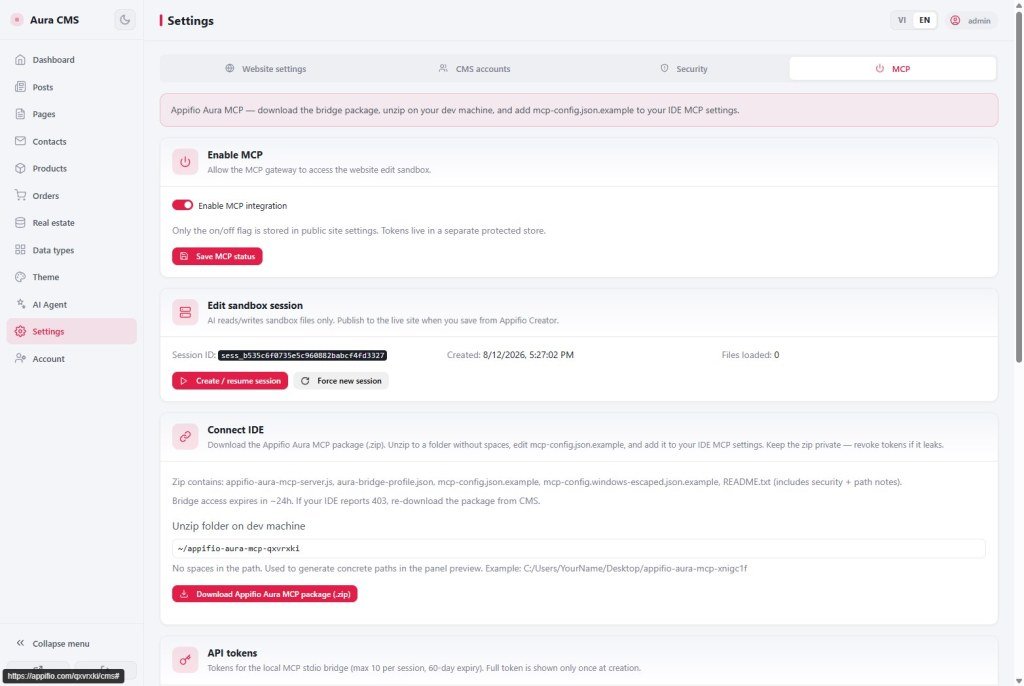
UI labels: Extracted folder on your machine · Method A - forward slash (recommended) · Method B - escaped backslash · Copy · Download Appifio Aura MCP package (.zip)
1. Path setup flow
C:/Users/.../appifio-aura-mcp-xxxC:\\Users\\...)\ in JSON (C:\Users\...) → parse errornode or npx · restart IDE2. Glossary
| Term | Meaning |
|---|---|
| Extracted folder on your machine | Field for the folder that contains server.js after unzipping the MCP package |
| Method A - forward slash (recommended) | Path like C:/Users/Name/Desktop/... - safe in JSON |
| Method B - escaped backslash | Each \ becomes \\ in JSON - easy to mistype by hand |
| Copy | Copies a correctly escaped config sample - paste into IDE MCP settings |
| Download Appifio Aura MCP package (.zip) | Local bridge expires ~24h - re-download on 403 (X09) |
3. Steps on Windows
- Finish H02: enable MCP, create sandbox session, token - follow T12.
- Download Appifio Aura MCP package (.zip) → extract to a folder without spaces (avoid
Program Files). - Paste the path into Extracted folder on your machine - use
/or convert from Explorer. - Click Copy on Method A - forward slash (recommended) → paste into Cursor/VS Code MCP config.
- Install Node 18+; in config use
nodeornpx- restart the IDE. - 403 after ~24h or expired token → re-download the zip (X09).
4. Method A vs Method B
Method A (recommended):
"args": ["C:/Users/YourName/Desktop/appifio-aura-mcp-abc123/server.js"]
Method B (escaped backslash):
"args": ["C:\\Users\\YourName\\Desktop\\appifio-aura-mcp-abc123\\server.js"]
Wrong (JSON breaks): C:\Users\... - a single backslash is treated as an escape sequence.
5. Compared with MCP JSON in general
- Any MCP server on Windows: same escape trap - not Appifio-specific.
- WSL paths: you can use
/mnt/c/...- still Method A style. - macOS/Linux: less common because paths don’t use backslashes - K12 focuses on Windows.
6. Technical limits
Paths with spaces (e.g. C:/Users/Your Name/...) - easy args/command failures; use a folder without spaces.
Node < 18 - server.js may not run; upgrade Node then restart the IDE.
~24h zip package - not a path bug; re-download from the MCP panel (X09).
7. Security
The MCP token in IDE config is a local secret - don’t commit it to public Git. The zip path stays on the dev machine; revoke the token in the panel when you change machines (T12).
8. Common issues
| Situation | Fix |
|---|---|
| IDE reports JSON invalid / parse error | Use Copy Method A; ensure no single \ remains |
| MCP server won’t start | Node 18+; path points at server.js; no spaces in path |
| 403 Forbidden after a day | Re-download zip + new token (X09, H02) |
| IDE edits don’t change the live site | MCP is sandbox only - Save changes in Creator (T12) |
| Cursor doesn’t pick up MCP after copy | Restart IDE; validate mcp.json with an online JSON validator |
9. Tips
- Always use Copy Method A - don’t type paths into JSON by hand.
- Keep a fixed extract folder (e.g.
C:/dev/appifio-mcp) - easier when you download a new zip. - Note the download date so you renew before the ~24h expiry.
10. Self-check · End of series K
- Can you Copy Method A into the IDE without JSON errors?
- Extract path has no spaces and Node ≥ 18?
- Do you remember to re-download the zip when you get a 403 (see X09)?
- Series K complete: safe pipeline (K02), guest form (K05), domain preview (K09), MCP path (K12).
After series K
X01-X13 - Troubleshooting & FAQ
Quick lookup: rate limit (X06), MCP 403 (X09), preview domain (X05) when production issues hit.
Internal navigation (same language)
Appifio Creator · User guide · K12
