
Appifio Creator · Lesson K11 · Technical
by purpose - don’t promise APK when you only need PDF
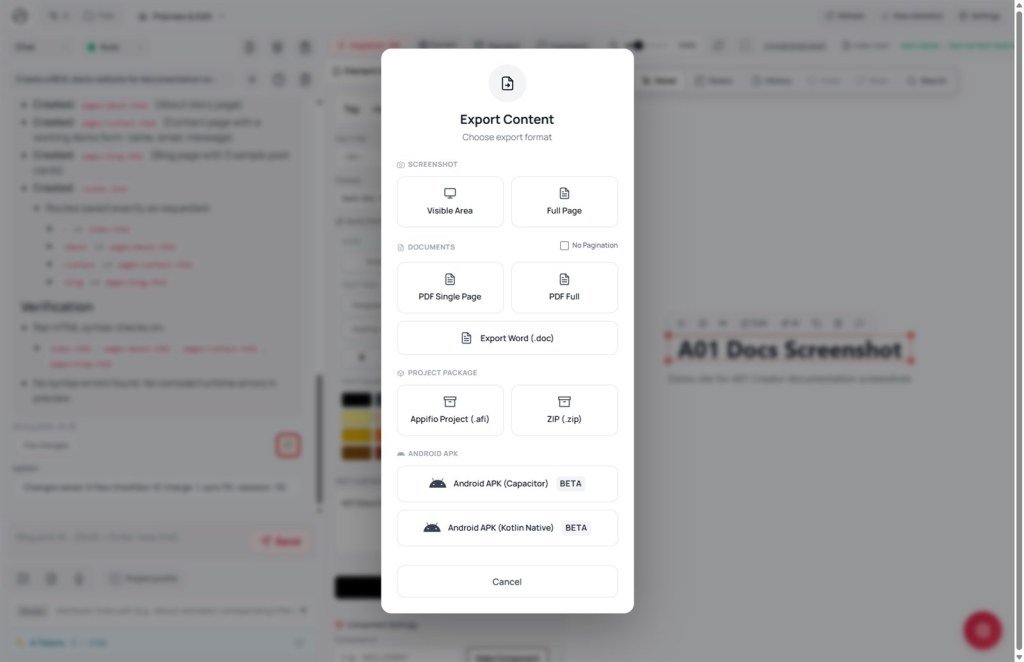
Technical view of the Export content modal: pick Screenshot, PDF, Word, .afi correctly - and know APK BETA limits before committing to a client.
Learning goals: Map need → correct Export format; know App Name comes from Project profile; avoid preview errors when exporting.
Reading time: about 12 minutes
Prerequisites: Stable preview (C01); full detail in E04.
Previous → next: K10 → K11 → K12
UI labels: Export · Export content · Screenshot · Viewport · Full page · PDF 1 page · PDF full · Export Word (.doc) · Appifio project (.afi) · App Name · Project profile (README.md)
1. Pick a format
2. Glossary
| Term | Meaning |
|---|---|
| Export content | Modal title from Export - Screenshot group and Project package group |
| Viewport / Full page | Capture visible area or scroll the full page length |
| Appifio project (.afi) | Compressed full source + assets - backup outside Versions |
| App Name | Field when packaging .afi/APK - from Project profile (README.md) |
| APK BETA | Experimental Android build - may fail or be blocked on free plans |
3. Export steps
- Stabilize preview - pick Changes or Current depending on what you want to export.
- Click Export → modal Export content (subtitle: Choose export format).
- Screenshot: choose Viewport or Full page - watch Preparing… → Done!
- Pick PDF 1 page, PDF full, or Export Word (.doc) for print/email/external editing.
- Appifio project (.afi): confirm App Name matches Project profile before download - file contains sensitive source.
- APK BETA: only try after reading E04 limits - don’t promise clients until a real-device build succeeds.
4. Each Export group
Screenshot (Viewport / Full page): Fast and light - send stakeholders layout. Full page may fail on very long pages or if html2canvas isn’t loaded.
PDF / Word: PDF 1 page for quote emails; PDF full for multi-section docs. Word (.doc) for editors outside Creator.
.afi: Periodic backup + project handoff - only to authorized people (may include backend/secrets paths).
APK BETA: Heavy task - free plans may show “Heavy task unavailable”; complex builds may “Build failed”. Detail: E04.
5. Compared with other tools
- Figma export PNG/PDF: strong for static design - Appifio exports a live page + .afi source.
- Webflow Export code: static HTML ZIP - .afi keeps Appifio structure + backend folder.
- Bubble mobile wrap: same “beta/limits” caution when promising store apps from no-code.
6. Technical limits
You can
- Image/PDF/Word from the open preview
- .afi full-project backup
- APK try on plans that allow heavy tasks
Limits
- Export before preview loads → “Preview not found”
- APK BETA is not store-ready
- Free plans may block heavy builds
7. Security
Appifio project (.afi) may include backend structure and secrets paths - don’t send on public channels. APKs built from projects with real API integrations - test on a private device before release.
PDF/Word/screenshots can leak draft content - check Changes vs Current before Export to external clients.
8. Common issues
| Situation | Fix |
|---|---|
| “Preview not found” | Wait for iframe load; clear custom-domain overlay (K09) then export again |
| Full page capture fails | Try Viewport; refresh if html2canvas is missing |
| Wrong App Name / logo in .afi | Update Project profile (README.md) before exporting |
| APK build failed | Check plan; simplify the app; see E04 |
9. Tips
- Export .afi regularly alongside Clone/Versions - two backup layers.
- For clients: Screenshot Viewport instead of APK when they only need UI review.
- Fill Project profile (B06) early - correct App Name on the first export.
10. Self-check
- Can you pick the right format (image / PDF / .afi / APK) by purpose?
- Do you know App Name comes from Project profile (README.md)?
- Have you read APK BETA limits in E04 before promising clients?
Next lesson
K12 - MCP paths on Windows
One \ breaks MCP JSON - Method A with / vs Method B escaped backslashes; see H02, T12, X09.
Internal navigation (same language)
Appifio Creator · User guide · K11
