
Appifio Creator · Lesson K10 · Technical
Preview Session · Review · batch Ask AI
Tell apart internal Notes (markers on preview/Inspector, Pending/Done + Ask AI batch) and Review comments (guests leave via Unpublished draft + Feedback). Know what a Preview Session is and how to manage both in Creator.
Learning goals: Use both comment types correctly; share Preview Session safely; read guest feedback; turn requests into AI patches (batch or chat).
Reading time: about 16 minutes
Prerequisites: E03 (Share), C01 (preview), K02 (Diff/Save).
Previous → next: K09 → K10 → K11
UI labels: Comments · Comments manager · Add · Pending / Done · Ask AI to edit ({count} pending) · Show all comments · Show review comments · Share · Unpublished draft · Preview / Feedback · Comment · Comments · preview_session · review_mode=1
Product truth (important):
Ask AI to edit ({count} pending) only counts and sends internal Notes with status Pending. Guest Review comments are not auto-batched - read them, then create Pending internal notes (or chat AI) to implement client requests.
1. Two comment types - comparison
| Criterion | Internal Notes (Creator) | Review comments (guest) |
|---|---|---|
| Who creates | You / team in Creator (preview/Inspector) | Client / stakeholder via share link (no Creator login) |
| Label in manager | Note · status Pending / Done | Review comment (separate label) |
| Preview markers | Usually orange (Pending) / green (Done) | Usually blue |
| Storage | Browser (local per link) - internal work notes | Server tied to that draft’s preview_session |
| Batch Ask AI | Yes - Ask AI to edit ({count} pending) | Not automatic - view, then create Pending notes or chat AI |
| Show/hide | Show all comments / Hide | Show review comments / Hide review comments |
2. What is a Preview Session?
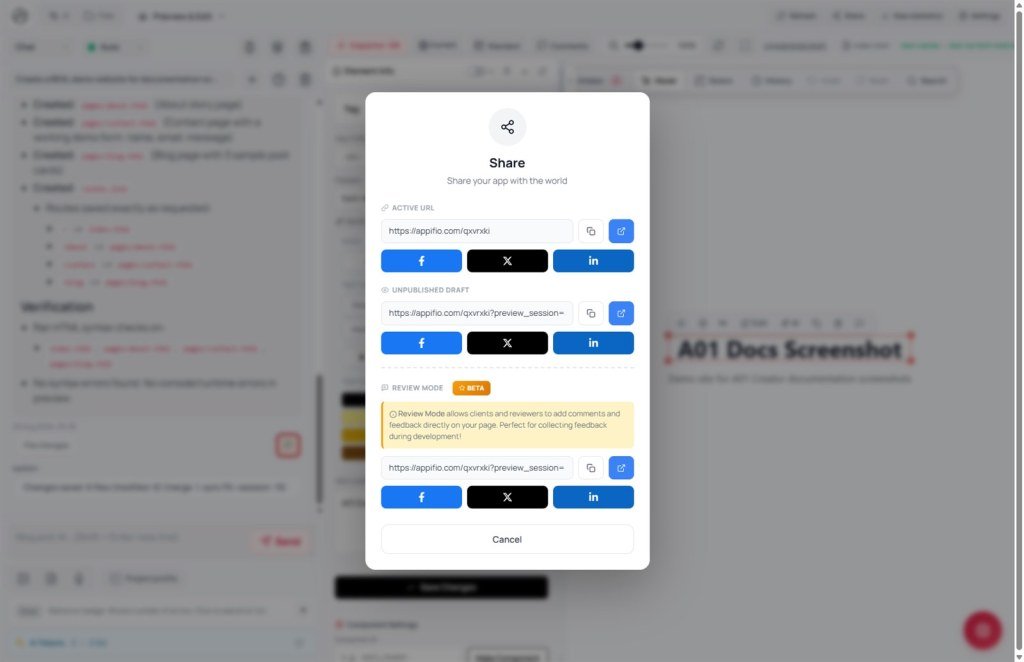
When you share Unpublished draft, the URL includes preview_session=…. That page serves files from the Creator session’s virtual disk - not the live Current site.
- Multi-page navigation: links/routes are rewritten to keep
preview_session. - Share toolbar: Preview (view only) ↔ Feedback (
review_mode=1), Routes list, Mobile view, open live URL, Help. - Feedback: Comment / Comments so guests pin and browse notes.
- Wrong/expired session → Preview session not found - copy a fresh link from Creator (same working session).
3. Guest → you → AI flow
4. Add & manage internal Notes
- On View & edit, use Comments, or with an element selected in Inspector click Add note on the floating toolbar (selector/DOM).
- Open Comments manager: Element · Path/ID · Content · Status · Actions (Edit / Delete / Pending↔Done).
- When Pending items exist: Ask AI to edit ({count} pending) - fills the chat box (with element HTML when found) and marks those items Done.
- Still review Diff / Changes preview, then Save changes for live.
- Show all comments / Hide toggles markers while comparing layout.
5. Receive & act on guest Review comments
- Share → copy Unpublished draft (
preview_session). Prefer Feedback /review_mode=1. - Guest opens link → Comment on elements - no Creator account.
- In Creator, same session → Comments manager: rows labeled Review comment (blue markers). Toggle Show/Hide review comments.
- Read each request → Add Pending internal notes, or describe in Coder/Interface chat.
- Batch AI (if you created Pending notes) or Send chat → Diff → Save. Delete handled Review comments if desired.
6. Value for clients / agencies
- Clients review the exact draft before Save - fewer “I never saw that version” disputes.
- Feedback pins to real HTML, not only a design file.
- Team can batch small internal notes to AI in one pass (copy, color, spacing).
- Compare draft vs live quickly from the Preview Session toolbar.
7. Limits & security
Draft + preview_session has no password - only share with authorized people.
Don’t send /cms with the review link.
Custom domain (K09) can block editor preview - share when the iframe works, or use a temporary appifio.com URL.
Batch AI won’t resolve every conflict in one pass - always Diff; large work → separate prompts / Clone first.
8. Common issues
| Situation | Fix |
|---|---|
| Guest can’t Comment | Need Feedback / review_mode=1; fresh Share link; same session |
| Preview session not found | Session expired/wrong - reopen Creator session, copy Unpublished draft again |
| Ask AI disabled / count = 0 | No Pending internal notes - Review comments don’t increase the count |
| See guest comments but AI doesn’t edit | Create Pending notes per request or chat AI manually |
| Markers cover layout | Hide all comments / Hide review comments |
9. Checklist
- Can you tell Notes (Pending/Done) from Review comments?
- Do you know batch AI only takes Pending internal notes?
- Can you get Unpublished draft (
preview_session) and enable Feedback for the client? - After guest feedback: create notes / chat → Diff → Save changes?
Next lesson
K11 - Smart export by purpose
Pick the right format in Export content - image, PDF, Word, .afi, APK BETA.
Internal navigation (same language)
Appifio Creator · User guide · K10
