
- 1. One source of truth (manifest)
- 2. Glossary
- 3. Step by step
- 4. Related features
- Manifest = contract between Creator and CMS
- UI contract - layout changes without losing mapping
- Published vs Draft
- 5. Design vs content models
- 6. Can / can’t
- 7. CMS sync security
- 8. Common issues
- 9. Tips
- 10. Self-check & next
Appifio Creator · Lesson K06 · Technical
with Aura CMS
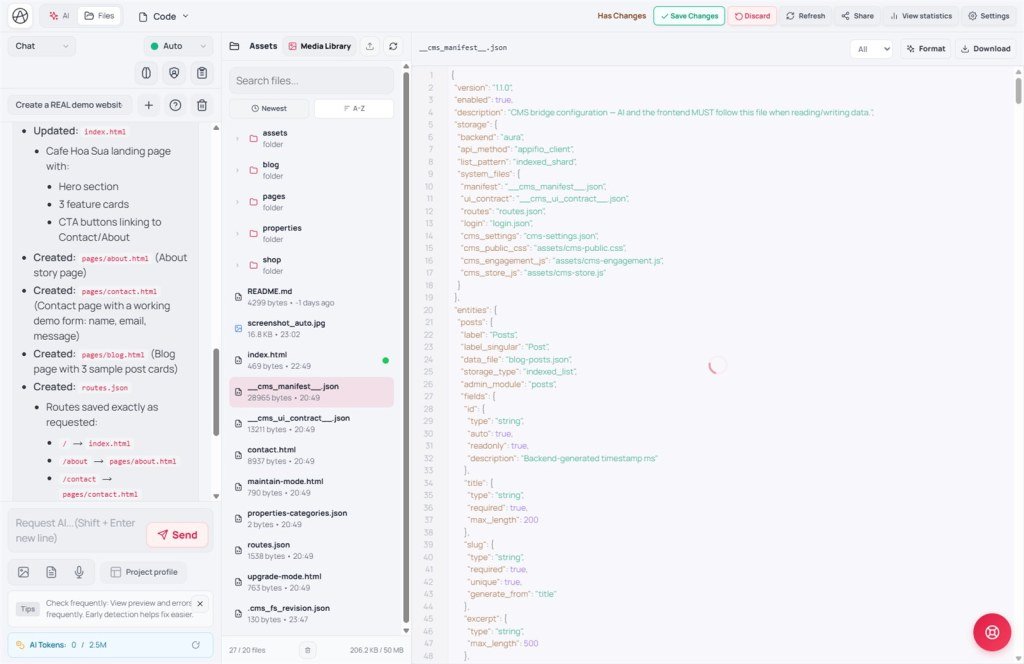
Creator builds the HTML shell; CMS publishes content - both must share one manifest, not two parallel data sources.
Learning goals: Read __cms_manifest__ and __cms_ui_contract__; sync listing/detail HTML with Posts/Contacts/Products panels; Routes + Save; Published / Draft status.
Reading time: about 19 minutes
Prerequisites: G02-G04 (CMS setup), T05 (manifest), H01 (publish), K05 (contacts).
Previous: K05 - Guest form appendData.
Next: K07 - Secrets & Backend Function.
Main UI labels:
1. One source of truth (manifest)
data_file + field namesdata_file2. Glossary
| Term | Meaning | Where in the UI |
|---|---|---|
| __cms_manifest__ | CMS schema: entity, file, fields, routes | Project JSON · read via Coder AI |
| __cms_ui_contract__ | Links HTML selectors ↔ CMS fields | JSON file · update when layout changes |
| data_file | JSON file holding entity records | Declared in the manifest |
| Published / Draft | Visibility status on the frontend | CMS panel when editing a post |
| Routes + Save | Configure listing/detail routes | Creator tab (≠ Save changes) |
| CMS theme panel | CMS admin colors/spacing - not Creator site HTML | CMS Appearance |
3. Step by step
- Step 1 - Open CMS: visit
/{url}/cms- confirm sidebar entities: Posts, Contacts, Products… - Step 2 - Read manifest before prompting: mode Coder: “Read
__cms_manifest__.jsonfirst; use the correct data_file and field names; update__cms_ui_contract__if you change listing/detail layout.” - Step 3 - Routes: Routes tab - blog list + detail
/blog/:slug(example) → Save (routes only). - Step 4 - HTML reads the right file: listing page calls readList/readOne on the manifest
data_file- don’t hardcode another name. - Step 5 - CMS content: create a Published post (or Draft for testing) - fields match the manifest.
- Step 6 - Creator preview: preview Changes - new post appears on the draft frontend.
- Step 7 - New data types: create in CMS Data types first - don’t let AI invent entities/files outside the manifest.
- Step 8 - Publish: Creator Save changes → check live URL - CMS and HTML share the same data.
4. Related features
Manifest = contract between Creator and CMS
Every entity (Posts, Products, Contacts) declares data_file, field types, slug rules. HTML and CMS panels both follow - change schema only in the manifest + CMS Data types, then update HTML.
UI contract - layout changes without losing mapping
When Inspector/AI changes HTML classes, __cms_ui_contract__ records new selectors ↔ fields like title, body… Dynamic render still binds correctly after publish.
Published vs Draft
Public frontend should only list Published posts. Draft is for staging - check on Changes preview or an admin preview URL.
5. Design vs content models
| Model | Design vs content | Appifio |
|---|---|---|
| WordPress theme + admin | PHP theme + post DB | Creator HTML + JSON manifest + CMS panel |
| Webflow Designer + Editor | Designer locked · Editor edits CMS fields | Creator edits layout · CMS edits content - linked by manifest |
| Headless (Next + Strapi) | Separate API · frontend fetch | Same Storage - appifio_client reads manifest files, no third-party API |
6. Can / can’t
You can
- One data_file for CMS + frontend + Contacts form (K05)
- Add entities via CMS Data types → update HTML from the manifest
- CMS admin theme separate from Creator site UI
Avoid
- Two JSON files for the same content type (posts.json + articles.json)
- Changing CMS fields without updating HTML/contract
- Expecting the CMS theme panel to rewrite listing HTML - edit in Creator
7. CMS sync security
- Manifest
securityenforces who may append/read - guest forms (K05) must match. - Don’t expose Draft posts on public routes - filter status in HTML.
- Review Diff when AI adds entities/files outside the manifest - may bypass security policy.
8. Common issues
| Situation | Fix |
|---|---|
| CMS has posts, frontend empty | Wrong data_file · not Published · haven’t Save changes |
| CMS field missing on the page | Update __cms_ui_contract__ · field name vs manifest mismatch |
| 404 on post detail | Routes → Save missing slug pattern |
| AI invents a new JSON file | Delete the divergent file · stick to manifest · create entity in CMS Data types |
| Form Contacts vs CMS panel diverge | Same contacts data_file in the manifest (K05) |
9. Tips
- Every CMS prompt starts with “read __cms_manifest__ first” - K01/K06 habit.
- When you change listing layout → update the contract in the same Diff, not later.
- Test: create 1 CMS post → refresh Changes preview before Save changes.
- New dynamic types: G04 + CMS Data types first, HTML second - never reverse.
10. Self-check & next
- __cms_manifest__ vs __cms_ui_contract__?
- Why not two data_files for the same content type?
- Save (Routes) vs Save changes?
- Do Draft posts appear on the public frontend?
- Flow to add a Products entity from CMS to HTML?
Next lesson
K07 - Secrets & Backend Function
Admin-only pieces guest forms (K05) must not call - email, payment, secure server logic.
Internal navigation (same language)
Appifio Creator · User guide · K06
