
Appifio Creator · Lesson K07 · Technical
Backend Function - keep keys out of the browser
Technical view for people who know F04: store API keys in Secrets manager, run server logic via executeBackendFunction, and stop AI from hardcoding secrets into HTML.
Learning goals: Use Secrets manager UI correctly, know the client/server boundary, and know when Diff should reject a secret-leaking patch.
Reading time: about 14 minutes
Prerequisites: F04 (basic Secrets), T06 (Backend API key), K02 (Diff before Save).
Previous → next: K06 → K07 → K08
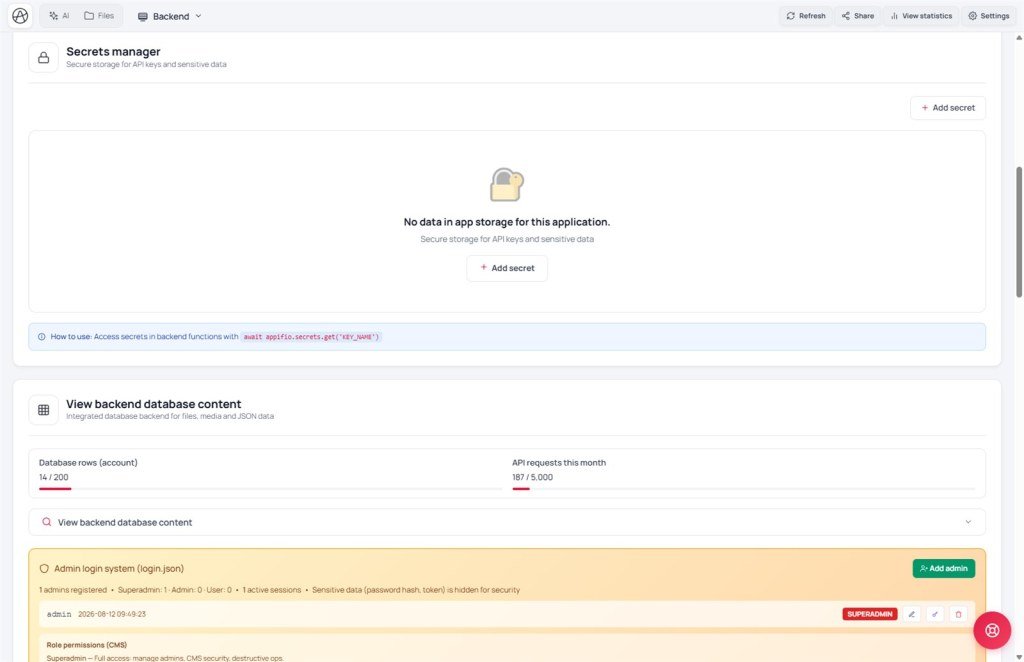
Main UI labels: Secrets manager · Add secret · Edit secret · Delete secret · Key name · Secret value · Description (optional)
1. Secret flow
appifio_client.appifio_executeBackendFunction('sendMail', params)await appifio.secrets.get('SMTP_KEY') → call external service → return result (secret never shown in full on screen)2. Glossary
| Term | Meaning |
|---|---|
| Secrets manager | Sensitive-key area on the Backend tab - admin+ roles only |
| Key name | Secret id (e.g. STRIPE_API_KEY) - letters, numbers, underscore; no accented characters |
| executeBackendFunction | Call a Node handler in backend/functions/ from a page - guests usually blocked |
| appifio.secrets.get | Async read of a secret - only valid inside backend/functions, never on the frontend |
| Masked secret on screen | Full secret value is not returned to the client - only masked form |
3. UI steps
- Open Backend → Secrets manager → Add secret.
- Fill Key name, Secret value, optional Description (optional) → save. See Secret saved successfully.
- If the key has accented characters, UI reports invalid key - use ASCII (e.g.
MAIL_API_KEY). - Ask AI to write
backend/functions/myHandler.jsusingappifio.secrets.get('KEY_NAME')inside the handler. - From an admin page, call
executeBackendFunctionto test - don’t print the secret to HTML orconsole.log. - Change a value: Edit secret. Remove entirely: Delete secret + confirm - not undoable.
4. Backend Function explained
Client sends params, server holds the secret: The page only passes public data (recipient email, amount…). The backend handler reads the key from Secrets manager, then calls Stripe, SMTP, webhooks…
Diff protection: If AI proposes hardcoding a secret into HTML/JS or readFsFile('backend/secrets/…'), Diff reject (✗) - fix the prompt or move logic into backend/functions.
Deeper references: Full concepts in F04; Backend API key setup in T06; rate-limit (“Try again later”) in X06.
5. Compared with other tools
- Vercel/Netlify env + Functions: same server-side secret model; Appifio is built into the Creator sandbox - no separate deploy.
- Firebase Functions + Secret Manager: similar separation; different call path via
executeBackendFunction. - WordPress wp-config.php: often puts keys in a shared config file; Aura keeps
backend/secrets/*.secretaway from client code.
6. Technical limits
You can
- Custom Node logic (mail, payment, webhook)
- CRUD secrets via admin UI
- Quick tests from a logged-in admin page
Not available
- Guests calling executeBackendFunction when security enforce is on
- Reading secrets from the frontend by any method
- Long-running cron/queue jobs in the sandbox
7. Security
Only backend/functions may use appifio.secrets.get and be targets of executeBackendFunction - don’t paste secrets into comments, README, or AI chat.
Guests blocked: Public forms cannot call sensitive functions - design via an admin page or backend session validation first.
8. Common issues
| Situation | Fix |
|---|---|
| Invalid key / accented characters | Change Key name to letters/numbers/underscore (e.g. API_KEY_VIET) |
| Diff ✗ because secret leaked | Reject the patch; remind AI to use secrets.get only in backend/functions |
| Function returns 401 from guest | Call from an admin page with a validated session; see F03/T06 |
| Rate-limit message when testing rapidly | Separate send limit for executeBackendFunction - wait and retry (X06) |
9. Tips
- Prompt AI: “Call executeBackendFunction; use appifio.secrets.get only in backend/functions; never show the full secret on screen.”
- Name keys UPPER_SNAKE_CASE - easier to grep, less confusion with normal JS vars.
- Always review Diff before Save changes (K02) - especially after a new integration.
- Rotate secrets periodically: Edit secret with the new value, deploy the function, then Delete secret for the old one.
- One key, one purpose - don’t reuse STRIPE_KEY for both test and production in the same project.
10. Self-check
- Can you add a secret and see Secret saved successfully?
- Do you understand why guests can’t call executeBackendFunction?
- Do you know Diff should reject secrets that land in HTML?
Next lesson
K08 - Soft delete · Hard delete · Restore
Safe file management: soft delete is recoverable; permanent delete is one-way - Clone first.
Internal navigation (same language)
Appifio Creator · User guide · K07
