
Appifio Creator · Lesson K04 · Technical
used together
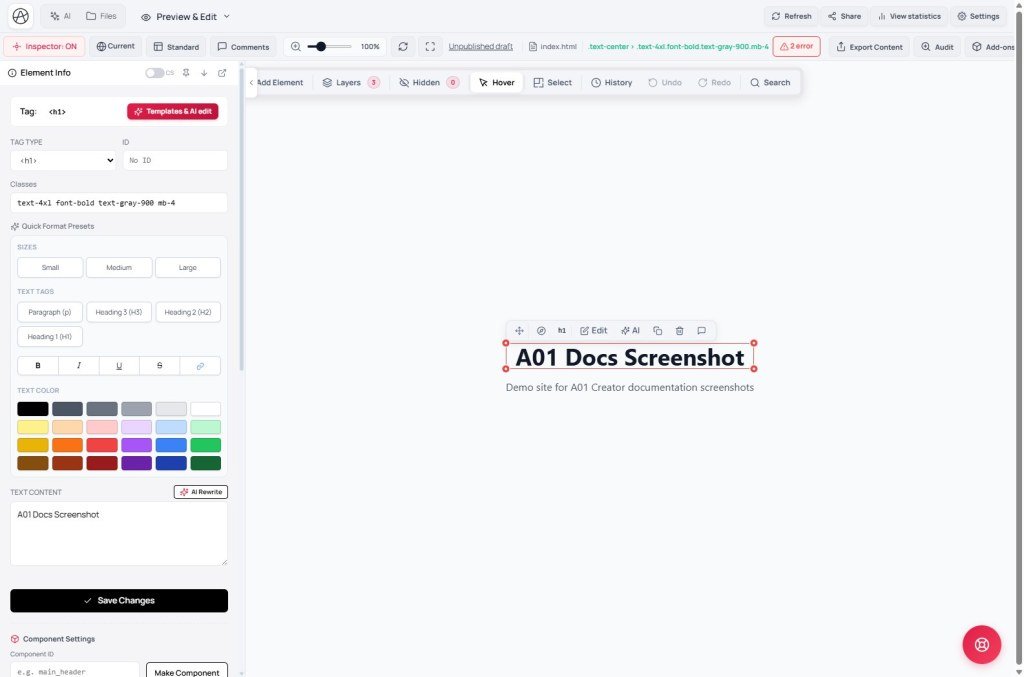
Clear job split: hand edit · AI Rewrite · Ask AI to edit (chat prefilled with selector) · full chat modes - always on the Changes draft.
Learning goals: Pick the right Inspector tool for each job; tell Ask AI to edit vs AI Rewrite vs Audit apart; use Layers and DOM Search.
Reading time: about 18 minutes
Prerequisites: C03-C05 (Inspector), B01 (chat), K03 (Canvas).
Previous: K03 - Canvas breakpoints.
Next: K05 - Guest form appendData.
Main UI labels:
1. Job split: Inspector vs AI
2. Glossary
| Term | Meaning | Where in the UI |
|---|---|---|
| Ask AI to edit | Prefills chat with tag/selector/path of the selected element | Element Info panel - full panel: C03; CSS/Computed: C04 |
| AI Rewrite | AI rewrites text in the field - no full chat | Button next to Inspector text fields |
| Delete | Remove the element from the Changes draft | Inspector panel |
| Layers | Hierarchical DOM tree - select covered elements | Tab in Inspector panel |
| DOM Search | Find selector/class/id in the preview page | Ctrl+Shift+F with Inspector on |
| Audit | Check report - does not call AI in the modal | Audit → Run check |
3. Step by step
- Step 1 - Draft: preview Changes (don’t edit as if you’re on live).
- Step 2 - Inspector on: click an element on Canvas; if you can’t select → Layers or DOM Search.
- Step 3 - Small jobs (hand): change text, color, URL in Inspector; Undo if wrong.
- Step 4 - Wording only: click AI Rewrite on a text field - AI replaces the sentence, keeps the HTML tag.
- Step 5 - Complex one-element edit: Ask AI to edit → chat prefilled with selector → add (“add shadow, padding 16px”) → Send → review Compare changes:.
- Step 6 - Large jobs: switch chat to UI/Coder - don’t use Ask AI on one element for a whole section.
- Step 7 - Delete element: Delete in Inspector - recheck Canvas after.
- Step 8 - Publish: when OK on every breakpoint → Save changes.
4. Related features
Ask AI to edit - DOM-aware prefill
Unlike free chat: this inserts tag, CSS selector, and file path into Ask AI…. AI knows the exact element - fewer wrong-section edits. You still add the request and click Send.
AI Rewrite - fast and local
Only rewrites text in the focused field - no large Diff, no nearby layout changes. Use for headlines and short descriptions. Need existing text in the field before clicking.
Audit - not AI
Audit modal only has Run check / Run again. No Ask AI to edit or AI Rewrite inside. Copy Audit results to chat or fix with Inspector.
5. Three Inspector tools compared
| Tool | Scope | When to use |
|---|---|---|
| Hand edit in Inspector | One field (text, color, link) | You know the exact value |
| AI Rewrite | Text in one field | Need different tone, keep HTML structure |
| Ask AI to edit | One element (style + small structure) | Describe in words: “round corners, add icon” |
6. Can / can’t
You can
- Pixel-level visual edits without long prompts
- Point AI at the right selector via Ask AI to edit
- Select overlayed elements via Layers / DOM Search
Limits
- Inspector doesn’t edit backend logic - use Coder mode
- AI Rewrite won’t do complex layout changes
- Ask AI on one element isn’t enough for multi-file refactors
7. Security with Inspector AI
- Don’t paste tokens/secrets into a text field then click AI Rewrite - it may go to the model.
- Review Diff after Ask AI to edit - AI may add inline scripts.
- Delete admin/settings panels carefully - ensure no hidden routes leak on live.
8. Common issues
| Situation | Fix |
|---|---|
| AI overwrites text you just edited by hand | Prompt “keep current text”; or Inspector after AI; Undo |
| Can’t select an element | Layers · DOM Search · reload · correct Changes tab |
| Ask AI to edit doesn’t prefill chat | Open AI Chat tab; check Element Info shows the button; reselect element |
| AI Rewrite returns empty | Put text in the field first; check WebSocket/network |
| Looking for AI in the Audit modal | None - only Run check; use Inspector/chat separately |
9. Tips
- Efficient order: hand → AI Rewrite → Ask AI to edit → full chat.
- Always select an element before any Inspector AI button.
- After Ask AI, check Diff - one element can still pull in a shared CSS file.
- Use Canvas (K03) with Inspector - edit on Mobile so you don’t ship desktop-only fixes.
10. Self-check & next
- Ask AI to edit vs AI Rewrite?
- Does Audit have an AI button - what do you click instead?
- When Layers vs DOM Search?
- Large jobs: Inspector or chat mode?
- After Ask AI to edit, what do you check before Save?
Next lesson
K05 - Safe guest forms with appendData
Combine Coder mode with guest policy - indexed appendData and rate-limit messaging.
Internal navigation (same language)
Appifio Creator · User guide · K04
