
Appifio Creator · Lesson T06 · Glossary
- pick correctly from the start
Two Backend editions ship different client scripts and capabilities. Switching mid-project can leave an app expecting Advanced APIs while the link is still on Easy.
Goals: Read Easy/Advanced UI labels correctly; understand backend_version; know quotas; when Advanced is required (CMS, shards, MCP).
Time: 11-13 minutes · Before: F01, T02 · Next: T07
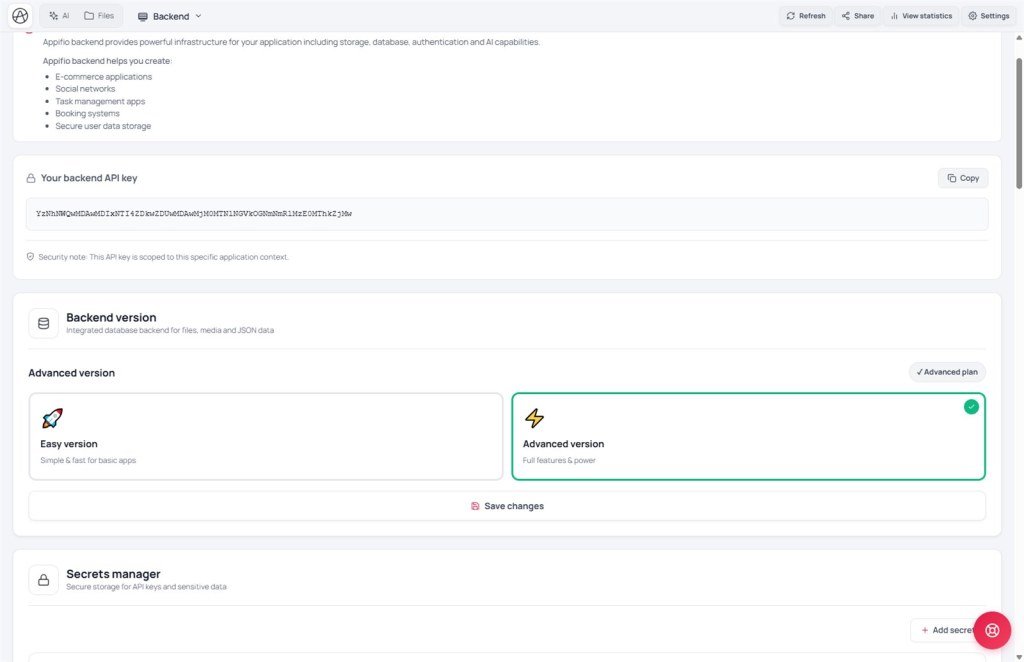
UI: Backend tab · Backend version · Easy version · Advanced version · Your backend API key · Database rows · API requests this month
1. Choice diagram
appifio_client (appendData, shards, CMS auth…)2. Easy vs Advanced
| Aspect | Easy | Advanced (Aura) |
|---|---|---|
| UI description | Simple & fast for basic apps | Full Aura Storage |
| Indexed + shards | Limited / don’t expect the full set | appendData · readList · updateData (T03) |
| Aura CMS | Usually not enough | __cms_manifest__ · roles (T05/T07) |
| MCP sandbox | May be limited | Needs Advanced + API key (T12) |
| Use cases | Biolink, one-form landing | Shop, CMS blog, multi-role admin |
3. Steps in the UI
- Tab dropdown → Backend.
- Read About Appifio backend and Your backend API key - use Copy.
- Backend version → choose Easy version or Advanced version (match Easy plan / Advanced plan).
- Save the version in the Backend tab (Backend-area save - not the Routes tab Save).
- Check quotas: Database rows / API requests this month.
- Open View backend database content if you need to inspect data after a form test.
- Toolbar → Save changes so the new client script reaches live.
4. Platform comparisons · Limits
- Firebase Spark vs Blaze: basic vs full backend.
- Shopify Lite vs full store: a selling channel needs Advanced-like capacity.
Quota: Database rows = total indexed rows; API requests = read/write calls this month. Hitting the limit → API errors - clear spare data or upgrade the plan.
Security: API key is app-scoped - 32-character hex; don’t paste into public Git; the MCP tab needs the key first (no_api_key).
5. Incidents · Tips
| Incident | Fix |
|---|---|
| Missing / invalid API key | Create a key in account settings; 32-character hex |
| CMS/MCP needs Advanced but the link is Easy | Upgrade plan + switch Advanced version + Save |
| appendData undefined on the page | Still on Easy client - switch Advanced + Save changes |
| Out of rows/requests quota | Clear spare data (careful - T04); reduce API polling |
Two Save layers: (1) Save in the Backend tab = change backend_version + client inject; (2) toolbar Save changes = publish HTML to the live site. Skip (2) → visitors still get the old Easy script even if Backend already shows Advanced.
6. Decision examples by app type
| App type | Recommend | Why |
|---|---|---|
| One-page biolink | Easy | Few APIs, no CMS |
| Blog + /cms | Advanced | Indexed, roles, manifest |
| Lead form + admin list | Advanced | appendData + readList (T03) |
| IDE MCP sandbox edits | Advanced + API key | T12 · no_api_key if missing |
7. Checklist
- Are account plan and Backend version both Advanced when you need CMS?
- Did you Save the Backend tab, then Save changes in Creator?
- Can you read rows/requests quota on the Backend tab?
Next: T07 - Roles user / admin / superadmin
Internal navigation (same language)
Appifio Creator · User guide · T06
