
Appifio Creator · Lesson T01 · Glossary
what it is
One idea - why visitors still see the old site after AI or Inspector “finished,” and why Discard can wipe an entire working session.
Goals: Tell the virtual disk (session draft) apart from the live site; read the unpublished-draft signal correctly; know when work “vanishes.”
Time: 10-12 minutes · Before: A03 · Next: T02
UI labels: Current · Changes · Save changes · Discard · Unpublished draft · Reload
1. Two storage layers
2. Glossary
| Term | Meaning | Where you see it |
|---|---|---|
| Virtual disk | Temporary working copy of all HTML/CSS/JS/assets in this Creator session | Hidden in the system; surfaced via Changes |
| Live site | Published files - what visitors see | Current · public URL |
| Unpublished draft | Badge: virtual disk differs from live | Top toolbar |
| Unpublished draft link | Shareable preview of the virtual disk without opening Creator | Tab menu / preview link |
3. Observe it in the UI
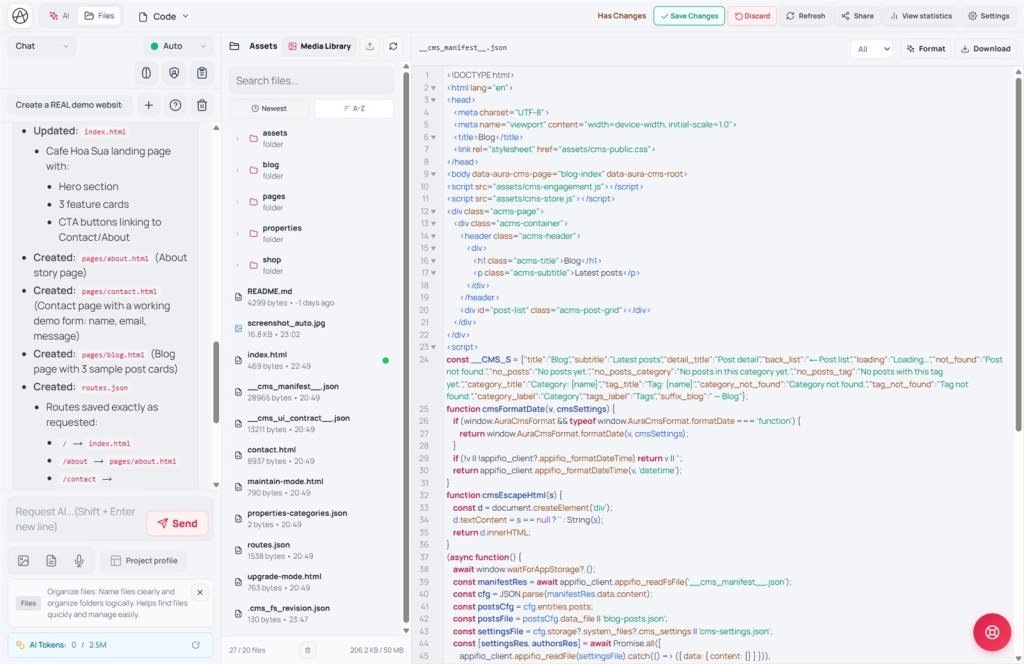
- Open Creator → tab dropdown → View & edit.
- Ask the AI to change one line of text (prompt box → Send) or edit with Inspector.
- Watch the Unpublished draft badge appear; Save changes and Discard show up.
- Click Changes - see the new draft. Click Current - see the old live site.
- Open the public URL in a private window → still Current until you Save changes.
- Try Discard on a throwaway session (after Clone on the Versions tab) to feel it: the virtual disk is dropped and preview returns to live.
4. How it works
Creator does not write straight to the live server on every AI reply. Edits land on the virtual disk first. Aura Storage JSON also has its own draft/session layer in some contexts, but for HTML/CSS/JS you see the pair Current / Changes. Save changes = publish to the live site (may bump FS revision). Reload only refreshes the iframe - it does not publish. The Versions tab shows rev N / N rev behind / Unsaved; when Site online, use Sync from site to pull live into the session (not a substitute for Save).
5. Comparisons
- Webflow: Designer vs Published - same draft/live idea.
- WordPress: Draft vs Publish - close, but WP drafts a post in the DB; Creator drafts the whole file tree.
- Lovable / v0: often apply straight into a sandbox; Appifio keeps a clear preview toggle plus Save changes.
6. Can / can’t
7. Security
An Unpublished draft link exposes content that is not public yet - share only with people you trust. Secrets on the draft can still be read if you share that link.
8. Common issues
| Situation | Fix |
|---|---|
| “AI already fixed it but visitors don’t see it” | You haven’t Save changes; or you’re viewing Current by mistake |
| Everything gone after Discard | By design; next time Checkpoint / Create new (Clone) first |
| Preview looks wrong | Reload; confirm you’re on Changes |
9. Tips
- Before a large edit: Clone a version → then ask the AI.
- Always compare Changes vs Current before Save.
- Don’t Discard when you’re tired - close the tab to keep the session if you’re unsure.
10. Checklist
- Can you explain why visitors don’t see the AI’s latest edit yet?
- Do you know Discard clears the virtual disk - not “undo one line”?
Next
T02 - appifio_client and bootstrap inject
Internal navigation (same language)
Appifio Creator · User guide · T01
