
Appifio Creator · Lesson T04 · Glossary
- off-limits for AI and you
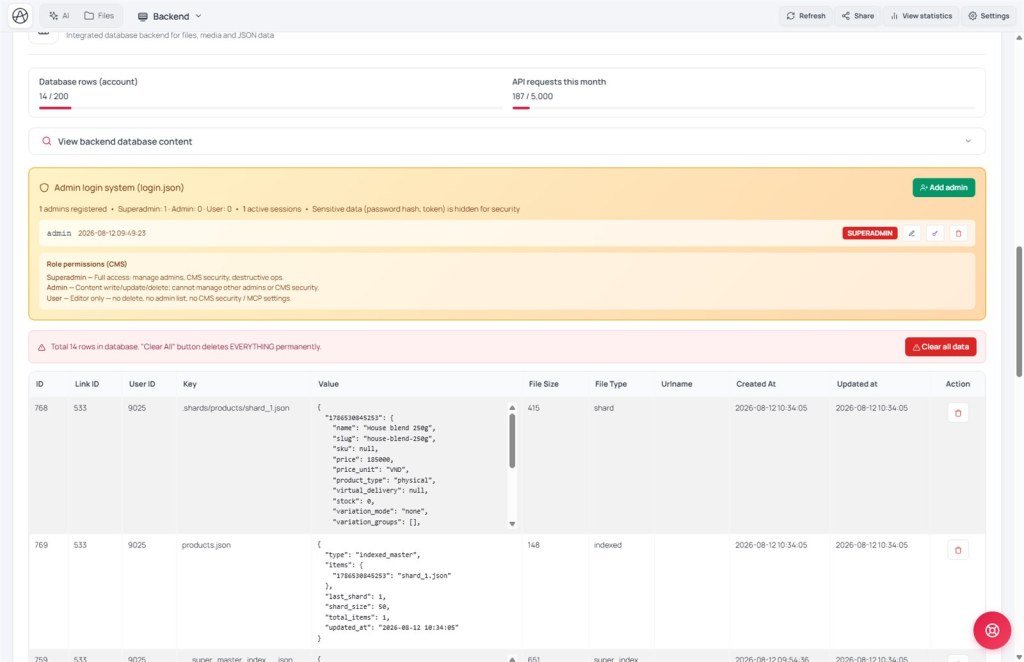
Aura splits large datasets into shards automatically. Some system files are denied - touching them errors out or breaks auth.
Goals: Know what sharding is; list files you must not read/write by hand; tell AI guidance apart from backend enforcement.
Time: 11-13 minutes · Before: T03 · Next: T05
UI: Backend · Clear all data · CMS Settings · Routes tab · Compare changes
1. Sharding diagram
appendData('blog-posts.json', item)readList('blog-posts.json')2. Glossary & system files
| Term / file | Meaning | Correct approach |
|---|---|---|
| Sharding | Automatically split a large dataset into stable pieces | appendData / readList / updateData |
| login.json | Admin store (hashed passwords) | login · registerAdmin · changePassword |
| routes.json | URL → HTML map | Routes tab · addRoute (T08) |
| __cms_manifest__.json | CMS schema - AI reads, Panel writes | CMS UI · don’t rename by hand out of sync with entities |
| manifest.storage.system_files | Notes for the AI inside the manifest | Not the same as every file being blocked by the backend |
3. Stay out of the restricted zone
- User admin: ask the AI to use
appifio_login/ registerAdmin - forbid “read login.json” (X11). - Routes: Routes tab → Add Route → Save - or addRoute/removeRoute APIs.
- In Diff: any path under
.shards/or writes to__super_master_index__→ ✗ immediately. - Backend: Clear all data only when you understand the risk - the UI asks you to type a confirmation string.
- Fixed prompt: “Do not access .shards, login.json, or __super_master_index__. Auth only through the API.”
4. Comparisons · Can / can’t
- MongoDB sharding / DynamoDB partitions: same idea of splitting load; Aura hides the details.
- WordPress wp-config + wp_users: same “don’t edit by hand” rule as login.json.
You can: CRUD through the public APIs with the right role. You can’t: edit shards by hand; see original passwords; hard-delete freely if you only have the user role.
Security: Passwords are hashed by the system; after CMS login, the admin session is kept in the browser under your project path - never commit it to Git/HTML.
5. Incidents · Tips
| Incident | Fix |
|---|---|
| API deny on a system file | Expected - switch to the official auth/route APIs |
| AI “fixes routes.json with writeFile” | Reject; use the Routes tab or addRoute |
| See a .shards folder under Files | Observe only - don’t edit; use readList |
| Clear all data wiped the wrong thing | Clone/Export first; don’t use it on live production |
Fixed prompt on every Advanced project: “Do not access .shards, login.json, or __super_master_index__. Auth only through the API.”
6. Diff rejection examples
writeFile('login.json', { users: [...] })→ ✗ - use registerAdmin.readFile('.shards/blog-posts/shard_001.json')→ ✗ - use readList('blog-posts.json').writeFile('routes.json', entireObject)→ ✗ - Routes tab + Save, or addRoute.- API response
deny: system file→ correct enforcement; switch to a public API.
7. Checklist
- Do you understand that readList hides .shards?
- Do you refuse to let the AI read login.json?
- Do you edit routes via the Routes tab + Save?
Next: T05 - CMS manifest & UI contract
Internal navigation (same language)
Appifio Creator · User guide · T04
