
Appifio Creator · Lesson T05 · Glossary
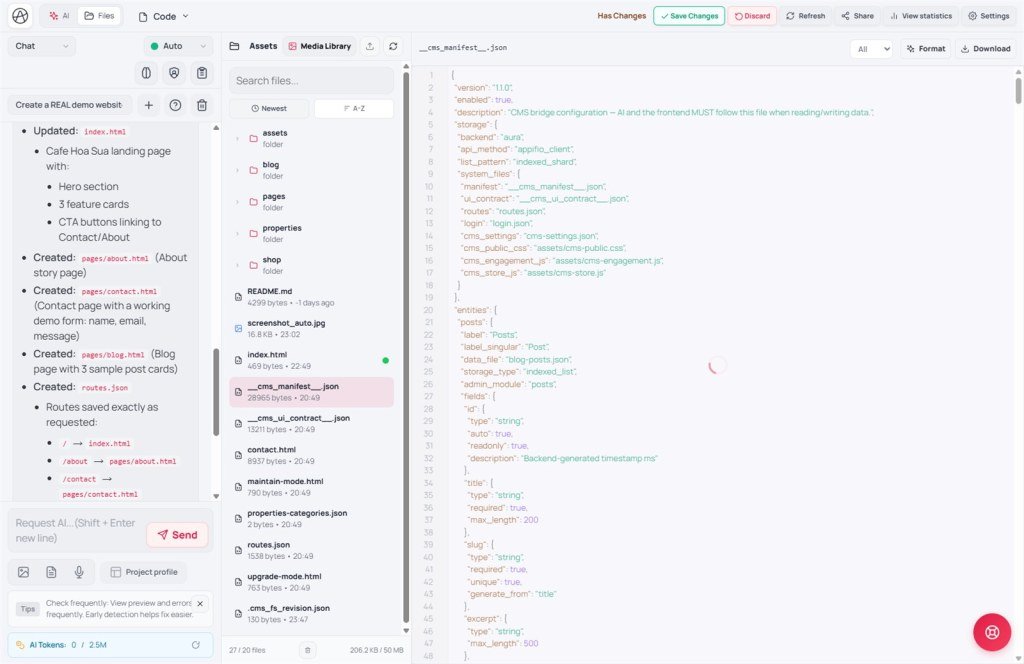
__cms_manifest__.json&
__cms_ui_contract__.jsonWhen Aura CMS is on, these files are the rulebook: the AI must not invent entity file names - follow the manifest.
Goals: Tell CMS off vs on apart; read entities/fields/routes/frontend; know when you need the UI contract.
Time: 13-15 minutes · Before: G01, G04, T03 · Next: T06
CMS UI: Overview · Data types · Interface · Settings · Content catalogs · Posts · Products
1. Diagram
__cms_manifest__.jsonentities.posts.data_file = blog-posts.json (example)__cms_ui_contract__.json (DOM hooks)2. Glossary
| Term | Meaning | Where you see it |
|---|---|---|
| __cms_manifest__.json | Map of entities, fields, data_file, routes | File store · CMS Panel · Files tab |
| __cms_ui_contract__.json | Frontend layout hooks ↔ CMS inject | When AI edits blog-list.html, product-detail.html |
| entities.*.data_file | Required indexed file name | Data types form · Storage file |
| publish_state | draft / published / private / trash - custom type field (built-in blog uses status) | Custom-type forms in CMS |
| Security enforce | Filter fields · block guest append | CMS Settings |
3. Manifest example (short)
Frontend must readList('blog-posts.json') - not my-posts.json invented by the AI.
4. Practical steps
- Open
/{url}/cms→ sign in → nav Posts, Products, Data types and match them to entities. - Creator → Files tab → open
__cms_manifest__.json(after CMS bootstrap). - Prompt: “Read __cms_manifest__.json first. Honor data_file. Edit HTML per __cms_ui_contract__ when present.”
- Publish a test post as Published → check routes on the Routes tab (T08) → preview the listing.
- Add a custom type: CMS → Data types / Custom data type → Save (AS20). Don’t let the AI create a parallel file under another name. If you ask the AI to declare it: merge both files using the Panel-safe method (AS21).
- Save changes in Creator after the AI edits the frontend.
5. Comparisons · Limits · Security
- WordPress CPT + ACF: manifest ≈ registering a post type + fields.
- Strapi content-types: schema JSON similar to entities.
- Webflow CMS collections: Appifio AI must follow the schema when CMS is on.
You can: keep Panel ↔ frontend in sync. You can’t: invent my-posts.json when the manifest only lists blog-posts.json.
Security: Security enforce hides sensitive fields from guests; don’t hardcode every admin field into public HTML.
Product note: CMS runs on Aura (Advanced) only - not Easy. Don’t enable Easy Storage and Aura Storage prompt templates together.
5b. Tips
- Always start AI prompts with: “CMS ON - read __cms_manifest__.json.”
- When editing listing HTML, check __cms_ui_contract__ for selector hooks before renaming classes freely.
6. Incidents · Checklist
| Incident | Fix |
|---|---|
| CMS has posts but the page is empty | Wrong data_file / missing route / AI reading a file outside the manifest |
| Two data sources out of sync | Delete the invented file; unify on the manifest |
| Listing HTML doesn’t match a new field | Re-read manifest fields + ui_contract hooks |
- Do you know that with CMS on you must read the manifest before prompting?
- Does data_file in code match entities.* in the manifest?
- Can you tell manifest (data) apart from ui_contract (layout hooks)?
CMS + AI practice
AS19 · AS20 · AS21
Prompt stack · Panel create type · AI merge both files using the Panel-safe method
Next glossary: T06 - Easy vs Advanced Storage
Internal navigation (same language)
Appifio Creator · User guide · T05
