
Table of contents
Appifio Creator · Lesson T03 · Glossary
Flat JSON vs Indexed
(CRUD list)
(CRUD list)
One wrong call - using writeFile for a blog or order list - can break sharding and make data “disappear” as you scale.
Goals: Pick the right file shape; know which APIs go with flat vs indexed; catch AI mistakes early.
Time: 12-14 minutes · Before: T02, F02 · Next: T04
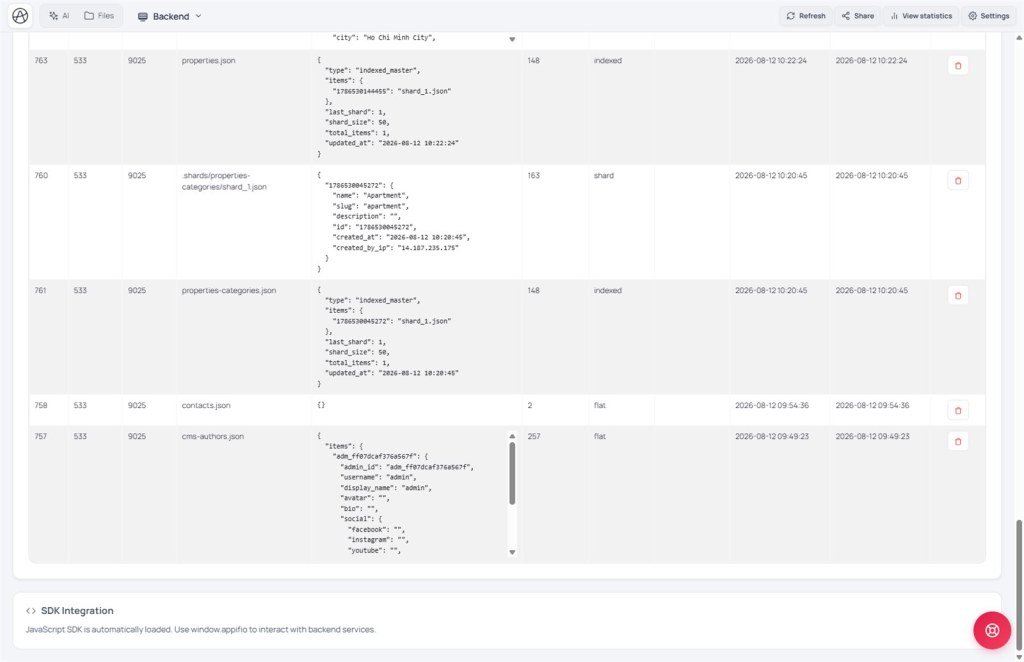
UI: Backend · View backend database content · Chat mode Coder · Architecture · Compare changes
1. Decision diagram
What kind of data is it?
→ One config object (cms-settings, theme flags)
FLAT → readFile / writeFile (fileType: 'flat')
e.g.
cms-settings.json = { site_name, logo_url, … }→ Many records (posts, contacts, products, orders)
INDEXED → appendData + readList + updateData + deleteFile(id)
e.g.
blog-posts.json, contacts.json, orders.json❌ Do NOT writeFile an entire list array → breaks Aura sharding (X07)
2. Glossary & Aura Storage APIs
| Term | Meaning | Main APIs |
|---|---|---|
| Flat | One JSON object for the whole file | readFile, writeFile |
| Indexed / CRUD list | List with id; master index + shards (T04) | appendData, readList, updateData, readFile(file,id) |
| id / created_at | Backend generates on append - do not set yourself | appendData result |
| First read empty | success: true + [] / null - not a 404 | Any virtual-disk read |
3. Concrete file examples
// FLAT - cms-settings.json
{ "site_name": "Shop ABC", "currency": "USD" }
// INDEXED - contacts.json (logical; physical layout may shard)
appendData('contacts.json', { name, email, message })
readList('contacts.json') → [{ id, created_at, name, … }, …]
updateData('contacts.json', id, { status: 'read' })
4. Use it correctly in Creator
- Backend tab → confirm Advanced version if you need large lists / CMS (T06).
- Chat mode Coder or Architecture → prompt: “Contact form: save with appendData into contacts.json (indexed). Admin reads with readList. Do not writeFile the list.”
- After the AI edits → open Compare changes: → look for appendData/readList; if you see
writeFile('blog-posts.json', [...])for the whole array → ✗. - Submit a test form → Backend → View backend database content and confirm the new row has an id.
- With CMS on: file names follow
entities.*.data_filein __cms_manifest__ (T05) - e.g. keepblog-posts.json, don’t rename to my-blog.json. - Click Save changes when it looks good.
5. Comparisons · Limits
- Airtable / Notion DB: always list-oriented; Aura Indexed is in that spirit.
- One browser memory cell holding the whole list: same mistake as writeFile on a list - breaks when it grows.
- Mongo one settings doc vs a collection: flat ≈ settings doc; indexed ≈ collection.
You can: grow large lists via shards; use flat for a single settings object.
You can’t: touch .shards/* yourself; invent ids; put each item in its own blog-1.json file.
6. Security · Incidents
Guests may appendData only when policy allows - never give guests writeFile/updateData (T07). With CMS on → stick to the manifest data_file.
| Incident | Fix |
|---|---|
| List “vanishes” after a few hundred rows | Suspect writeFile on the list - migrate to indexed (X07/F05) |
| First read looks like an error | Initialize defaults when empty - success is still true |
| updateData can’t find the id | Use the id from appendData/readList - don’t invent one |
7. Tips · Checklist
- Fixed prompt: “Indexed for every list; Flat only for settings.”
- One list file (e.g. blog-posts.json) holds all items - the backend shards for you.
- Can you tell when to use writeFile vs appendData?
- Can you read the Diff and reject writeFile([...]) on a list?
- Do you know readList returns ids generated by the backend?
Next: T04 - Sharding & system files
Internal navigation (same language)
Appifio Creator · User guide · T03
