
Appifio Creator · Lesson X09 · Troubleshooting
(~24h) & 60-day token
The IDE reports 403 Forbidden after about a day, or MCP “dies” suddenly - usually an expired bridge zip or a revoked/expired token. That is intentional design, not a random bug.
Goal: Tell bridge expiry (~24h) apart from token expiry (60 days); follow the UI order; know when to Revoke.
Before: T12, H02, K12 · After: X10
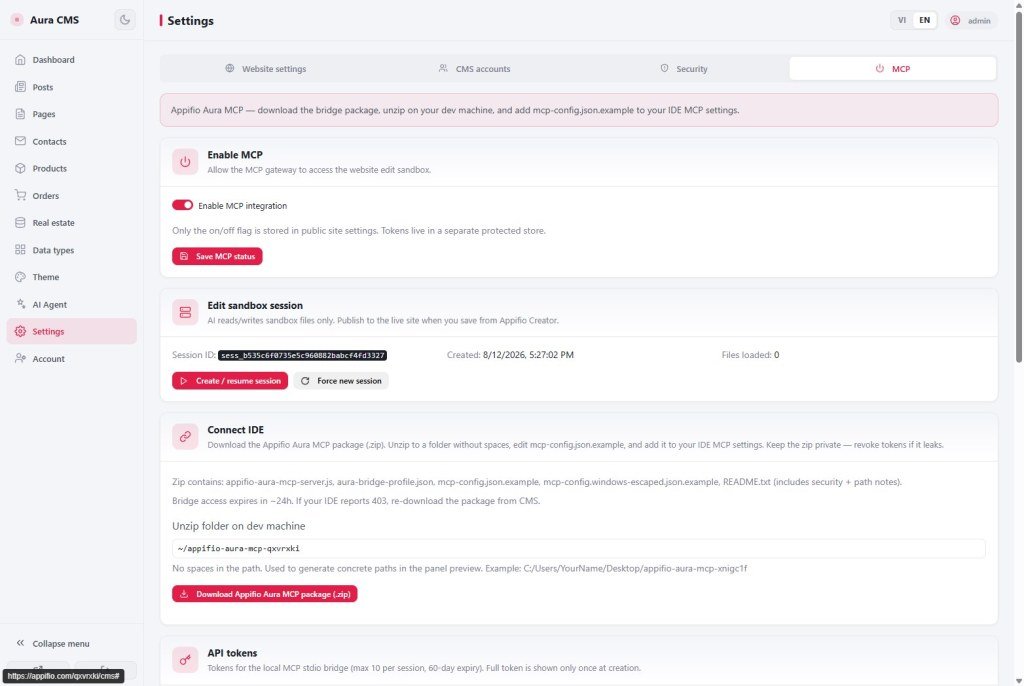
MCP tab UI: Enable MCP integration · Save MCP state · Create / resume session · Create token · Revoke · Download Appifio Aura MCP package (.zip)
1. 403 diagnosis map
2. Two kinds of expiry
| Component | Lifetime | Symptom | Fix |
|---|---|---|---|
| Bridge zip | ~24 hours | 403 after ~1 work day; package no longer accepted | Download a new zip + update the IDE path |
| MCP token | 60 days | 403 early; token > 60 days; or already Revoked | Revoke (if leaked) → Create a new token |
| Sandbox session | Per session | “No session yet”; MCP tools don’t list files | Create / resume session |
3. Recovery steps (correct order)
- "Backend" tab - confirm you have a backend API key (32-character hex). Missing → create it in account settings first.
- "MCP" tab → enable "Enable MCP integration" → "Save MCP state".
- "Create / resume session" - wait until a Session ID appears (no more “No session yet”).
- If the old token expired or may be leaked: "Revoke" → confirm → "Create token" → copy immediately (shown once only).
- Click "Download Appifio Aura MCP package (.zip)" - extract to a path without spaces (K12).
- Update
mcp-configin Cursor/IDE - new token + new zip path (on Windows, Prefer Method A with/). - Restart the MCP server in the IDE → try listing sandbox files.
- After IDE edits: open Creator → "Changes" → "Save changes" to go live (T12).
4. Comparison · Security
- SSH key rotation: similar to Revoke + Create token when you suspect a leak.
- OAuth refresh token: the 24h bridge is like a short session - you must re-download periodically.
Security: the zip and token are secrets - do not commit them to a public Git repo; the package README reminds you to keep them private. Token leaked on Slack/screenshot → Revoke immediately. About 10 tokens per session max - clean up tokens from old machines you no longer use.
5. Issues · Advice
| Situation | Fix |
|---|---|
| 403 every morning after a work day | 24h bridge - download a new zip; set an end-of-day reminder |
| Token “lost” after create | UI shows it once - Revoke + Create again; store in a password manager |
| Windows JSON path errors | Use forward slashes or escaped backslashes (K12) |
| IDE edits OK but the site didn’t change | MCP only writes the sandbox - you still need Save changes in Creator (X13) |
- End of a work week: download a fresh zip on Monday - don’t assume last week’s bridge still works.
- One dev machine = one labeled token (e.g. Lenovo laptop).
6. Checklist
- Did you Create / resume session before Create token?
- Can you tell a bridge fix (24h) apart from a token fix (60 days)?
- Do you know when to Revoke, and never commit tokens to a repo?
Next: X10 - APK build failed
Internal navigation (same language)
Appifio Creator · User guide · X09
