
Appifio Creator · Lesson X12 · Troubleshooting
but not loading
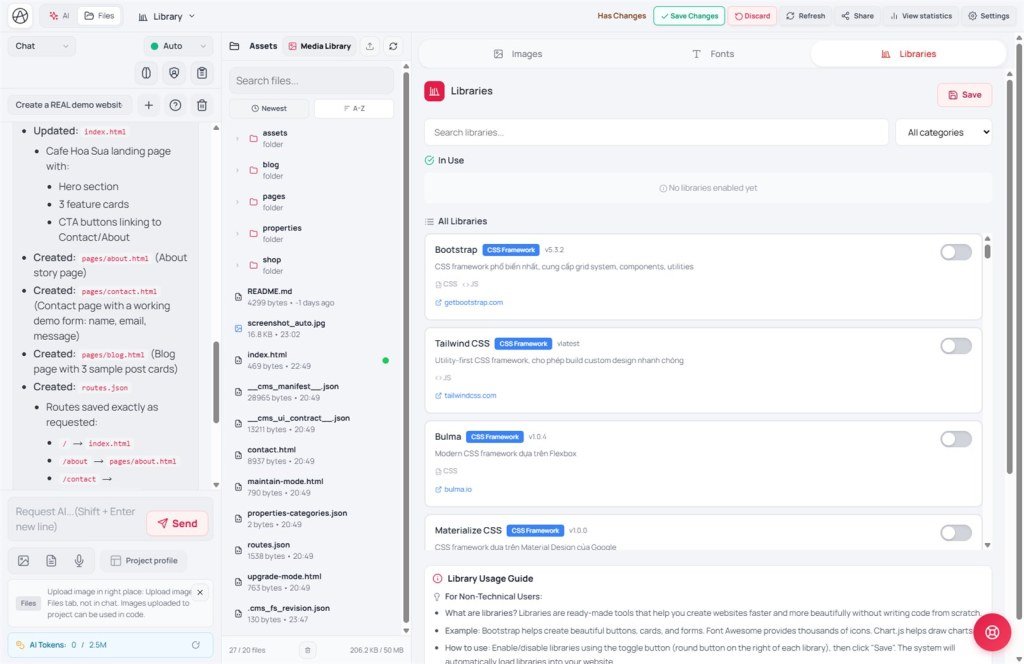
You toggled Bootstrap/Chart under Libraries (CDN) but preview still says $ is not defined - usually you forgot to Save, or you confused it with the media Files / image library.
Goal: Follow toggle → Save → refresh preview; tell the two “library” areas apart.
Before: C05 · After: X13
UI: dropdown tab Libraries · subtab Libraries (CDN) / Fonts · toggles · Save · Save changes · Reload preview - don’t confuse with subtab Images (Stock) or Files Media Library
1. Flow map (matches the in-tab guide)
2. Wrong tab - two “libraries”
| Tab / area | Purpose | Not for |
|---|---|---|
| Libraries tab → Libraries (CDN) | Enable Bootstrap, Font Awesome, Chart.js… auto-injected on page load | Uploading PNGs / searching Pixabay |
| Images (Stock) / Media | Stock = Pixabay/Pexels/Unsplash; Media = uploaded files (D01) | Loading jQuery from a CDN |
Both can feel like a “library” in the UI - always confirm you’re on the dropdown tab with JS/CSS library toggles and a Save button at the bottom, not the media gallery.
3. Fix steps
- Open Libraries → subtab Libraries (CDN) → enable the right libs (e.g. Bootstrap 5 + Popper if needed).
- Scroll down → click "Save" - wait for the success toast.
- Fonts subtab (if you use Google Fonts) - enable fonts → Save the same way.
- Preview toolbar → "Reload"; make sure you’re viewing "Changes", not a stale "Current".
- Don’t hand-add
<script src="https://appifio.com/uploads/pages/appifio-x12-cdn-libraries.jpg">in HTML - the platform injects; duplicates cause odd errors. - Ask AI: “Use Bootstrap already enabled under Libraries (CDN) - don’t import another CDN.”
- Corporate network blocking cdnjs/jsdelivr → try another network or turn off VPN (X01).
4. Comparison · Limits
- npm install without saving the lockfile: toggle on but forgot Save - preview still missing the package.
- WordPress enqueue: you must wp_enqueue_script - here it’s toggle + Save in the panel.
Limits: only libraries in the tab catalog; versions are fixed by the platform - you can’t pin an arbitrary old jQuery if the UI doesn’t offer it. Too many CDNs → slow preview TTFB.
5. Issues · Advice
| Situation | Fix |
|---|---|
| Toggle green but console 404 on the script | Libraries tab not Saved; Save then Reload |
| Chart blank even with Chart.js on | Order: Save CDN → AI code uses global Chart → Reload |
| Turned a lib off by mistake | Toggle off → Save again (matches the non-tech guide in the UI) |
| Live differs from preview | Forgot Creator Save changes after saving CDN config |
6. Checklist
- Did you click Save in the Libraries (CDN) tab - not only the toggle?
- Can you tell the CDN Libraries tab apart from Files / Media?
- After Save, did you Reload the preview?
Next: X13 - MCP ↔ Creator conflict
Internal navigation (same language)
Appifio Creator · User guide · X12
