
Appifio Creator · Lesson X04 · Troubleshooting
missing route
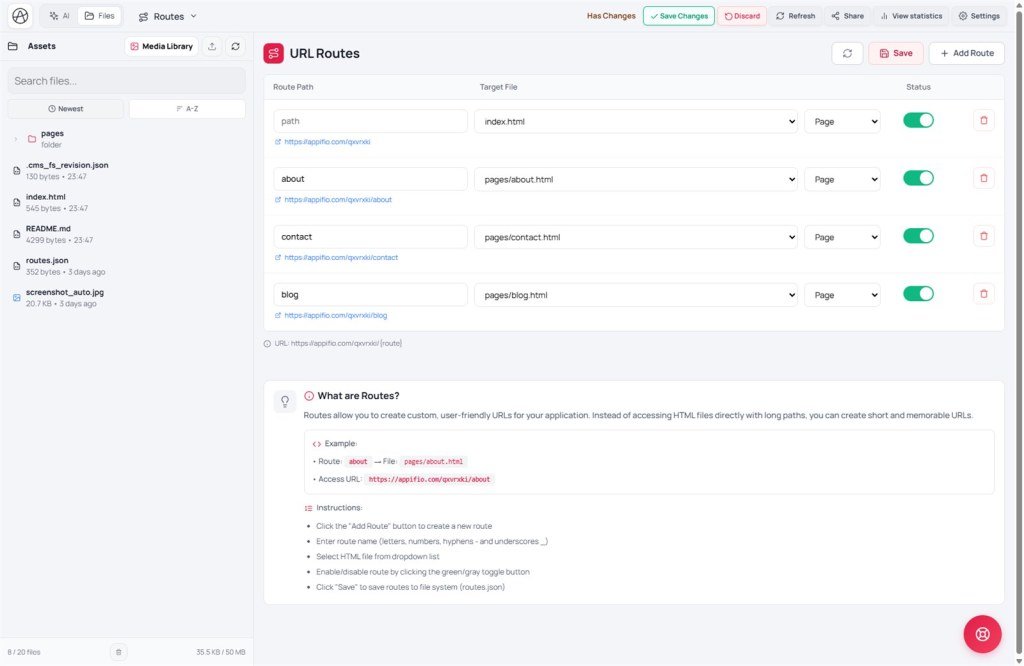
You have an HTML file in Files but the URL still 404s - almost always a missing or wrong map on the Routes tab.
Learning goals: Add a route with the right slug ↔ file, click Save on the Routes tab, tell slug apart from file path (T08).
Reading time: ~10 minutes · Previous: T08, D02 · Next: X05
UI labels: Routes tab · Add Route · Save · green/gray toggle · Save changes · Files
1. Fix flow
2. Glossary
| Term | Meaning | Where you see it |
|---|---|---|
| Route Path (slug) | Public URL: letters, digits, -, _; can nest blog/hello | Routes tab |
| Target File | HTML file on the project virtual disk - not public by file name alone | Dropdown when adding a route |
| Route map | Slug → file mapping - updates only when you click Save on this tab | Managed via Routes (not hand-edited) |
| Save vs Save changes | Save = routes on the draft; Save changes = publish the whole draft | Routes tab vs toolbar |
3. Steps (T08 labels)
- Open the Routes tab.
- Click Add Route.
- Enter the route slug (letters, digits,
-,_) - don’t confuse with a file name likepost-hello.html. - Pick the HTML file from the dropdown (Target File).
- Turn the toggle green (route active).
- Click Save - writes the route map to the project. Not the same as Save changes.
- Preview Changes → try the URL → if OK → Save changes to publish.
- After AI creates a new page: always check this tab - AI often forgets to add the route.
4. Compare · Can / Cannot
Next.js file-based routing: file path ≈ URL. WordPress permalinks: rewrite ≈ route map. Appifio keeps file ↔ route explicit - flexible pretty slugs.
5. Security
Don’t route admin / Aura CMS pages to guessable slugs without auth (T07). Public routes only for guest pages that should be visible.
6. Symptom table
| Symptom | Fix |
|---|---|
| 404 despite HTML in Files | Add Route + Save; check green toggle |
| Route edit not live | Forgot Routes Save; then Save changes |
| Broken internal links | Use absolute URLs from the app base (T08) |
| Slug right, wrong file | Change Target File on the route → Save |
| All routes gone after template | Clean template wiped routes - add again or restore an old Clone (X08) |
| Post deleted but URL remains | Remove the matching route + Save |
7. Tips · Checklist
- Prompt AI: “After creating the page, add the route and remind me to Save on the Routes tab.”
- Aura CMS dynamic types can auto-create routes - still check Routes when you see 404.
- Can you tell URL slug from HTML file name?
- Do you know that Routes Save is not the same as Save changes?
- Tried green toggle + Save before reporting 404?
Next lesson
Internal navigation (same language)
Appifio Creator · User guide · X04
