
Table of contents
Appifio Creator · Lesson X03 · Troubleshooting
Inspector cannot
select an element
select an element
Clicks don’t pick a node, an overlay covers the preview, or DOM Search is disabled - checklist before asking AI to “edit blind.”
Learning goals: Turn on Inspector in the Changes context, clear covering layers, use DOM Search - know limits of Android Mock / custom domain.
Reading time: ~9 minutes · Previous: C01, H04 · Next: X04
UI labels: Inspector · Changes · Current · Layers · DOM Search · Notes · Android Mock · Reload
1. Fix flow
Click doesn’t select?
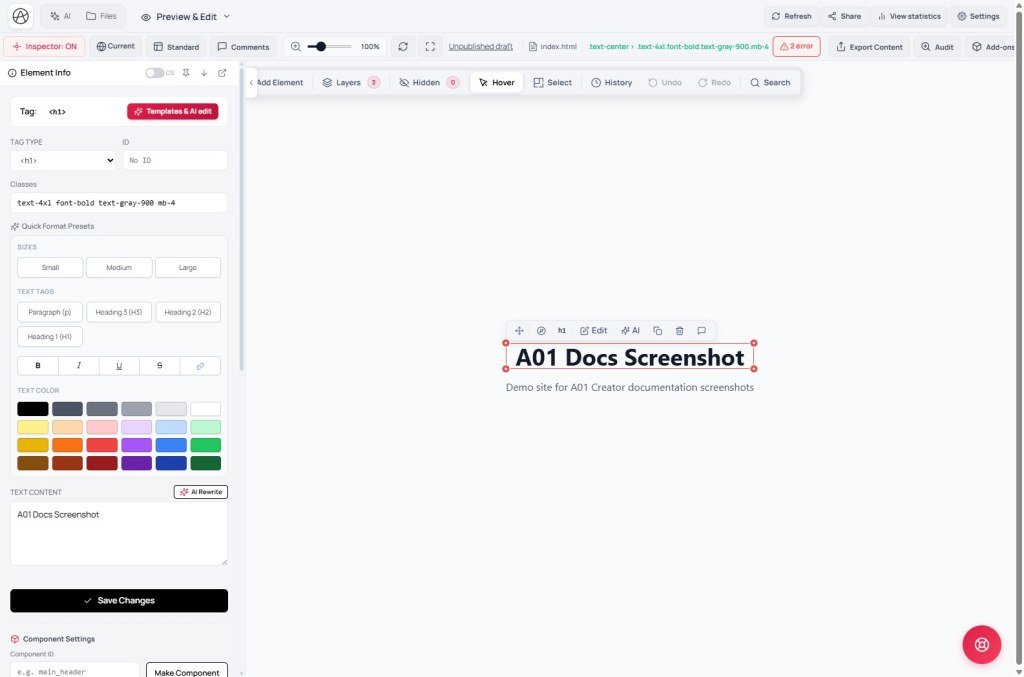
→ Inspector button on (active)? Tooltip: Turn element inspector on/off…
→ Context Changes (not Current if you’re editing the draft)
→ Overlay: Notes / hint / mock covering? → turn some off
→ Layers panel - pick the parent that blocks the target
→ DOM Search (Ctrl+Shift+F) - needs Inspector ON
→ Iframe not finished loading → Reload → select again
→ Android Mock on? layout differs - turn mock off if you need Canvas/web click
Custom domain overlay (X05)? → can’t inspect cross-origin
2. Glossary
| Term | Meaning | Where you see it |
|---|---|---|
| Element Inspector | Click-to-select nodes inside the preview iframe | Inspector button |
| DOM Search | Find by Class / ID / Text | Ctrl+Shift+F · Inspector panel |
| Layers | DOM tree to pick a node when click fails | Inspector sidebar |
| Android Mock | Android control simulation - hides Canvas, click behavior differs | Toolbar (fixed label) |
3. Steps (exact labels)
- Switch preview to Changes - Inspector on Current won’t reflect the draft you’re editing.
- Click Inspector until the button is active (tooltip: Turn element inspector on/off…).
- If DOM Search is grayed out: turn Inspector on first - UI says “Turn on Element Inspector to use DOM Search.”
- Click fails → open Layers → pick the right child/parent.
- Ctrl+Shift+F → search class/id/text → jump to the node.
- Turn off Notes / review overlays if they cover the preview.
- On Android Mock? Turn mock off → enable Canvas/Standard again if you need web inspect (H03/C01).
- Reload the iframe → turn Inspector on → try again.
- Still failing → describe to AI (class, position) - you don’t have to click.
4. Compare · Can / Cannot
Chrome DevTools: inspect any tab - Creator Inspector only works inside the same-origin preview iframe. Webflow/Framer: similar click-to-select, less often blocked by custom-domain iframe policy.
Can: Pick nodes via Layers/DOM Search; edit styles in Inspector when the iframe loads OK.
Cannot: Inspect under the Preview unavailable overlay (X05); cross-origin custom domain.
5. Symptom table
| Symptom | Fix |
|---|---|
| Click does nothing | Turn on Inspector + Changes |
| DOM Search disabled | Turn on Element Inspector first |
| Always selects a wrapper div | Use Layers or DOM Search |
| Selection lost after Reload | Turn Inspector on again - expected |
| Android Mock on, Canvas gone | Turn off Android Mock (C01/H03) |
| Inspector phase failed at load | X01 - refresh; Inspector may be incomplete |
6. Tips · Checklist
- Workflow: Changes → Inspector ON → click or Ctrl+Shift+F - faster than a long AI description.
- With a custom domain: temporarily switch back to appifio.com (X05) before full inspect.
- Inspector only works when the button is active and preview is on Changes?
- Know that Android Mock affects Canvas/click?
- Tried Reload + DOM Search before reporting a bug?
Next lesson
Internal navigation (same language)
Appifio Creator · User guide · X03
