
Appifio Creator · Lesson G07 · Intermediate → Advanced
manage content with AI & chat history
How CMS Agent works: site overview, plan with AI, read/write content by permission, and manage every chat session.
Learning goals: See how CMS Agent speeds admin work; configure read/write; Build prompt for Frontend; manage Visitor + CMS history.
Reading time: about 18 minutes
Prerequisites: Site AI Agent on and Frontend Agent understood (G06); logged into CMS with admin rights.
Previous → next: G06 → G07 → H01 (full webapp) or H02 (MCP)
1. What CMS AI Agent does
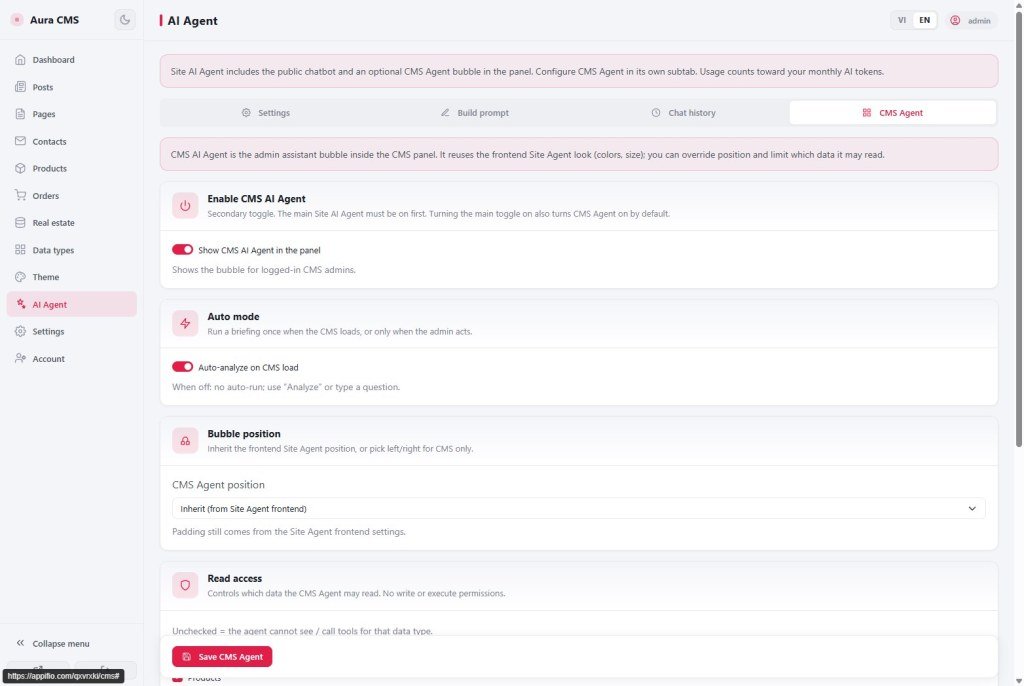
It is the assistant bubble inside the CMS panel (logged-in admin) - not the public visitor chatbot (G06).
2. Mechanism: read / write by settings
CMS Agent does not use the visitor Build prompt. It uses a built-in CMS prompt + CMS data gated by the CMS Agent tab toggles.
| Read access (usually on by default) | Helps admins |
|---|---|
| Visitor chat history (Frontend Agent) | See frequent questions and sales opportunities |
| Contacts / leads | Read latest contacts; prioritize replies |
| Orders | Orders needing action; recent status |
| Posts · Products | Review what exists before writing/editing |
| Custom data types | See schema + records (events, services…) |
| Knowledge indexes | Reference Frontend knowledge you built |
| Write access (off by default - opt-in) | AI can | You still |
|---|---|---|
| Write posts (draft) | Create / edit posts as draft | Open Posts → Save / Publish |
| Write products (draft) | Create / edit products (incl. variants) as draft | Open Products → Save / Publish |
| Write custom types (draft) | Create / edit records matching the type schema | Open that data type → Save / Publish |
Important: AI never deletes and never publishes. Every write is forced to draft - Publish in the panel creates the public route.
3. Practical admin capabilities
- Site overview - briefing on CMS load (auto) or Analyze: visitor chats, contacts, orders, posts… per read rights.
- Discuss & plan - “what to write next?”, “which leads first?”, “how to improve the catalog?”.
- Read latest contacts - tips / questions about recent leads.
- Create & edit posts with AI - when post write is on; always draft.
- Create & edit products with AI - when product write is on; always draft.
- Create & edit custom-type records with AI - when custom write is on; AI reads schema first.
- Quick tips on the bubble - contacts / orders / visitor chats / post ideas / product ideas / custom types (hidden if that read right is off).
4. Build prompt (for Frontend Agent)
This tab feeds the visitor chatbot (G06), not the CMS Agent prompt:
- Custom System prompt + optional website-info insert.
- Indexes: Tag · Title · Markdown body; label
[Tag] Title; max 50 → Save Build prompt.
5. Configure CMS Agent - steps
- CMS Agent tab (master Site AI Agent must be on).
- Enable CMS AI Agent in panel.
- Auto-analyze on CMS load: on = briefing when entering; off = Analyze / typed questions only.
- Position: Inherit / Left / Right (palette-size from G06 Config).
- Set Read access for what the team needs; uncheck types AI must not see.
- Enable Write access only when ready for “AI drafts → human Publish”.
- Save CMS Agent → try tips / create a draft / ask for an overview.
6. Chat history - view & manage all sessions
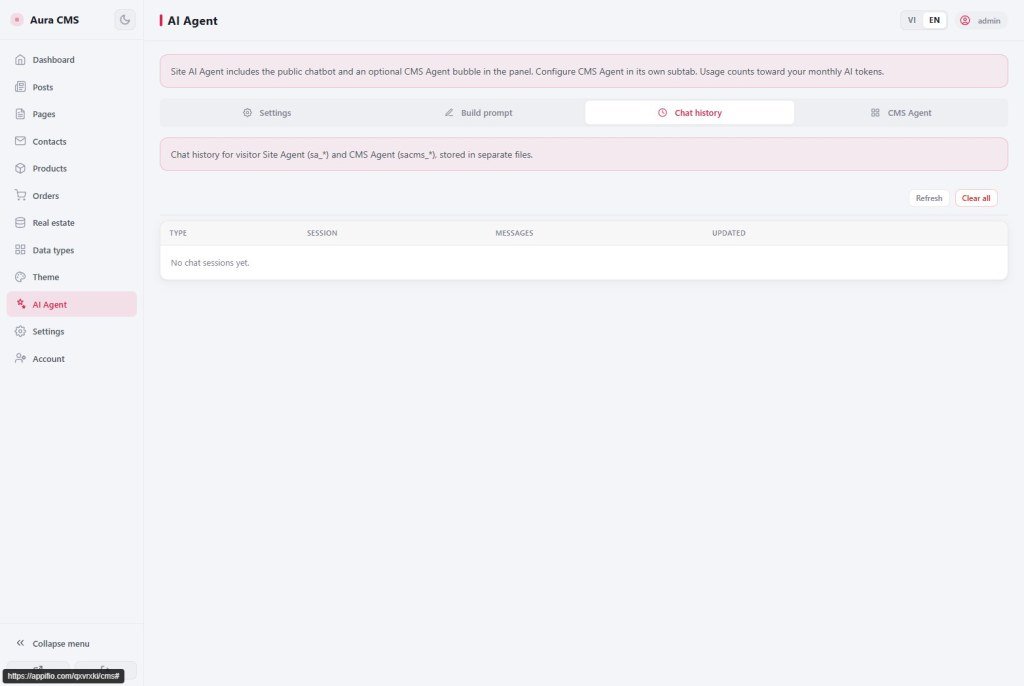
Chat history collects sessions from both agents:
- Visitor - Frontend Agent chats with site visitors.
- CMS Agent - admin chats with the panel assistant.
- See Type · message count · updated time.
- View · Delete session · Refresh · Clear all (Visitor + CMS - confirm first).
- Use Visitor history to improve Build prompt / indexes; use CMS history to track draft-creating sessions.
7. Technical limits
You can
- Overview + planning + read by permission
- Create/edit draft posts · products · custom types
- Manage all Visitor & CMS history
Limits
- No delete / no publish from the agent
- Does not use visitor Build prompt
- Tokens bill the site owner
8. Common issues
| Situation | Fix |
|---|---|
| No CMS bubble | Enable master + CMS Agent; stay logged in; refresh |
| Cannot read contacts / orders | Enable matching read rights → Save CMS Agent |
| Create post / product / custom rejected | Enable the matching write right; then Publish in the panel |
| Wrong custom-type fields | Ask AI to read the type schema first; see G04 |
| Empty history | Refresh; confirm the chat succeeded (no quota error) |
9. Self-check
- Can you list CMS Agent admin jobs (overview, plan, read, draft write)?
- Do you know read vs write, and that Publish stays human?
- Can you open History and manage Visitor + CMS Agent sessions?
Next lesson
H01 - Full webapp: Creator + Storage + CMS
Merge A-G into an end-to-end checklist. Need IDE MCP → H02.
Internal navigation (same language)
Appifio Creator · User guide · G07
