
Appifio Creator · Lesson G06 · Intermediate
how it works & the visitor chatbot
See how the Frontend Agent answers visitors from a custom prompt + website info + published products + indexes - then enable the live bubble.
Learning goals: Understand Frontend AI Agent mechanics (knowledge sources → visitor answers), tell it apart from CMS Agent / Creator AI, and enable the live bubble.
Reading time: about 15 minutes
Prerequisites: Can open Aura CMS (G01); site saved at least once; published products help catalog answers (G03).
Previous → next: G05 → G06 → G07 (CMS Agent · Build prompt · History)
1. Two agents inside Site AI Agent
Both differ from Creator AI Agent (edits HTML/CSS/JS) and from MCP (IDE - H02).
2. How the Frontend AI Agent works
When a visitor opens the bubble and asks, the agent combines knowledge in this order:
| Source | Used for | Not included |
|---|---|---|
| Custom prompt | Reply rules, style, scope | Empty prompt → chat will not run |
| Website info | Hours/address/phone/brand from Settings | Blank fields are skipped |
| Knowledge indexes | FAQ, policies, hand-written service notes | Blog posts not added as indexes |
| Published products | Price, stock, product descriptions | Drafts · contacts · orders · unpublished posts |
3. What Frontend Agent does
- 24/7 visitor help on the live site - no CMS login.
- Answers from knowledge you build: prompt + site info + indexes + published catalog.
- Multi-turn chat in one open bubble; close/F5 may clear client context - sessions still appear under Chat history (G07).
- No CMS writes: visitors cannot create/edit posts, products, or orders here.
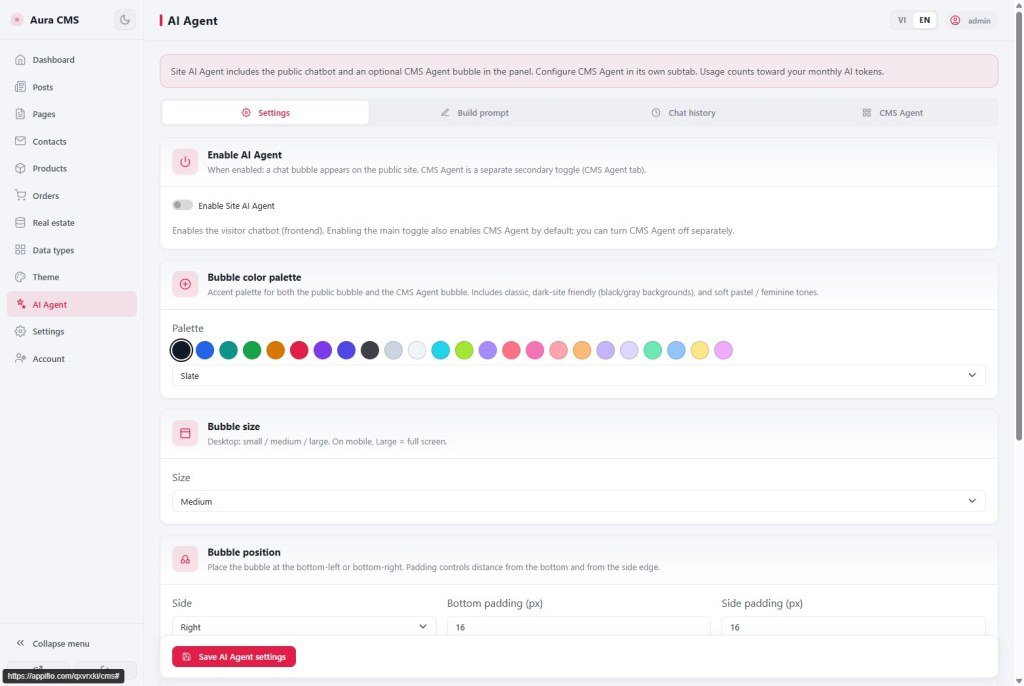
- Look & feel: Markdown welcome, palette, size, position, model (DeepSeek / OpenAI) - shared theme with CMS Agent.
4. Glossary
| Term | Meaning | Where in the UI |
|---|---|---|
| Frontend AI Agent | Public visitor chatbot (one half of Site AI Agent) | Live-site corner bubble |
| Enable Site AI Agent | Master switch for the visitor bubble | Config tab |
| Build prompt | System prompt + site-info insert + indexes - the Frontend Agent’s “brain” | Build prompt tab |
| Welcome message | First bubble visitors see; Markdown | Config tab |
| CMS AI Agent | Admin assistant that reads/writes content by permission (G07) | CMS Agent tab |
5. Enable Frontend Agent - steps
- CMS → AI Agent → Config → turn on Enable Site AI Agent.
- Build prompt: write a required System prompt.
- (Recommended) Enable auto-insert website info if Website settings are filled (G05).
- Add FAQ/policy indexes if needed (details in G07) → Save Build prompt.
- Publish products you want the bot to discuss (G03).
- Config: welcome, palette, size, position, model → save.
- Open the live site (incognito) → ask about hours / a product / shipping policy.
6. Quick comparison
| Criterion | Frontend Agent | CMS Agent (G07) | Creator AI |
|---|---|---|---|
| Who | Site visitors | CMS admins | App builders |
| Job | Q&A answers | Overview + read/write content | Edit VDisk code |
| Prompt | Your Build prompt | Built-in CMS prompt | Creator Prompt & skills |
| Writes data | No | Drafts if enabled | Draft files (until Save) |
7. Technical limits
You can
- Answer from prompt + site info + indexes + published products
- Tune welcome, palette, size, position, model
- Keep sessions for admin history
Limits
- Empty system prompt → chat will not run
- No contacts / orders / drafts for visitors
- Visitor tokens bill the owner quota
8. Common issues
| Situation | Fix |
|---|---|
| No bubble | Enable + save; open live URL; hard refresh |
| Missing prompt / no reply | Build prompt → System prompt → Save |
| Product prices unknown | Publish products (G03) or add indexes |
| No address/phone answers | Fill Website settings + enable site-info insert |
9. Self-check
- Can you list the four knowledge sources Frontend Agent uses?
- Can you tell Frontend vs CMS Agent vs Creator AI apart?
- Does the live bubble answer from prompt / site info / published products?
Next lesson
G07 - CMS AI Agent: manage content with AI + history
Site overview, read contacts/orders, create-edit posts / products / custom types (drafts), and manage all chat sessions.
Internal navigation (same language)
Appifio Creator · User guide · G06
