
Table of contents
Appifio Creator · Lesson G04 · Advanced
Dynamic types
& Theme - extend CMS for your needs
& Theme - extend CMS for your needs
When Posts/Products aren’t enough - e.g. Real estate, Courses, Project portfolio - and how to apply a consistent site-wide theme.
Learning goals: Define a new data type with custom fields, and apply the default theme to the site.
Reading time: about 16 minutes
Prerequisites: Comfortable with Posts/Products (G02, G03) and can open /your-link-name/cms.
Previous → next: G02, G03 → G04 → G05
1. Create a new data type
0. Open CMS
→ /your-link-name/cms → sign in
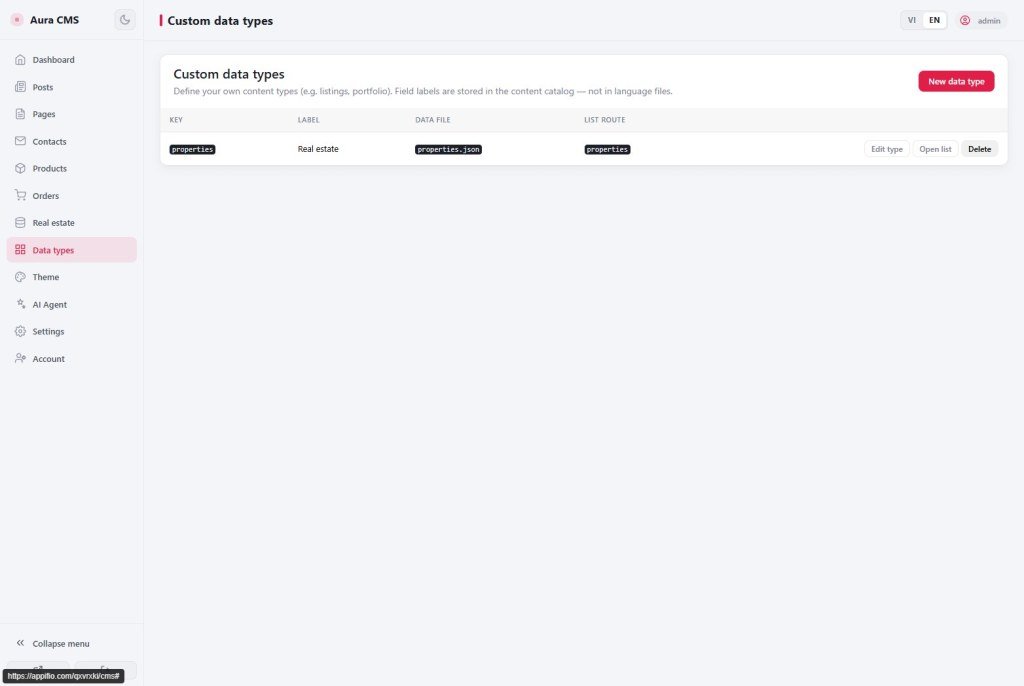
1. Nav "Data types" → "Add data type"
→ Entity key (e.g. listings), plural/singular labels, storage file
2. Public URL config
→ List slug, detail URL pattern, list/detail HTML files
3. (Optional) Categories & tags
→ enable like Posts if you need classification
4. Add Fields
→ "Add field" - Type, Widget, select options if needed
5. Save → system updates
→ __cms_manifest__.json - AI reads this to generate matching frontend
6. (Optional) Nav "Appearance"
→ "Apply theme" - shared header/footer site-wide
2. Glossary
| Term | Meaning | Where in the UI |
|---|---|---|
| Data type (Dynamic type) | Custom content table - beyond built-in Posts/Products | Nav "Data types" |
| Entity key | Internal id - lowercase/digits/underscore; don’t clash with system names | Form → "Identity & storage" |
| CMS manifest | __cms_manifest__.json describes entities, fields, routes - AI uses it for code | Project files (hidden from casual users) |
| publish_state | Draft / Published / Private - only Published has a public URL | Add/edit record form |
| Widget | Input display type per field (text, select, image…) | "Fields" → "Add field" |
| Theme (Appearance) | Shared header/footer/menu for home & CMS pages | Nav "Appearance" |
3. Plan before you click
Example: a real-estate site. Before opening the form, jot down:
- Entity key:
listings(short English technical name) - Menu labels: "Listings" (plural) / "Listing" (singular)
- Fields: Price, Area, District, Cover image
- URLs: list
/listings, detail/listings/{slug}
4. Steps - create a custom data type
- CMS → "Data types" → "Add data type".
- "Identity & storage":
- Entity key - e.g.
listings(no spaces/accents). - Plural label - "Listings" (CMS menu).
- Singular label - "Listing" (add-record button).
- Storage file - keep default or set clearly (e.g.
listings.json).
- Entity key - e.g.
- "Public URLs":
- List slug - e.g.
listings. - Detail URL pattern - e.g.
listings/{slug}. - List / detail HTML files - page paths; system adds
.htmlif missing.
- List slug - e.g.
- If you need classification, enable "Categories & tags" - system creates matching data files, routes, and sample HTML.
- "Fields" → "Add field":
- "Price" - number type, text widget.
- "District" - text or select (options: D1, D2, D3…).
- "Cover image" - image widget.
- Mark important fields Required.
- Click "Save data type" - wait for success.
- Click "Open list" → add a sample record → set Published → save.
- Back in Creator, ask AI to read
__cms_manifest__.jsonand align list/detail HTML with the new fields.
5. Apply Theme site-wide
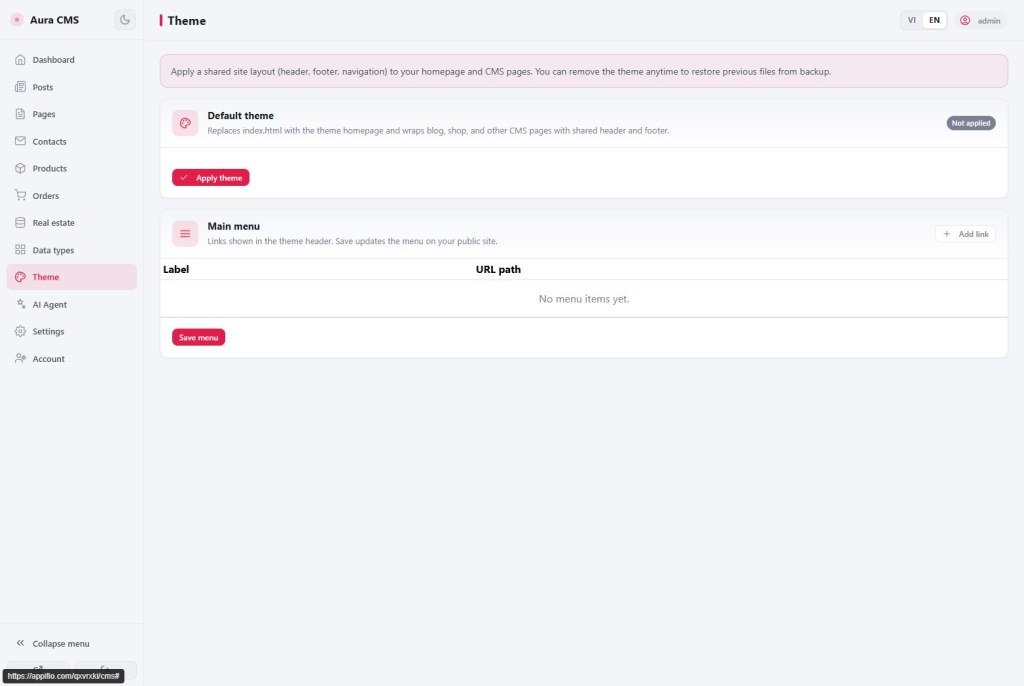
- Nav "Appearance" - read the short note about the default theme first.
- Click "Apply theme" - confirm; it replaces current
index.html. The original is backed up automatically. - Blog/shop/CMS pages get a shared header/footer - check the live site menu.
- Edit "Main menu": add rows → Label + URL path → drag to reorder → "Save menu".
- To revert → "Remove theme" - restores
index.htmlfrom backup if available. - Remember Save changes in Creator after AI edits theme-related HTML.
6. Security
- Only superadmin and admin create/edit data types - Editors usually only add records in existing entities.
- Private publish_state has no public URL - good for internal content.
- After Security enforce (G05), confirm new entities still allow guests to see Published items.
7. Compared with other tools
- Strapi/Contentful: “Content Type” ≈ Dynamic types here, with a similar field builder.
- Airtable: tables + columns ≈ entity + fields, but Airtable doesn’t auto-generate public routes/HTML.
- WordPress CPT + ACF: same idea, but needs code/plugins; here it’s a form in the panel.
8. Technical limits
You can
- Create entity + custom fields via form
- Enable Categories & tags for new entities
- Apply/remove Theme with index.html backup
- Auto-update manifest on save
Limits
- Deleting an entity doesn’t delete old data/HTML on disk
- Renaming a data file doesn’t move old records
- List/detail HTML still needs AI/dev edits
- Complex entities need Advanced backend (F01)
Important: Deleting a data type only removes the catalog entry - stored data and related HTML pages remain. Renaming a category/tag data file also doesn’t delete old data - old records stay under the previous filename until you move them.
9. Common issues
| Situation | Fix |
|---|---|
| “Invalid entity key” | Use lowercase a-z, digits, underscore; avoid system names (blog, posts, users…) |
| Detail page 404 despite a record | publish_state = Published; detail HTML exists; Save changes in Creator |
| Apply Theme wiped the old look | "Remove theme" restores index.html from backup |
| CMS menu has the item but the site doesn’t | Add it to Main menu under Appearance, or update custom HTML menus in Creator |
| AI used wrong field names | Ask AI to re-read __cms_manifest__.json |
10. Tips
- Keep entity keys short English (
listings,courses) - technical name, not the visitor-facing label. - After creating an entity, always ask AI to read
__cms_manifest__.jsonbefore writing HTML. - Apply Theme early if you want one menu across custom home and CMS pages.
- Create and publish one sample record before asking AI for HTML - easier to test than empty pages.
11. Self-check
- Have you created one new data type with at least two custom fields?
- Have you added a sample record and set Published?
- Do you know deleting a type doesn’t delete old data/HTML?
- Have you applied and removed Theme once to see the backup?
- Do you know AI should read the manifest before editing HTML?
Next lesson
G05 - CMS Settings: site mode, users, MCP
Finish series G: site-wide config, team roles, and MCP inside CMS.
Internal navigation (same language)
Appifio Creator · User guide · G04
