
- Mode-selection map
- Glossary
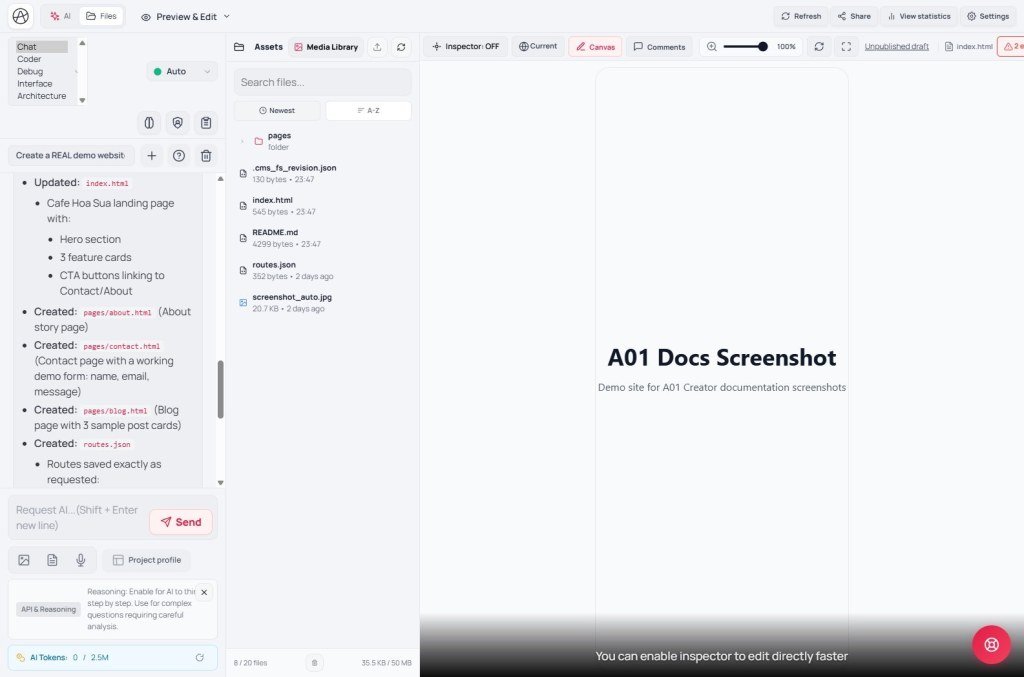
- Five chat modes - when to use each
- "Chat" - default, general work
- "Coder" - precise code writes/edits
- "Debug" - find and fix a specific bug
- "UI" - visuals, layout, color, imagery
- "Architecture" - big structural decisions before coding
- Quick chooser - sample prompts
- Three helper toggles
- Token limits - know this before enabling everything
- Compared with Cursor IDE & v0/Lovable
- Technical limits
- Common issues
- Practical tips
- Self-check
Appifio Creator · Lesson B05 · Beginner → Intermediate
UI · Architecture
This lesson covers the five AI chat modes, the three toggles Auto Reasoner / AI Supervisor / Context summary, when to use each, and why the right mode choice really does save monthly AI Tokens.
Learning goals: Match chat mode to the job, know when to enable Reasoner/Supervisor/Context summary, and understand why monthly "AI Tokens" burn fast when modes are misused.
Reading time: about 15 minutes
Prerequisites: At least one AI chat (B01).
Previous lesson: B01 - First AI chat
Next lesson: B06 - Prompt Studio & Project profile
Mode-selection map
Glossary
| Term | Meaning | Where in the UI |
|---|---|---|
| Chat mode | The working context assigned to the AI before it replies | Selector above the chat input |
| Auto Reasoner | "Thinking mode" - the AI reasons more carefully before acting | "Auto Reasoner" toggle |
| AI Supervisor | "Supervisor mode" - checks & may auto-fix after the main AI finishes | "AI Supervisor" toggle; status "AI Supervisor is checking…" |
| Context summary | "Session memory & planning" - summarizes older chat so the AI remembers without blowing the token window | "Context summary" toggle; status "Summarizing conversation context…" |
| AI Tokens | Monthly AI token usage against your account quota | "AI Tokens" area on the toolbar |
Five chat modes - when to use each
The UI only shows short mode names, not long blurbs. The guidance below comes from how these modes are used in real build workflows - try the same request in two modes to feel the difference instead of trusting labels alone.
"Chat" - default, general work
Use for broad asks: "build a bio page", "add an about section", how-to questions about Creator. Best when you are not sure you need Coder/Debug/UI yet - describe in plain language and let the AI decide which files to touch.
"Coder" - precise code writes/edits
Use for concrete logic: JS form handlers, calculations, Backend API calls, tight HTML/CSS edits. Fits when you (or a teammate who codes) can state a technical brief and want structured results with less freeform invention than Chat.
"Debug" - find and fix a specific bug
Use when something is clearly broken: dead button, mobile layout break, data not saving, console errors. Describe the symptom ("Submit does nothing") and attach a screenshot if you can - Debug hunts root cause before inventing new features.
"UI" - visuals, layout, color, imagery
Use when the focus is look and layout: "shift to navy", "bigger hero with image on the right", "center the CTA on mobile". Pairs well with Canvas (C01-C02) so you can check each breakpoint immediately.
"Architecture" - big structural decisions before coding
Use before a multi-part webapp: file/route layout, Easy vs Advanced Backend, flat vs indexed data (F05). Ask here before Coder writes details, so you do not tear down a large project later.
Quick chooser - sample prompts
| What you are doing | Pick | Sample prompt |
|---|---|---|
| New page from a rough idea | Chat | "Create a personal bio page for a photographer, dark tone, 5 link buttons." |
| Form logic, API calls, JS math | Coder | "On contact form Submit, validate email then call Backend API to save into contacts." |
| Dead button / broken mobile layout | Debug | "The 'Sign up' button on the Mobile breakpoint does nothing on click - find the cause and fix it." |
| Color, type, layout, motion | UI | "Hero: image on the right, large title on the left, orange CTA on a white background." |
| Plan pages, routes, Backend | Architecture | "Propose file + route structure for a 5-page site with blog and contact form - Easy or Advanced Backend?" |
Three helper toggles
| Toggle | Exact tooltip sense | When to enable | Trade-off |
|---|---|---|---|
| Auto Reasoner | "Thinking mode (Auto Reasoner)" | Complex, multi-step work that fails if rushed (e.g. restructuring many files) | Slower replies, more tokens |
| AI Supervisor | "AI supervisor mode (Check & auto-fix)" | Important changes where you want an automatic quality pass after the main AI finishes | A second AI pass → more tokens/time per request |
| Context summary | "Context summary (session memory & planning)" | Very long threads where the AI starts "forgetting" earlier decisions | Uses tokens to summarize before the next reply |
Token limits - know this before enabling everything
Each account has a monthly AI Tokens quota (toolbar "AI Tokens", tooltip like "AI tokens used this month"). All three toggles raise cost per request because each is one or more extra AI calls:
- Leaving all three on for tiny asks (e.g. "recolor one button") wastes quota - plain "UI" mode is enough.
- Even with toggles off, very long threads cost more because history is re-read - that is why "Context summary" and "Clear history" / "New" exist.
- There is a Hallucination guard - if the AI claims it called a tool but no tool ran, the system may auto-resend a fix prompt (hidden extra tokens). Clear, short asks reduce that.
Compared with Cursor IDE & v0/Lovable
| Tool | How modes are split |
|---|---|
| Appifio Creator | Five job-type modes (Chat/Coder/Debug/UI/Architecture) + three independent reason/supervise/summarize toggles |
| Cursor IDE | Split by autonomy (Ask, Agent, Plan) - different axis than Creator, same idea: pick context before the AI acts |
| v0 / Lovable | Usually one UI-generation chat stream - you write more detailed prompts to approximate "Coder"/"UI" |
Technical limits
You can
- Switch mode between messages without starting a new chat
- Toggle Reasoner/Supervisor/Summary independently
- Clear history or start "New" anytime to reset context
You cannot
- Rely on long in-UI mode essays - you learn by practice
- Cap tokens per chat/mode - quota is account/month
- Expect Auto Reasoner to always be right - it only raises odds on hard jobs
Common issues
| Issue | Fix |
|---|---|
| AI goes off-track | "Clear history", switch mode, or rephrase - sometimes you need a few attempts. |
| AI Tokens spike unexpectedly | Check the three toggles - turn off Reasoner/Supervisor for small work; start "New" instead of dragging a huge thread. |
| AI says it changed the page but nothing moved | Possible internal Hallucination recovery - wait for the auto-retry; if still wrong, "Reload" preview and ask again with a clearer prompt. |
Practical tips
- Default to "Chat"; switch to Coder/Debug/UI/Architecture only when the ask clearly fits.
- Enable "AI Supervisor" for important edits before Save to live; disable while rapidly trying options.
- Use "Architecture" once at the start of a large webapp, then "Coder" for details - avoid mid-project structure thrash.
- Watch "AI Tokens" periodically; near the monthly cap, prioritize critical work and turn helpers off for tiny edits.
Self-check
- When should you use "Debug" instead of "Coder"?
- Can you state the idea behind each of the three toggles?
- Where do you check monthly "AI Tokens"?
- Do you "Clear history" / "New" when switching to unrelated work?
Next lesson
B06 - Prompt Studio & Project profile
Store AI tone/skills (Prompt Studio) and brand/product facts (Project profile) so you do not re-explain every chat - pairs well with mode choice from this lesson.
Internal navigation (same language)
Appifio Creator · User guide · B05 · Based on Creator chat modes and AI helper toggles
