
- 1. End-to-end landing page workflow
- 2. Landing page terms
- 3. Step by step - build the landing page
- 4. Audit - how to read the report
- Correct tab names in the modal
- Export - when to use which format
- 5. Compared with Carrd / Framer
- 6. Technical limits
- 7. Security when the page collects leads
- 8. Common issues
- 9. Practical tips
- 10. Check that you understand B03
Appifio Creator · Lesson B03 · Level: Beginner
for sales or events
Create a landing page with Hero, CTA, and a lead form; check responsive layout on every breakpoint; run Audit before you publish - enough for sales, events, or a product launch.
Learning goals: Build a landing page with Hero/CTA/form, verify three breakpoints, read and act on an Audit report before Save changes.
Hands-on time: about 45-70 minutes.
Prerequisites: A01-A03, B01. B02 helps if you already know Canvas + Inspector.
Previous lesson: B02 - Build a personal biolink.
Next lesson: C01 - Preview workspace: Standard vs Canvas.
Key UI labels you will see:
1. End-to-end landing page workflow
2. Landing page terms
| Term | Meaning | Where in the UI |
|---|---|---|
| Hero | Top block: main headline, short copy, image/video, first CTA | Top of the page - not a separate button label |
| CTA (Call to Action) | Primary action button: "Sign up now", "Buy now", "Book a call" | Prominent buttons in Hero and near the end |
| Above the fold | What you see before scrolling | Top viewport at each breakpoint |
| Breakpoint | Simulated device width for preview | Desktop 1200 · Tablet 810 · Mobile 390 in Canvas |
| Audit | Modal Website Audit Tool - client-side analysis; you must click Run check; it does not auto-fix / has no AI button inside the modal | "Audit" on the preview toolbar |
| Core Web Vitals | Speed/stability metrics Audit measures (e.g. layout shift / CLS) | "Performance" section in the Audit report |
| Export | Export the current preview as Screenshot/PDF/Word/ZIP/.afi/APK (BETA) | "Export" on the preview toolbar |
3. Step by step - build the landing page
- Step 1 - Prompt a full section stack: in "Chat" mode: "Create a landing page for [product/event] with: Hero + headline + 'Sign up now' CTA, 3-column benefits, testimonials, signup form (name, email, phone), final CTA, contact footer." Click "Send".
- Step 2 - Check three breakpoints: turn on "Canvas", walk "Desktop", "Tablet", "Mobile" - watch for cropped Hero images and CTAs that fall below the first screen (above the fold).
- Step 3 - Emphasize CTAs in Inspector: select each CTA, raise contrast vs background, enlarge if needed, keep CTAs at both the top and bottom.
- Step 4 - Wire the form for real data: UI-only demos can skip Backend. For real leads, connect the form to Aura Storage via Backend (lesson F02) before a wide launch.
- Step 5 - Run Audit: click "Audit" → choose Desktop or Mobile → "Run check" (opening the modal alone is not enough). Read Overview, then Performance, SEO On-Page, Accessibility, Best Practices. Full detail: lesson E05.
- Step 6 - Fix outside the Audit modal: paste issues + tips into the Ask AI… box, or fix by hand in Inspector. Ask AI to fix lives on the Inspector panel for a selected element - not inside the Audit modal.
- Step 7 - Run again: after fixes, Audit → "Run again" (results may be cached ~5 minutes if you only close/reopen the modal).
- Step 8 - Save changes: final Current/Changes compare, then "Save changes".
- Step 9 - (Optional) Export for internal review: use "Export" for Screenshot or PDF before a wide share.
4. Audit - how to read the report
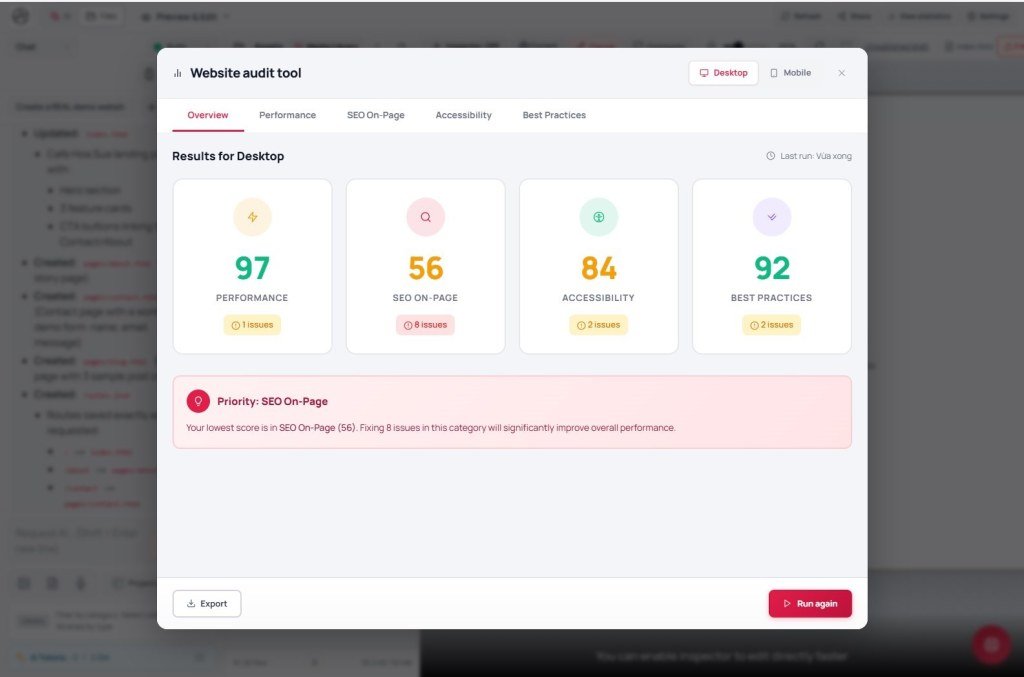
Correct tab names in the modal
- Performance: Core Web Vitals, lazy load, images missing width/height, render-blocking CSS/JS.
- SEO On-Page (not “SEO Content”): title, meta description, H1, alt, canonical…
- Accessibility: contrast, form labels, headings, viewport zoom.
- Best Practices: CSP, Referrer Policy, HTTPS for password forms…
- Also see Resource chart (waterfall) and lesson E05 for depth.
Export - when to use which format
Screenshot/PDF work well for stakeholder content review. Word suits copywriters. ZIP/.afi is for backup or moving code elsewhere. APK is still BETA - not for an official app release of a landing page (see E04, H03).
5. Compared with Carrd / Framer
| Criterion | Carrd | Framer | Appifio Creator |
|---|---|---|---|
| Time to first draft | Very fast, simple ready blocks | Fast, AI + strong animation | Fast - AI writes structure and copy from one prompt |
| Pre-publish quality check | No built-in audit | No built-in SEO/A11y audit in the editor | Built-in "Audit" in preview, four check groups |
| Data / backend | Mostly third-party forms (Mailchimp…) | Light CMS; complex logic needs external tools | Aura Storage + Aura CMS in the same stack for basic lead capture |
6. Technical limits
You can
- Run SEO/performance/accessibility checks inside Creator for a first quality pass.
- Export multiple formats for review or offline backup.
- Connect a live form to Aura Storage so leads land when you launch.
You cannot / still limited
- No built-in multi-variant A/B testing - use two routes and compare yourself.
- Audit does not replace deep SEO tooling (Search Console, etc.).
- APK export is BETA - not for an official app-style landing release.
7. Security when the page collects leads
- Store form data (name, email, phone) in access-controlled Aura Storage - not as public static JSON.
- Audit may flag HTTPS - required to protect form input; confirm HTTPS on your domain before paid traffic.
- Do not publicly share an "Unpublished draft" link that exposes internal pricing/promos before launch day.
8. Common issues
| Situation | What to do |
|---|---|
| CTA falls below the first screen | Check Hero at each Canvas breakpoint; shorten top content or add a CTA inside the Hero. |
| Low Performance score from heavy images | Ask AI/Inspector to add loading="lazy", use right-sized assets, or recompress/re-upload in Files. |
| Form submits but you cannot find the data | Check whether the form is wired to Backend (F02); UI-only demos do not store submissions anywhere. |
| Accessibility flags (labels, ARIA) | Ask AI to add /aria-label for the inputs Audit lists. |
9. Practical tips
- One primary CTA, repeated (top, mid, bottom) - avoid competing CTAs that split decisions.
- Keep forms short: only what you need for the first step (name + contact); ask more after you have the lead.
- Run Audit before every important Save - not only once at the start.
- Before ads or a wide share, test on a real phone (not only Canvas) so the keyboard does not cover Submit.
10. Check that you understand B03
- List the main landing blocks in order.
- What are Audit’s four report groups? Give one example warning each.
- What must a form connect to if it should store real data?
- What is Export for, and how does it differ from Save changes?
- Which Creator difference vs Carrd/Framer helps you most?
Next lesson
C01 - Preview workspace: Standard vs Canvas
You will learn Canvas pan/zoom, managing multiple breakpoints, and when to switch back to Standard - foundations for every page type, not only landings.
Internal navigation (same language)
Appifio Creator · User guide · B03 · Based on Creator Audit, Export, and preview product behavior
