
Appifio Creator · Lesson F03 · Advanced
login.json & three roles - user / admin / superadmin
Why you should not invent your own login system - and how to use Aura’s built-in auth methods correctly.
Learning goals: Know the three admin roles, what login.json is and why you never read/write it directly, and how to brief AI to build a correct admin page.
Reading time: about 12 minutes
Prerequisites: Backend tab (F01).
Previous → next: F01 → F03 → G01 (Aura CMS shares the same superadmin system)
1. Admin login flow
2. Glossary (3 columns)
| Term | Meaning | Where in the UI |
|---|---|---|
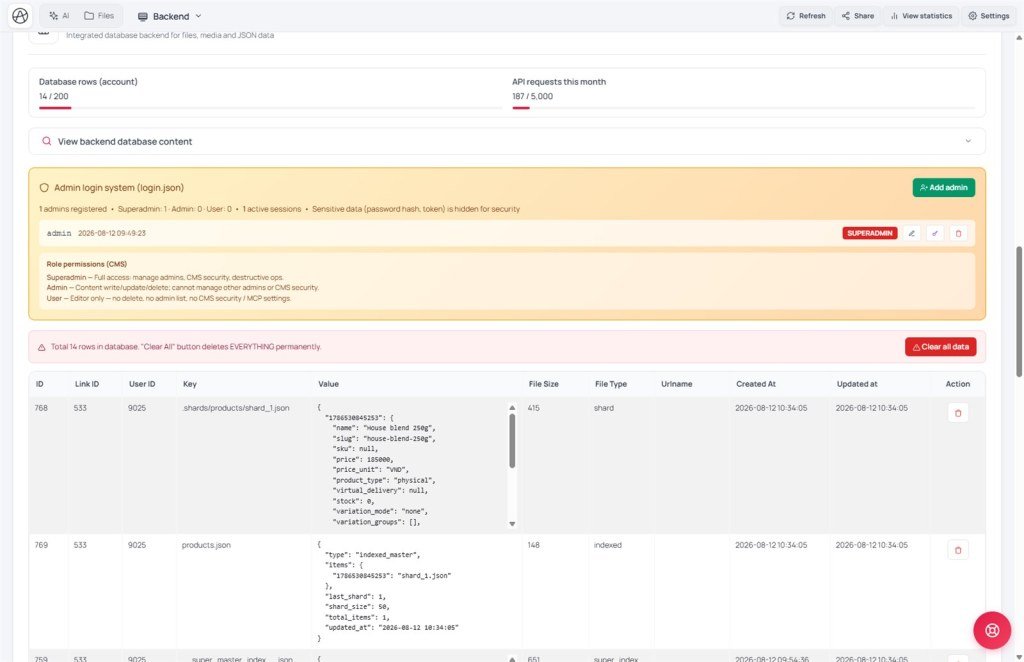
| login.json | The only system file with the admin list - never read/write directly | Hidden - manage via login / Admin Management |
| Guest | Not logged in - public forms only (appendData) | Public pages |
| user (Editor) | CMS content staff - no account management or security config | CMS → Editor role (G05) |
| admin (Administrator) | Shop/orders, site settings - cannot add/remove superadmins | CMS → Administrator |
| superadmin | Full power: accounts, security, MCP - usually 1-2 people | First bootstrap / CMS Superadmin |
| Bootstrap | No admins yet - first registrant becomes superadmin | "First-time setup" form (G01) |
3. Three roles - store analogy
Think of the app as a shop:
- Guest = walk-in customer - leave a contact slip only.
- user (Editor) = warehouse staff - enter posts/products, no safe access.
- admin (Administrator) = shift manager - orders and shop settings, can’t hire/fire the owner.
- superadmin = shop owner - accounts, security, MCP.
Only three valid roles: user, admin, superadmin - no editor/viewer/moderator. Need finer UI splits → hide/show buttons on the page; the backend still blocks insufficient roles.
4. Permission matrix by role
| Action | Guest | user | admin | superadmin |
|---|---|---|---|---|
| appendData (public form) | ✅ | - | - | - |
| appendData / updateData CMS content | ❌ | ✅** | ✅ | ✅ |
| writeFile / writeField normal data | ❌ | ✅ | ✅ | ✅ |
| writeFile system files (cms-settings.json) | ❌ | ❌ | ✅ | ✅ |
| listAdmins / updateAdmin / deleteAdmin / hardDeleteFile | ❌ | ❌ | ❌ | ✅ |
** user still must be logged in; only a few high-admin tasks are blocked.
5. Build an admin page via AI
- Ask AI: “Create login.html for admins - call registerAdmin when nobody exists yet (bootstrap), then login() to sign in.”
- Ask AI to put at the top of every admin page: check admin session; if invalid, redirect to login.html.
- If several managers: a page only superadmin sees - “hide account-management buttons unless role is superadmin, but still let the backend block - don’t ask AI to disable server checks.”
- Verify in Backend → Admin Management: registered admin count, active sessions; sensitive data (hashed passwords, sessions) stays hidden there.
6. Compared with other tools
- Firebase Auth / Auth0: also separate auth from app code, but heavier SDK wiring; Aura needs a few ready
appifio_clientmethods. - WordPress: richer roles (admin, editor, author…); Aura simplifies to three roles for custom sites.
- Homegrown PHP/Node auth: Aura already hashes passwords, issues sessions, and rate-limits for you.
7. Technical limits
You can
- 3 roles + bootstrap superadmin
- CMS login and app admin pages share login.json
- Change password / add admins via built-in APIs
You can’t
- Invent arbitrary roles (editor, viewer…)
- Read/write login.json directly
- Delete the last superadmin
- Ship a custom users.json - the system ignores it
8. Security - hard rules
Don’t invent a private auth file (auth.json, users.json, admins.json…) - the system won’t recognize it; people can’t log into that homemade admin.
Don’t read/write login.json directly - calls get 403. Always use registerAdmin / login / logout / getSession / getAuthSetupStatus / changePassword / updateProfile.
- listAdmins/getSession never return raw passwords or leaked session tokens - AI can’t “accidentally” print passwords on the page.
- Changing someone else’s password via updateAdmin invalidates all their old sessions.
- You can’t delete or demote the last superadmin - avoids an app with no admin left.
- Too many failed logins → temporary rate limit (not a system outage).
9. Common issues
| Situation | Fix |
|---|---|
| AI made users.json; login fails | Ask AI to delete it and switch to registerAdmin/login |
| Can’t create a second superadmin | Expected - from person #2, only the current superadmin may call registerAdmin |
| Want an “editor” role | Not supported - only user/admin/superadmin; hide/show UI features if you need finer splits |
| Login says “IP blocked” | Too many wrong passwords - wait, don’t spam submit |
10. Tips
- Bootstrap the first superadmin as soon as the app shell exists - don’t leave admin pages public for long.
- For larger teams, give staff
admin; keepsuperadminfor 1-2 owners. - After a password change, log out and back in to confirm old sessions were invalidated.
11. Self-check
- Can you name the three valid roles and the basic differences?
- Do you know why you must not invent a private auth file?
- Do you know what an admin session check is for and where it belongs on a page?
Next lesson
F04 - Secrets manager & Backend Function
When you call third-party APIs (mail, payments) without leaking keys, use Secrets manager with executeBackendFunction.
Internal navigation (same language)
Appifio Creator · User guide · F03
