
Table of contents
Appifio Creator · Lesson E05 · Intermediate
Audit: SEO · Performance
Accessibility - check before you publish
Accessibility - check before you publish
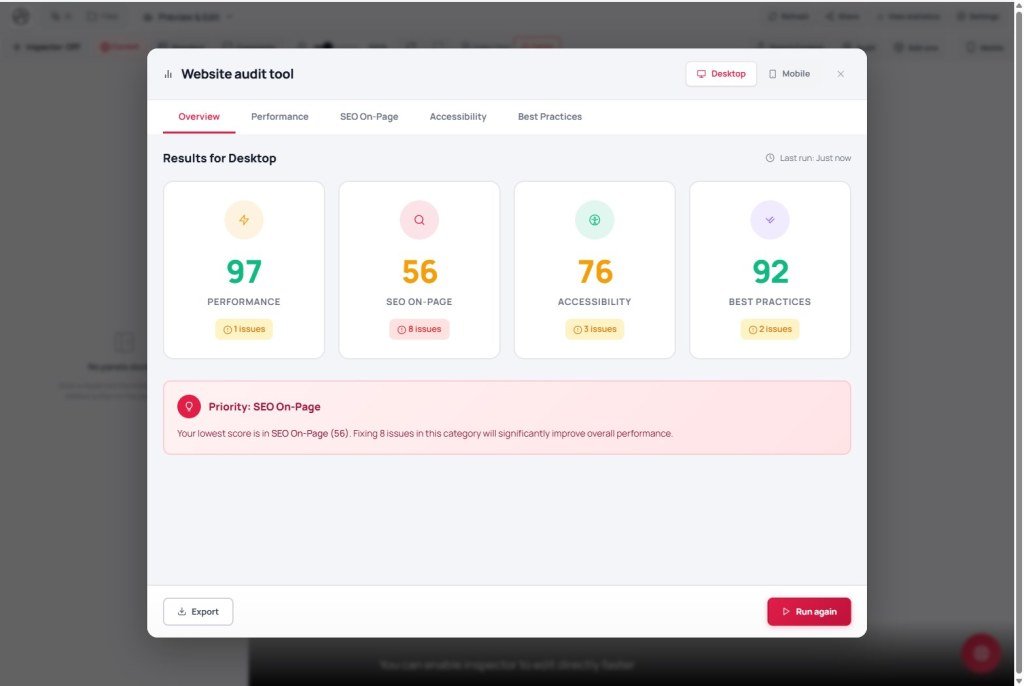
Audit is a client-side site quality analyzer in the browser, in the spirit of Google PageSpeed. It does not auto-fix code and has no “Ask AI to edit” button inside the modal - read the report, then fix by hand / AI chat / Inspector.
Learning goals: Open the Website Audit Tool modal, click Run check, read the 5 tabs, understand ~5-minute cache, and turn each issue into an AI prompt or Inspector edit.
Reading time: about 12-15 minutes
Prerequisites: A page on Changes (A03, C02).
Previous → next: C02 → E05 → E03 (Save changes)
UI labels: Audit · Website Audit Tool · Desktop · Mobile · Run check · Run again · Overview · Performance · SEO On-Page · Accessibility · Best Practices · Export data · Close
Don’t confuse: Ask AI to edit lives on the Inspector panel when an element is selected (C03) - not inside the Audit modal. Audit only has Run check, Export data, and Close.
1. Audit workflow
1. Open the tool
→ Audit on the toolbar → Website Audit Tool modal
2. Pick device
→ Desktop (no throttle) or Mobile (4G throttled, ~375px viewport)
3. Run analysis
→ Run check (later: Run again) - reloads the preview iframe then measures
4. Read results
→ Overview + Performance / SEO On-Page / Accessibility / Best Practices · Resource chart (waterfall)
5. Fix (outside Audit)
→ Copy issues → paste into AI chat · or Inspector · or Inspector Ask AI to edit on the related element
6. Export / re-run
→ Export data (optional) · Run again after fixes
2. Glossary
| Term | Meaning |
|---|---|
| Website Audit Tool | Audit modal title - client-side analysis in the editor |
| Run check / Run again | Start / re-run analysis for the selected device |
| Core Web Vitals (FCP, LCP, CLS, TTFB, TBT…) | Speed/layout stability metrics like PageSpeed |
| SEO On-Page | Title, meta description, H1, image alt, canonical, schema… (tab label is SEO On-Page) |
| Resource chart | Request waterfall - heavy files / too many requests |
| ~5-minute cache | Results cached locally by URL + device; reopening may show the last run if still valid |
| Great / Warning / Error / Info | Severity levels in the report |
3. Detailed steps
- View Changes (draft) - Audit measures the open preview iframe.
- Click Audit → tip: Click “Run check” below to analyze the site on this device…
- Pick Desktop or Mobile. Each has its own results; No data for {device} means you haven’t run that device yet.
- Click Run check → wait Preparing… / Analyzing… → Check complete!
- Overview: overall score 0-100; blocks like Needs urgent improvement / Priority: {group} / Excellent! depending on score.
- Accessibility: contrast, form labels, headings - critical for public sites.
- Best Practices: CSP, HTTPS, referrer policy - easy to skip, useful for basic security.
- When done with a tab, Close or switch tabs - Audit has no auto-fix button.
- (Optional) Export data → save the report for a client or before/after.
- After code fixes: reopen Audit → if ~5-minute cache still applies, click Run again.
4. Four check groups
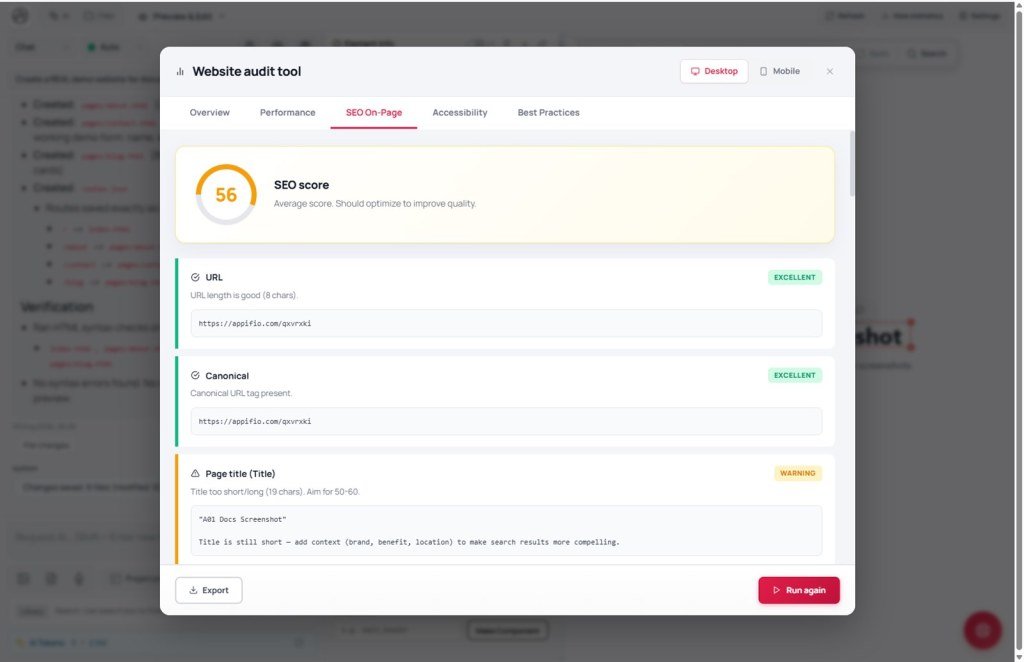
| Tab | What it checks | Example issues |
|---|---|---|
| Performance | FCP/LCP/CLS/TTFB/TBT, render-blocking CSS/JS, images missing width/height / lazy, DOM size, third-party | Hero image missing fetchpriority; too many requests |
| SEO On-Page | Title, meta description, canonical, H1, alt, text/HTML ratio… | Missing |
