
Appifio Creator · Lesson E01 · Intermediate
Clean · Clone · Site online · Sync · Compare
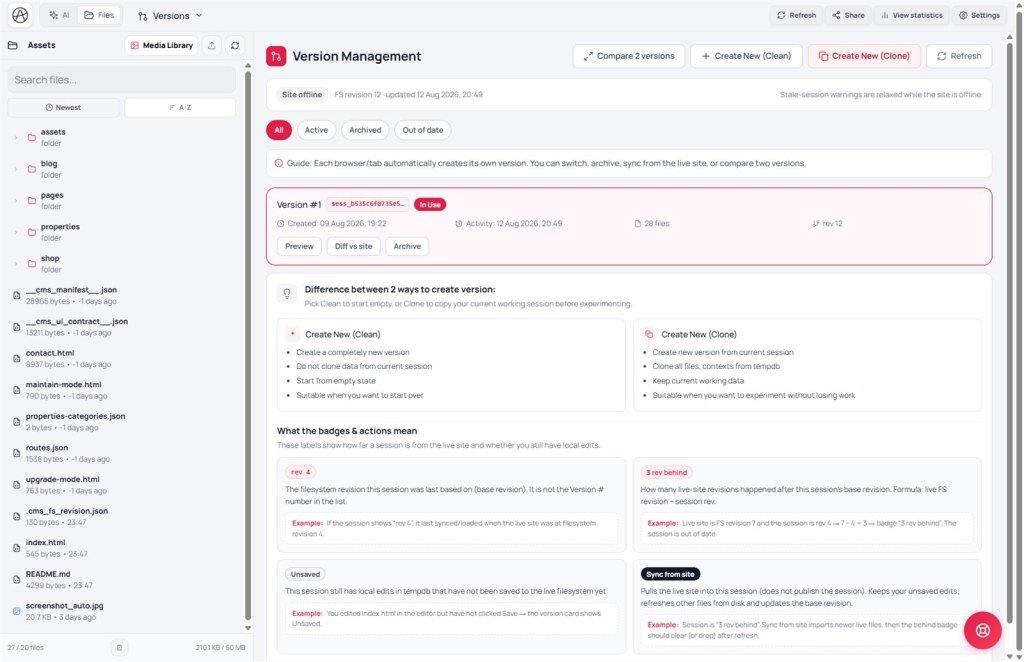
Each browser/tab has its own working session. This lesson covers Clean vs Clone, rev / Unsaved / out-of-date badges, Sync from site, Compare 2 versions, and how Site online changes warnings when you open an old session.
Learning goals: Pick Clean/Clone correctly; read Site online / rev / Unsaved / stale badges; know when to Sync from site, Diff vs site, Compare 2 versions, Archive; understand how Site online changes stale-session warnings.
Reading time: about 18-22 minutes
Prerequisites: Current / Changes (A03) and session picker (A02).
Previous / next: ← A03 (Current/Changes) · → E02 (Checkpoint on AI messages)
Main UI labels: Versions · Create new (Clean) · Create new (Clone) · Compare 2 versions · Refresh · Site online / offline · FS revision · Unsaved · Out of date · N rev behind · Sync from site · Diff vs site · Archive · All / Active / Archived / Out of date
1. Workflow map
2. Glossary
| Term | Meaning | Where in the UI |
|---|---|---|
| Versions | Tab for parallel working sessions on the project | Top Creator tab |
| Create new (Clean) | Brand-new version - no clone; starts empty | Button in Versions |
| Create new (Clone) | New version that copies all files/context from the current session | Button in Versions |
| Refresh | Reload the latest versions list | Button in Versions |
| Site online | “Site is live” flag: allows search indexing; when on, Creator warns more strongly about sessions older than the live site | Link settings (Online/Offline); Versions banner |
| FS revision / rev N | How many times the live filesystem was written. Card rev N = that session’s base revision - not the “Version #” list number | FS revision banner · card meta |
| N rev behind | Lag: live FS revision − session rev. Example: live = 7, session = rev 4 → 3 rev behind | Pink badge on the card |
| Unsaved | Session still has virtual-disk edits not yet published with Save Changes | Gray badge on the card |
| Sync from site | Pulls live files into the session (does not publish the session). Keeps Unsaved edits; refreshes other files; updates base revision | Dark button when Site online + stale |
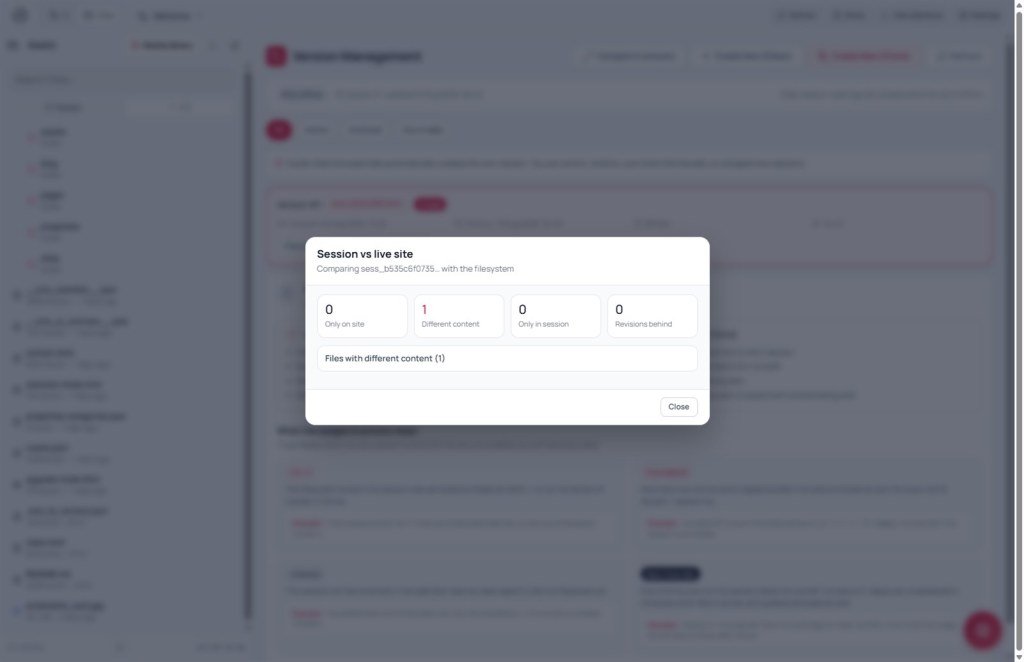
| Diff vs site / Compare 2 versions | Diff vs site: session ↔ live. Compare 2 versions: pick A & B → only in A / only in B / different content | Card button / Compare 2 versions |
| Archive / Filters | Park a session out of the daily list; filter All / Active / Archived / Out of date | Archive · filter row |
3. Clean vs Clone
| Create new (Clean) | Create new (Clone) | |
|---|---|---|
| Starting data | Completely new version | New version from the current session |
| Clone data? | Does not clone from current | Clones all files and contexts from project temp data |
| Start state | Empty | Keeps your current work |
| Best when | You want to start over | You want to experiment without losing work |
Remember: On Clone, the system reports how much was copied, e.g. “Cloned: {files} file(s), {contexts} context(s), {user_contexts} user context(s). Total: {total} item(s)” - check the count to confirm a full clone.
3B. Site online, badges, and new actions
Site online is toggled in link / app settings (Online / Offline) - not inside the Versions tab. When Online: search engines may index the site; Creator warns before opening stale sessions and shows Sync from site. When Offline (default while building): stale-session warnings are relaxed.
Badge example: Banner FS revision 7 · card shows rev 4 + 3 rev behind → live changed 3 times after this session’s base. Unsaved = draft not yet Saved (independent of behind).
- Diff vs site - files only on live / only in session / different content before you decide.
- Sync from site - pull live into the session; keep your Unsaved edits; not a substitute for Save Changes (publish).
- Compare 2 versions - pick A & B → Only in A / Only in B / Different / Identical.
- Archive - park a session out of the daily working list (can unarchive later).
When Site online: Switching to a stale session without Sync can make a later Save Changes overwrite live files with an older draft. Diff vs site or Sync first, or start a fresh session from the site.
4. Steps
Open Versions. While loading: Loading versions list….
Click Create new (Clean) → confirm: Create a completely new version (no data clone)? → success: Created new version (clean): {id}.
Click Create new (Clone) → confirm: Create a new version by cloning the current session ({id})? → success: Created new version (clone): {id} plus clone counts.
If there’s no current session to clone: Cannot clone: no current session. Make sure you’re working in a version.
5. Compared with popular tools
| Tool | Similar | Different |
|---|---|---|
| Git branch | Clone ≈ new branch from current, keeping work history | No Git knowledge; two buttons only - no merge/conflict UI |
| v0 / Lovable (fork) | Clone to experiment safely | Creator versions are per browser/tab, not fully separate projects |
| WordPress Staging | Clone an environment before going live | No separate staging server setup in Creator |
6. Technical limits
You can
- Run many parallel versions for different experiments
- Clone with all current files/contexts
- Read FS revision / behind / Unsaved; Sync from site; Diff vs site; Compare 2 versions; Archive + filters
- See clone item counts to confirm completeness
You can’t
- Clone without a valid current session
- Merge two versions like Git - Compare only reports differences
- Sync from site does not publish to live; sessions do not auto-sync across tabs
7. Common issues
| Issue | Fix |
|---|---|
| Created a version but don’t see it | Click Refresh |
| Clone says “Cannot clone” | Open a valid version/session first, then try again |
| Want a big experiment without risking current work | Always Create new (Clone) first - if it fails, return to the original |
| See “3 rev behind” / “Out of date” while Site online | Diff vs site → Sync from site (keeps Unsaved) or start a fresh session from the site before Save |
| Confuse Unsaved with behind | Unsaved = you haven’t Saved the draft. Behind = live changed after the session base. Both can appear together |
8. Tips
- Before a large feature or wide AI rewrite, Clone first - low cost, high safety.
- Use Clean only when you truly want a blank start (e.g. totally new project idea).
- When Site online and you see behind: Sync or Diff before Save - avoid overwriting live with an old draft.
- Note important version IDs; Archive unused sessions to keep the list clean.
9. Self-check
- Can you tell Clean from Clone using the comparison table?
- Can you explain rev N, N rev behind, Unsaved, and Sync from site?
- Have you created a Clone and seen the clone counts?
- Do you know Refresh, the Out of date filter, and Compare 2 versions?
Next lesson
E02 - Checkpoint on AI messages: create and restore
A lighter safety net than Versions: mark a point on an AI reply and jump back quickly in the same session.
Internal navigation (same language)
Appifio Creator · User guide · E01
