
Table of contents
Appifio Creator · Lesson E04 · Intermediate
Export: Screenshot, PDF,
.afi, ZIP & APK (BETA)
.afi, ZIP & APK (BETA)
Pick the right export format for each goal: quick client preview, print, source backup, or a trial Android package.
Learning goals: Find Export, choose the right format, and understand APK BETA limits before promising clients.
Reading time: about 14 minutes
Prerequisites: A stable preview (C01).
Previous → next: C01 → E04 → E05
1. Which format?
What do you need?
→ Quick image for a client: Screenshot
→ Print / formal email: PDF (1 page) or Full PDF
→ Editable text outside Creator: Export Word (.doc)
→ Full Creator handoff / restore: Appifio project (.afi)
→ Clean site source only (no chat history): ZIP (.zip)
→ Try Android: Export APK (BETA) - read §5 before promising clients
2. Glossary
| Term | Meaning | Where |
|---|---|---|
| Export | Opens the “Export content” modal | View space toolbar |
| Viewport / Full page | Capture what’s on screen or scroll the whole page | Screenshot modal |
| Appifio project (.afi) | Full project package for backup / handoff / reopen in Appifio (may include Creator session meta: chat history, context summary…) | Project package group in Export |
| ZIP (.zip) | Site files (HTML/CSS/JS/images…) but excludes Creator session meta - best for sharing clean source externally | Project package group in Export |
| Project profile | Source for App Name / Logo when packaging | Prompt Studio (B06) |
| Export APK (BETA) | Build an Android install file from the webapp - experimental | Project package / Templates |
| Capacitor / Kotlin | Two packaging approaches: HTML/JS shell or native Kotlin | Sample apps in Templates |
3. Open Export and take a screenshot
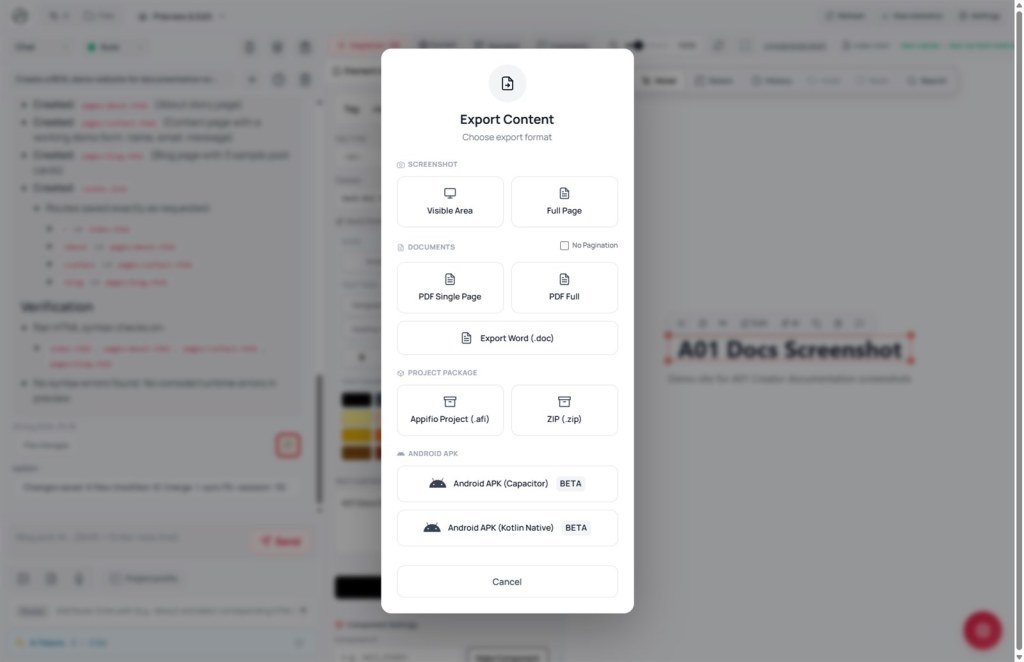
- On the View space toolbar, click Export → Export content opens (subtitle: Choose export format).
- Two main groups: Screenshot and Project package.
- Under Screenshot, choose:
- Viewport - only what’s on screen (fast, fewer errors).
- Full page - scroll and stitch (long pages may be slower).
- You may see a separate Screenshot modal with the same two options + Cancel.
- Status: Preparing → Loading page… → Capturing… → Downloading → Done! - the browser downloads the image.
- If Preview not ready: wait for the iframe to load, switch tabs, try again.
4. PDF, Word, .afi, and ZIP
- In Export, pick a document format:
- PDF (1 page) - single page; good for quote emails.
- Full PDF - multi-page; good for long docs.
- Export Word (.doc) - edit content outside Creator.
- Wait for the download - don’t close the Creator tab mid-export.
- Under Project package, pick by goal:
- Appifio project (.afi) - backup / handoff that can restore the Creator working environment (may include chat history / context summary). Share only with trusted people.
- ZIP (.zip) - same site files but without Creator session meta (chat history, conversations, context summary). Use when you only need clean source externally.
- Both .afi and .zip: Creator tries to Save the draft to the filesystem first; archives favor speed/compatibility (light compression). The main difference is which files are included (full Creator meta vs site-only).
- Form shows App Name and package file - UI note: Name and Logo come from Project profile.
- Before .afi / ZIP / APK: open Prompt Studio → update Project profile (B06) with the right name and logo.
- Export → wait → store the file safely; open the download on disk - don’t trust only the on-screen Done!.
4b. Quick picker
| Goal | Choose |
|---|---|
| Quick chat/email preview | Screenshot → Viewport |
| Print or attach to a contract | PDF (1 page) or Full PDF |
| Backup / handoff inside Appifio | Appifio project (.afi) |
| Share clean site source (no chat) | ZIP (.zip) |
| Demo on Android | Export APK (BETA) - read limits in §7 |
5. APK (BETA) - steps and limits
Two Templates samples illustrate two APK approaches:
| Approach | Best when |
|---|---|
| Capacitor (HTML Capacitor app) | Pure HTML/CSS/JS - wrapped in an Android shell |
| Kotlin native | You need real Android code (not only a web view) |
- Stable preview + recent Save changes.
- Export → Export APK (BETA) (or Capacitor sample in Templates).
- Check App Name from Project profile - fix if wrong.
- Build → Building APK… - may take minutes; don’t close the tab.
- Success: browser downloads .apk → install on a real Android phone.
- Failure: read Build failed or Heavy task unavailable on free plan - see Limits below.
BETA warning: APK builds can take longer, can fail on complex apps, and heavy tasks may be blocked on free plans. Always build and open a real APK before delivery - don’t promise an Android launch date from preview alone.
6. Compared with other tools
- Figma/Canva: strong static image/PDF export - not runnable source or APK.
- Bubble: mobile packaging via third parties - similarly “beta/limited.”
- Webflow: solid static code export for landings - no built-in APK build.
7. Technical limits
You can
- Viewport / Full page screenshots
- 1-page PDF, full PDF, Word
- .afi (full Creator meta) or ZIP (clean site)
- Try Capacitor/Kotlin APK (BETA)
- Pull name/logo from Project profile
Limits
- APK BETA may fail on complex apps
- Free plans may block heavy builds
- Full-page capture can fail on long pages
- Needs a loaded preview - not an empty tab
- No direct Google Play upload - .apk file only
8. Common issues
| Situation | Fix |
|---|---|
| “Preview not found” on export | Wait for preview to load (switch tabs) then export again |
| “Service temporarily unavailable” | Wait a few minutes; try a lighter format (image instead of .afi) |
| Capture library not loaded | Refresh Creator; wait for preview; try Viewport instead of Full page |
| APK build fails / hangs | Check plan; try a simpler app; see H03/X10 |
| Wrong App Name / logo in .afi | Update Project profile in Prompt Studio before exporting |
9. Tips
- Use PDF (1 page) for quick quote emails; Full PDF for long multi-section pages.
- Export .afi regularly on important projects (full Creator restore); use ZIP when sharing clean site source externally.
- If asked “is there an Android app?” - answer honestly: BETA; build and test before any store release.
- Run Audit (E05) before exporting a formal PDF for clients.
10. Self-check
- Can you open Export from the preview toolbar?
- Do you pick format by goal (view / print / backup / Android trial)?
- Can you tell .afi (full Creator meta) from ZIP (clean site, no chat)?
- Do you know packages take name/logo from Project profile?
- Have you captured a Viewport screenshot once?
- Do you understand APK is BETA and may fail or be plan-limited?
Next lesson
E05 - Audit: SEO · Performance · Accessibility
Before publish: open Audit → Run check → read the report → fix via chat/Inspector (no AI button inside Audit).
Internal navigation (same language)
Appifio Creator · User guide · E04
