
- 1. What is the system doing? (one picture)
- 2. Operating model - four points to remember
- 2.1 Pages = familiar HTML/CSS/JS
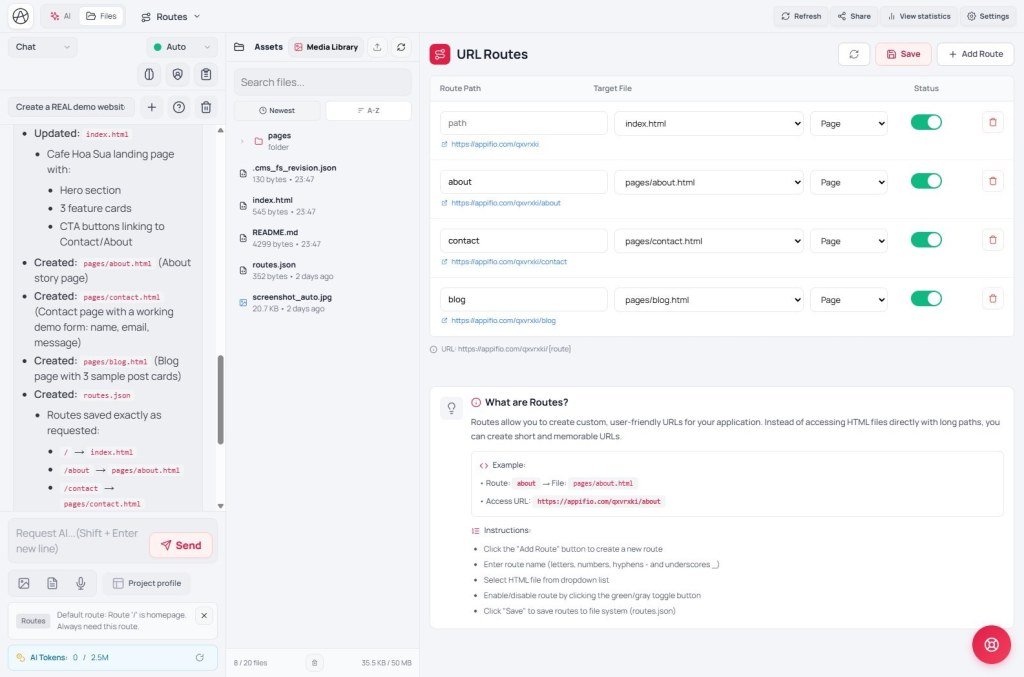
- 2.2 URL routes must be declared
- 2.3 Aura Storage = the data bridge
- 2.4 Server functions = work that must not run in the browser
- 3. Product positioning (set expectations)
- 4. Who is it for? (recommended audiences)
- 5. When should you consider another path?
- 6. Strengths & habits you must keep (security / ops)
- 7. Viable for real use / client delivery?
- 8. Versus tools you may already know
- 9. Decision checklist (print and keep)
- 10. One-paragraph summary
Appifio Creator · Report BR01 · Fit decision
and who it fits
Understand the operating model so you can answer: Am I in the group that gets real value? Not a deep technical manual - a decision brief before you invest time.
Goals: Grasp the four layers; know which apps run well on Appifio; run a “fit / not yet” checklist yourself.
Time: about 15-18 minutes
Readers: site owners, makers, people using AI to build web - before committing to a large project.
Also read: AS01 · AS17 · AM01 / EM01 · BR02 (Easy vs Aura) · BR03 (AI Agent capabilities)
Important - Prompt & skills (when asking AI in Creator)
Prompt & skills → Appifio prompt template: enable exactly one guide that matches Backend - Easy: Appifio Easy Storage - Complete AI Guide · Aura: Appifio Aura Storage (Advanced) - Complete AI Guide.
Do not enable both at once - the Agent mixes rules and generates the wrong code.
1. What is the system doing? (one picture)
Appifio helps you build websites / webapps with standard HTML · CSS · JavaScript. Pages are served by the platform (PHP), can use URL routes (you must declare them), and talk to data through Aura Storage - a ready backend API. For sensitive work (SMTP passwords, payment keys…), server functions run in a separate environment.
Like a shop: storefront (pages) · street signs (routes) · warehouse (Storage) · back-office safe (Secrets + server functions). Layer detail: series AS01-AS06.
2. Operating model - four points to remember
2.1 Pages = familiar HTML/CSS/JS
You (or the AI) work in mainstream web languages. You do not need a proprietary framework to ship a page. Most UI logic runs in the visitor’s browser; the platform delivers the right page when they open a link.
2.2 URL routes must be declared
Home is usually ready. Every other address (About, post detail, tag…) needs a line in the Routes tab pointing at the right HTML file. That keeps many apps on one platform from colliding - in return, each URL needs both a file and a route (AS04).
2.3 Aura Storage = the data bridge
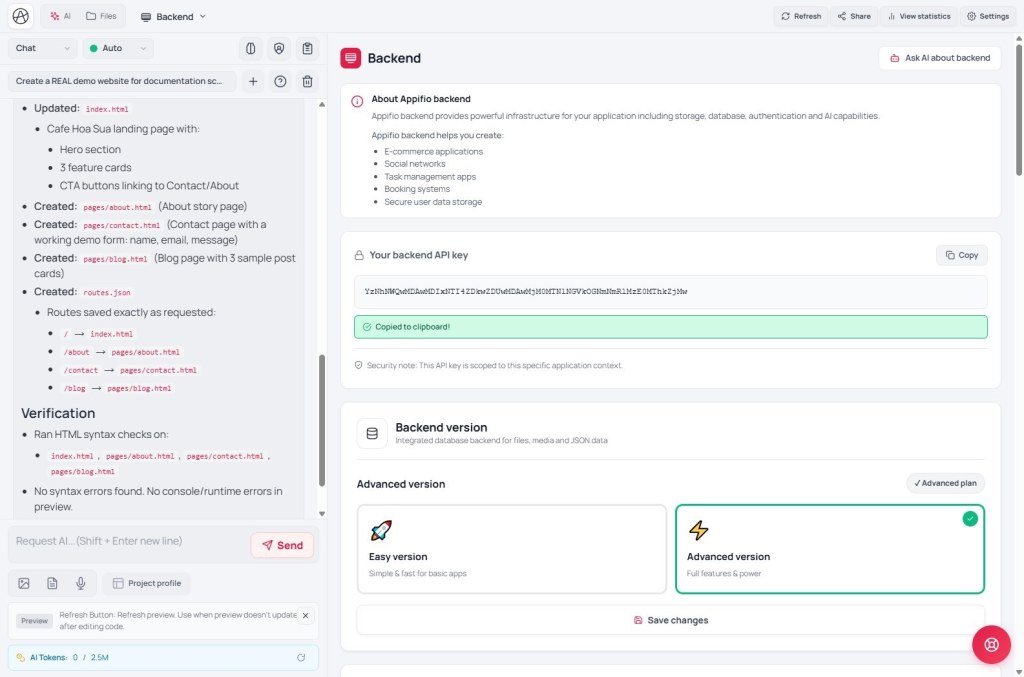
Contact forms, posts, orders, settings… persist through the Storage API (you do not stand up your own database). On the page, the built-in appifio_client library handles read / append / login… (AM series). There is guest vs admin access, rate limiting (“Try again later”), and a separate place for secrets.
2.4 Server functions = work that must not run in the browser
Sending mail with an SMTP password, calling a keyed service… should run server-side and read secrets from Secrets manager. The function environment has safety bounds (time, resources, call style) - good for short, controlled logic; not a replacement for an unbounded custom app server (AS06 · AM07).
3. Product positioning (set expectations)
Appifio aims at building and running webapps / sites quickly in one stack: Creator (design + AI) · Storage (data) · CMS (day-to-day content) · MCP (optional IDE editing).
| Treat Appifio as… | Do not expect it to be… |
|---|---|
| A platform for small-medium sites / webapps + ready data store | A full custom cloud stack for every scale |
| HTML/CSS/JS + a unified API - friendly to AI / makers | A deep analytics / complex reporting system |
| CMS + forms + light shop + blog in one place | Unlimited realtime / integration fabric like a large custom backend |
4. Who is it for? (recommended audiences)
| Group | Why it fits | Example projects |
|---|---|---|
| Small shop / service owners | Need a polished site + forms + a few intro pages; CMS to publish and review contacts | Landing, portfolio, blog, inquiry form |
| Makers / freelancers | Want familiar HTML/CSS/JS; AI help; no private server to stand up | Light internal webapps, client microsites |
| Small AI-assisted teams | Coder prompts + ready Storage; clear handoff checklist (AS17) | MVP, catalog, simple booking |
| Editors (after build) | Day-to-day work in CMS, little Creator time | Publishing posts, handling orders / contacts |
5. When should you consider another path?
Not “it cannot work” - fit is lower. Compare deeper tools before making Appifio the main platform:
- Very large data / complex reporting: Storage is optimized for lists, forms, CMS content. Heavy multi-dimensional analytics usually needs a dedicated data layer.
- Continuous realtime / unbounded third-party integrations: Server functions suit controlled jobs; “every API, every protocol, long-running” usually belongs on a specialist backend.
- Industry compliance (healthcare, heavily audited finance): Align legal/security checklists with your technical team before attaching sensitive data.
- Teams that want “100% drag-and-drop, never see code”: Appifio is friendly, but power sits in Creator + HTML/JS + Storage - different from pure block builders.
Many teams use Appifio for front door & content ops and place a heavy core elsewhere - that is a valid split.
6. Strengths & habits you must keep (security / ops)
Built into the platform
- Guest / admin split; editor vs owner roles
- Rate limits (“Try again later”)
- System files (accounts, routes…) have dedicated paths
- Secrets stay off the public page
- CMS / MCP optional and can be turned off
Habits you must keep
- Do not ask AI to put passwords / keys in HTML
- Guest forms: append one row - never overwrite the whole list
- Every URL needs file + route; remember Save changes
- Separate staff / owner accounts (AS05)
- Share MCP tokens only with trusted people (AS14-16)
Most real risk comes from how the site is built (leaked secrets, missing routes, overly broad permissions) more than from “not knowing Storage exists”. AS/AM series target those points.
7. Viable for real use / client delivery?
Clearly viable when the project fits: brochure sites, blog/CMS, forms, light catalog / shop, medium internal webapps, MVPs that need to launch fast.
Commercial value sits in speed to a running site + store + content admin in one place, especially with Creator AI. You do not need to host a database just to get forms and posts.
Before client handoff: use checklist AS17 (Creator · Storage · CMS · MCP). That moves you from “understand the model” to “verified in practice”.
8. Versus tools you may already know
- Webflow / Framer: strong visual design; Appifio emphasizes HTML/JS + Storage + built-in CMS.
- WordPress: same “pages + content admin” idea; Appifio bundles Creator AI and an API store in a maker-oriented way vs scattered plugins.
- Bubble / heavy no-code logic: block logic; Appifio keeps logic in JS + Storage - closer to “light code”.
- AI site gens (Lovable, v0…): same “AI → UI” direction; Appifio adds host + Storage + CMS + MCP in one ecosystem.
9. Decision checklist (print and keep)
More “Yes” answers → stronger case for Appifio as the main platform
- Do I need a site / webapp fast, preferring HTML/CSS/JS or AI-written code?
- Is data mostly lists (posts, contacts, orders, products) plus a few config sheets - not a huge analytics warehouse?
- Am I willing to declare routes for every important URL?
- Will I (or the AI) keep secrets in Secrets manager, not on the page?
- Is day-to-day publishing / form review via CMS enough?
- Is current scale SMB / MVP / internal - not a heavily audited industry system yet?
If many answers are “Not yet / No”
Restate the need (e.g. realtime reporting, complex bank integrations, huge datasets). Appifio may still fit UI & content while the core lives elsewhere - or choose a deeper platform for the whole project.
10. One-paragraph summary
Suggested next step
AS01 - Three layers: pages · data · admin
If section 9 leans “Yes”, start with AS01; before delivery use AS17.
Internal navigation (same language)
Appifio Creator · Orientation report · BR01
