
- 1. Ecosystem and Platform Overview
- Security and Account
- Plans and Billing
- 2. Appifio Creator: Creative Studio and Operational Rules
- Five Core Pillars
- Operational Mechanism and Technical Constraints
- 3. Creative Community and Resource Library
- Community Showcase
- AI Prompt Studio
- 4. Aura Data System (Exclusive to Creator)
- 5. Infrastructure, Domains, and Analytics
- 6. Collaboration and Team Management
- 7. Support and Customer Care System
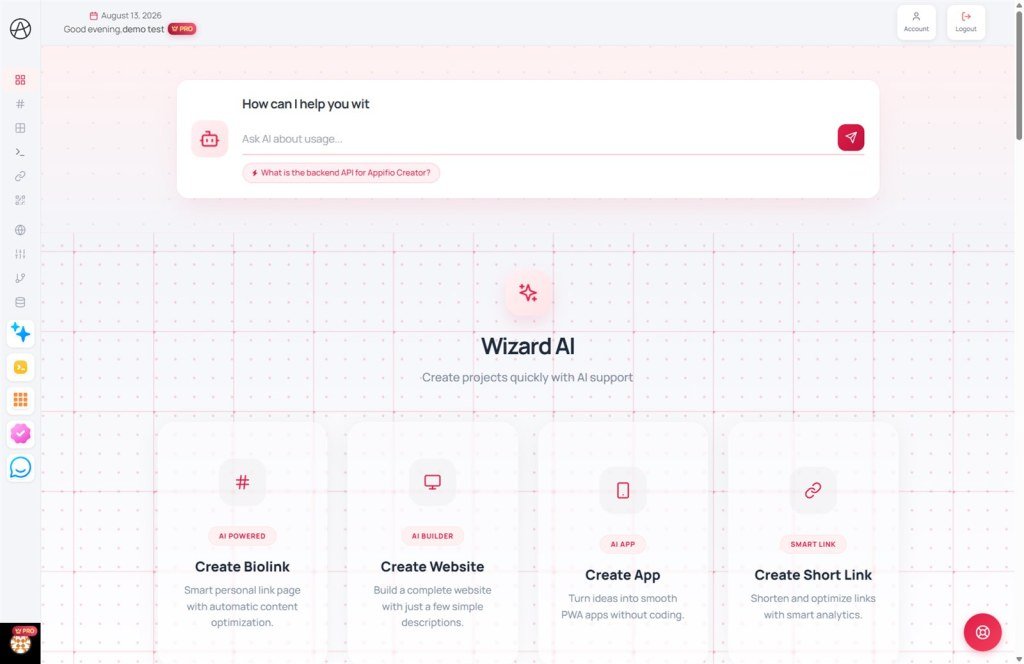
A comprehensive overview of Appifio's strategic solutions and Creator editor technical constraints.
1. Ecosystem and Platform Overview
Appifio is a centralized management platform for links and analytics data, serving as the operational environment for products created with Appifio Creator. Within this ecosystem, Appifio Creator provides a design studio where users collaborate with AI Agents to build Website, Biolink, or Webapp interfaces, integrated with the visual Inspector for flexible drag-and-drop editing and element refinement. The system is enhanced by Aura backend storage for dynamic data, Aura CMS for content management of posts/products, and Aura MCP for seamless synchronization between the design environment and external programming tools (such as IDEs like Cursor, Trae, etc.).
Security and Account
- Secure Registration: Email verification and support for quick login via Google/Facebook to activate usage rights.
- Anti-bot Verification (Onboarding): An intelligent survey system to identify real users and unlock link creation features.
- Multi-layer Protection: Automatic login lockout mechanisms, IP control, and prevention of disposable emails to protect system resources.
- Activity Logs: Detailed tracking of login history and operations by IP address to safeguard accounts.
- Public Profile: A personal identity page displaying design capabilities, prompt libraries, and featured projects.
Plans and Billing
- Service Plan Tiers: Resource limit management across Free, Gold, and Diamond plans.
- Billing and Invoices: Automated invoice system, transaction history, and upgrade mechanisms via redeem codes.
- Affiliate Program: A collaborative mechanism allowing users to earn commissions by sharing the ecosystem.
2. Appifio Creator: Creative Studio and Operational Rules
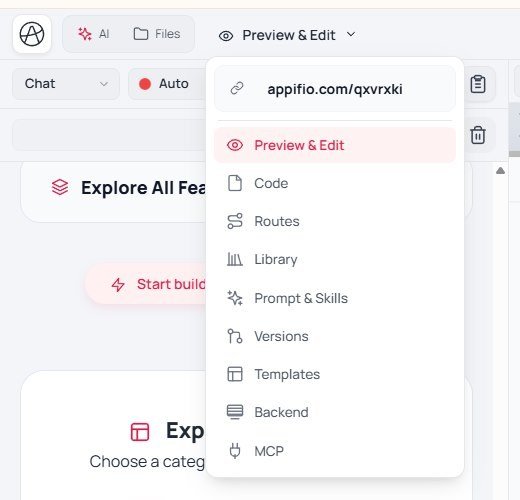
A breakthrough editor that combines the power of AI and visual tools to build professional products without requiring programming knowledge.
Five Core Pillars
- AI Agent: An intelligent assistant that writes code and executes creative requests.
- Viewing Space: A versatile preview with Standard and Canvas modes (for multi-device comparison).
- Inspector: A visual editing tool for fine-tuning every element on the interface.
- Aura Storage & CMS: Integrated data storage and content management systems for projects.
- Aura MCP: Bridge from Creator to external IDEs (e.g. Cursor) via an MCP session and token.
Operational Mechanism and Technical Constraints
- Virtual Disk: Secure draft management (Changes), fully separated from the live version (Current). If chat/Inspector finishes but the live site did not change → click Save changes.
- Web Language Constraints: Exclusively supports pure HTML, CSS, and Vanilla JavaScript. PHP, TypeScript, or SPA frameworks are not supported.
- Android Native Development: Supports Java, Kotlin, and XML for building genuine mobile applications.
- AI Supervisor: A real-time source code monitoring and automatic error correction system.
- Audit & SEO: Tools for automatic performance checking and search engine optimization.
- Checkpoint & Versions: Save milestones on AI chat; Clone/Clean on the Versions tab before big experiments. Applying a Template can wipe files/temp data.
- Export:
.afi(backup/handoff inside Appifio) vs ZIP (clean source). Update Project profile before export. - File Rules: Automatically hides the
.htmlextension in the browser for clean, professional links.
3. Creative Community and Resource Library
A hub for sharing knowledge and reusing successful design templates from the Appifio community.
Community Showcase
- Gallery: A collection of the best websites, applications, and prompt sets.
- Template Installation: Copy the entire structure and source code of sample projects to personal accounts.
- Design.md Button: Directly connects the displayed product in the Showcase with the original prompt in the Prompt Studio.
AI Prompt Studio
- Prompt Library: Store, share, and optimize prompts for artificial intelligence on the Appifio website.
- Prompt Categorization: Includes system templates (System Prompts) and community templates (User Prompts).
- Sample Results: Provides a visual preview of what the AI will create.
- Different from in-Creator tools: the Prompt & Skills tab + Project profile button apply only to the open project - they do not replace the public website library.
4. Aura Data System (Exclusive to Creator)
Specialized tools integrated directly with Creator for handling dynamic data and content management.
- Aura Storage: A JSON data storage system for automatically collecting orders and contact forms from websites.
- Aura CMS: A dedicated administrative interface (at /cms) for daily updates of posts and products.
- Appstorageclient: An internal API library connecting JavaScript source code with Aura storage.
5. Infrastructure, Domains, and Analytics
Tools for professionalizing brands and monitoring link operational efficiency.
- Custom Domains: Procedures for connecting private domains, configuring DNS (A/CNAME records), setting up SSL, and specifying Index/404 URLs to professionalize the brand.
- Project Management: Organize and categorize links and websites by campaign or client.
- Pixel Manager: Simultaneously integrate multiple tracking codes (Facebook, Google, TikTok, Zalo) for conversion measurement.
- Analytics & UTM: Detailed reports on traffic, devices, and referral source efficiency.
- QR Codes & Shortlinks: Create versatile QR codes and shortened links for optimized social sharing.
6. Collaboration and Team Management
Scalable operational solutions allowing multiple users to participate in building and managing projects.
- Teams Management: A mechanism for delegating project work to collaborators without sharing primary account passwords.
7. Support and Customer Care System
Interaction channels to help users resolve technical difficulties and receive direct assistance.
- AI Help Bubble: A 24/7 support center integrated into the dashboard for quick answers and documentation lookup.
- Ticketing System: A specialized request system to track status and receive direct feedback from administrators.
© 2026 Appifio - Comprehensive AI Creative Ecosystem
