
Powerful AI Tool
Transform your description into a professional profile page (Biolink) in seconds.
1. Introduction to Biolink AI Wizard
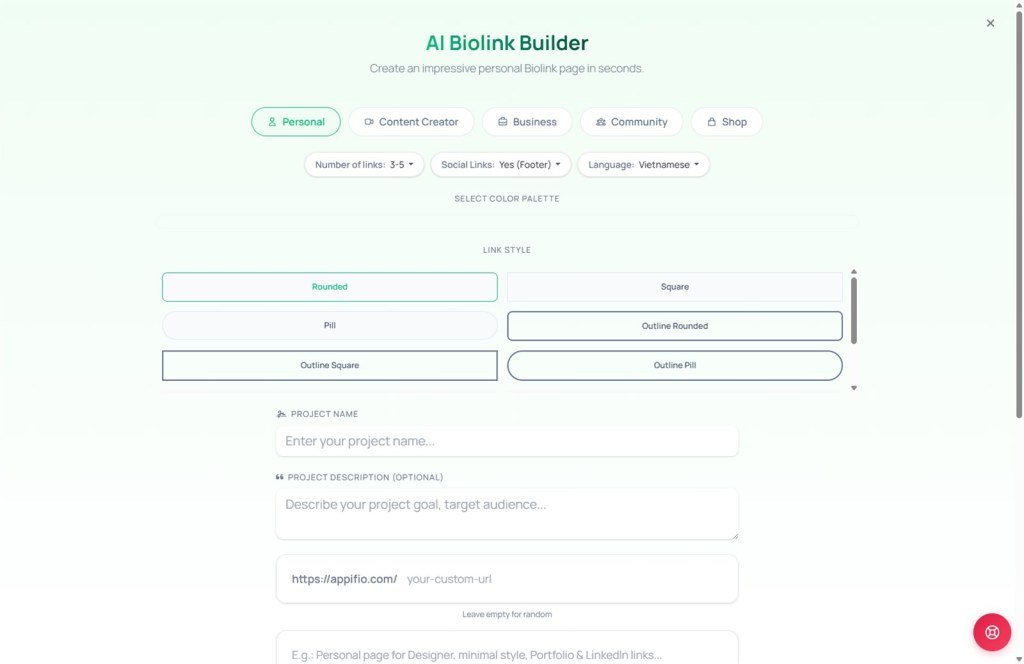
The Biolink AI Wizard is an intelligent assistant that helps you create electronic business cards or link aggregator pages without any design experience ngay tại Dashboard. The AI automatically selects colors, layout, and generates content based on your specific requirements.
2. Step-by-step execution
Select a topic (Tabs)
Choose the category that best fits your needs:
- Personal: For self-introductions or online CVs.
- Creator: For TikTokers, YouTubers, and Influencers.
- Business: For real estate agents, insurance, or professional services.
- Community: For groups, clubs, or events.
- Store: For online sales, fashion shops, or beauty brands.
Configure settings
Each topic includes quick options to help the AI refine its output:
- Link count: Choose the number of buttons you want to display.
- Social networks: Display icons in the Header or Footer.
- Language: AI supports content generation in Vietnamese or English.
- Style: Choose between Dynamic, Cute, Cool, or Minimalist vibes.
Select color palette & button style
The system provides dozens of pre-designed palettes and button styles (Rounded, Square, 3D, Pill, Shadow...) to give your page a unique visual identity.
Enter description and create
Write a few sentences about yourself or the purpose of your page, then click the "Create AI Biolink Page" button.
3. The "Rewrite Prompt" mechanism
This is the core feature that ensures your page looks professional. Instead of sending your short description directly to the AI, the system performs a sophisticated "Restructuring" (Rewrite) process:
Automated optimization process:
- Design token integration: The AI automatically embeds your chosen color codes (Primary, Secondary, Text...), typography settings, and border radius into the prompt.
- Context enhancement: The system adds industry-specific instructions, target audience details, and CSS hints (like 3D, Shadow, Outline).
- Refined rewriting: The AI transforms your simple input into a detailed blueprint. For example: "Selling coffee" becomes "Create a minimalist coffee shop Biolink using earthy brown tones, 3D buttons with soft shadows, focusing on the menu and shop atmosphere."
The result is a page that is not only content-accurate but also visually beautiful and consistent.
4. Pro tips for best results
Prefer manual creation?
If you prefer to configure every pixel yourself, you can always click Manual Create to bypass the AI and go directly to the detailed editor.
© 2026 Appifio Creator - Biolink AI Wizard Guide
