
- 1. Account overview
- Quick glance information
- 2. Professional public profile
- Profile features & functionality
- 3. Managing personal information
- Profile picture (Avatar)
- Personal details
- 4. Account security
- Password management
- Two-factor authentication (2FA)
- 5. Billing and invoice settings
- Configuring billing information
- 6. Additional security features
- Anti-phishing code
- Newsletter subscription
Identity Management
Estimated reading time: 10 minutes | 110 views
Learn how to manage your profile, security settings, and customize your professional presence on Appifio.
1. Account overview
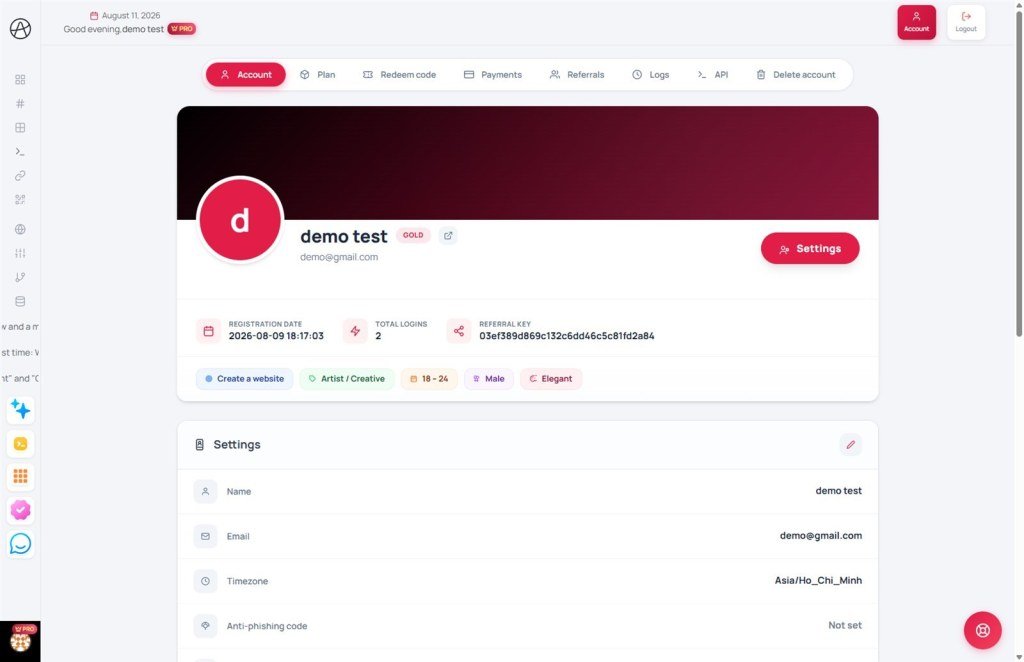
Your account page provides a comprehensive summary of your identity and activity on the platform:
Quick glance information
- User profile: Displays your avatar, full name, and current subscription plan level.
- Activity metrics: Track when you joined the system and your total login count.
- Referral key: Your unique identifier for participating in our affiliate programs.
- Verification status: Shows your onboarding survey progress and anti-bot verification status.
2. Professional public profile
Every Appifio member is assigned a professional Public Profile. This serves as your online "studio" to showcase your creative work and build your brand within the community.
Profile features & functionality
- Professional identity: Displays your avatar, location, and tenure. It acts as your professional face on the platform.
- Skill badges: Visual tags representing your design style, goals, and expertise based on your onboarding survey.
- Reputation metrics: Aggregates the number of apps, websites, and AI Prompts you've shared, along with total installations and likes.
- Showcase gallery: Displays your AI-generated websites and apps as interactive cards with live demos and one-click installation options for other users.
- Prompt library: A dedicated space to share intelligent AI commands. Other users can view their effectiveness and use them for their own projects.
3. Managing personal information
You can update your core identity details at any time in the account settings.
Profile picture (Avatar)
Upload a personal photo to enhance your profile's recognition. If no image is uploaded, the system will automatically display your initials on a color-coded background.
Personal details
- Full name: Your name as it appears across the platform and within your shared links.
- Email address: Used for login and official notifications. Note: Changing your email requires a verification step at the new address.
- Timezone: Setting this correctly ensures that your traffic reports and statistics reflect the accurate time of visit.
4. Account security
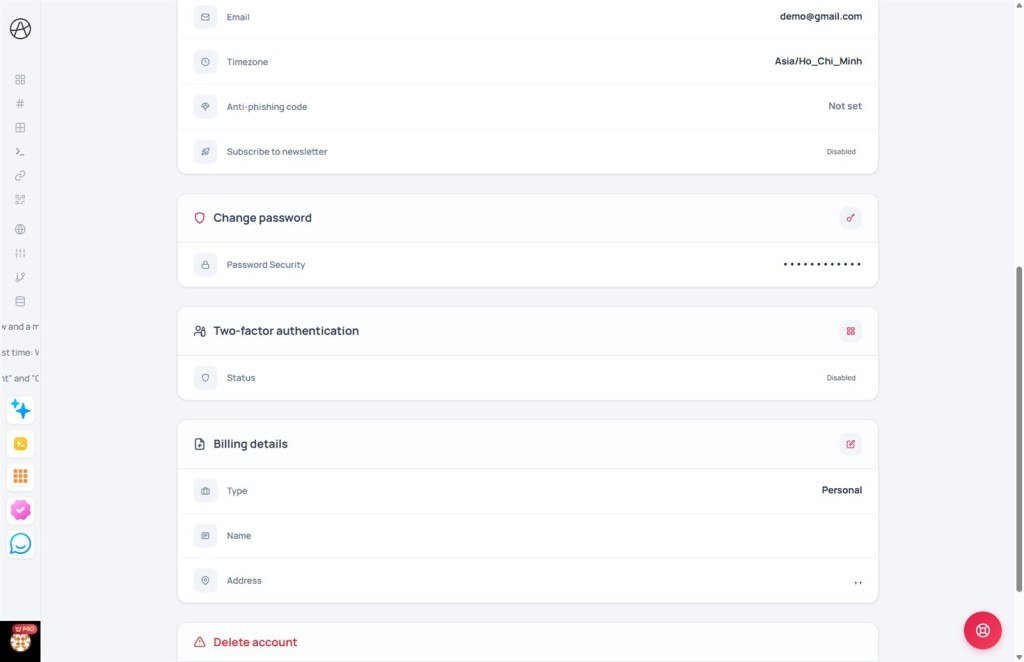
Appifio provides robust protection layers to keep your data safe.
Password management
We recommend updating your password periodically. New passwords must be at least 6 characters long to maintain system security.
Two-factor authentication (2FA)
This is the highest level of security. When enabled, you will need to enter a time-sensitive code from an authenticator app (like Google Authenticator) in addition to your password to log in.
5. Billing and invoice settings
This section is crucial for users on paid subscription plans. The information provided here is used to generate official invoices.
Configuring billing information
- Account type: Choose between "Personal" or "Business".
- Tax ID: Required only if the "Business" type is selected.
- Contact details: Includes your full name, phone number, address, city, and country.
- Additional notes: You can add specific information that needs to appear on your invoices here.
Note: If you have an active recurring subscription, you may not be able to change billing details directly without first canceling the subscription or contacting support.
6. Additional security features
Anti-phishing code
You can set a custom keyword that will appear in every official email from Appifio. This helps you distinguish legitimate system emails from potential phishing attempts.
Newsletter subscription
Enable this to stay updated on new features, design templates, and exclusive promotional offers from Appifio.
© 2026 Appifio. All rights reserved. Documented by Account Operations.
