
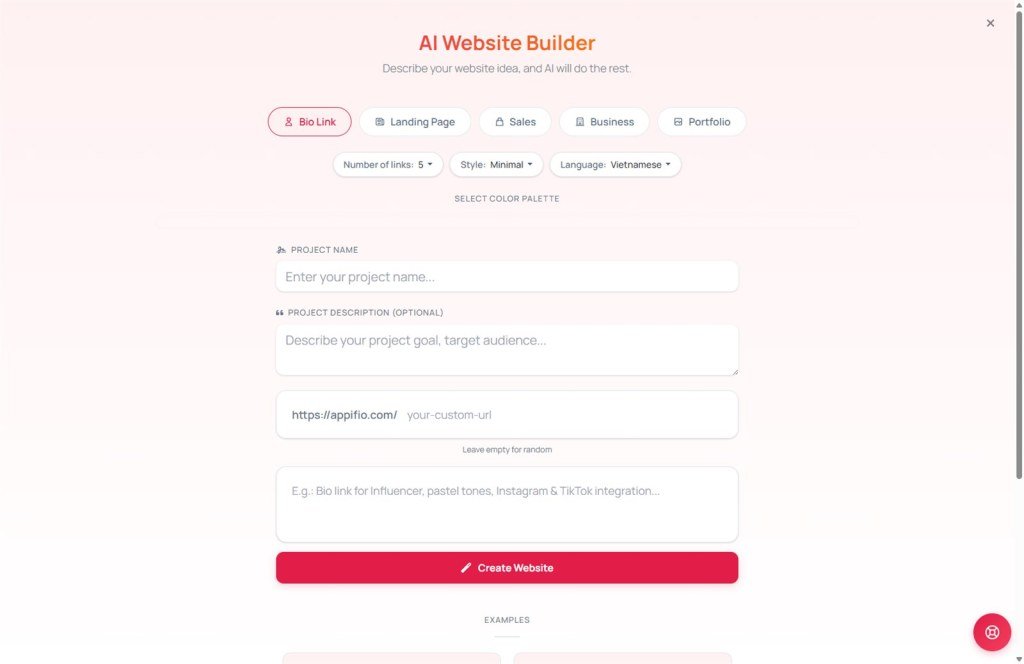
Website AI Engine
Launch a professional website or landing page with just a single prompt.
1. What is the Website AI Wizard?
This is Appifio's most powerful tool, allowing you to generate a complete landing page with full content, imagery, and marketing-ready structures without any coding or graphic design skills Dashboard.
2. How it works
Define your website type
Choose your goal so the AI can optimize the page structure:
- Biolink: Advanced link aggregation page.
- Landing Page: Focused page for products or services.
- Sales Page: Optimized for conversions and product showcases.
- Business: Professional corporate presence.
- Portfolio: Showcase for personal or professional projects.
Select design source
The Website AI Wizard allows you to choose your starting point:
- Blank: AI creates entirely from scratch.
- Default Templates: AI builds upon successful industry structures.
- Showcase ID: Found a design you love in our community? Enter its ID, and the AI will replicate that style.
Personalize your palette
Select a color scheme that reflects your brand. The AI will intelligently apply these colors to buttons, headers, and backgrounds throughout the site.
Describe your vision
The more detail you provide, the better the result. Example: "Create a playful website for online children's English courses, use green tones, include parent testimonials and a pricing section." Then click the "Create AI Website" button.
3. The "Rewrite Prompt" mechanism
The "Rewrite" feature is the key to creating SEO-friendly, high-conversion websites. When you click "Create," the system automatically executes several critical steps:
Smart restructuring process:
- Goal analysis: The AI identifies whether you're selling, introducing a service, or building a portfolio.
- Design token integration: Color parameters (Primary, Surface, Text...), fonts, and border radius are embedded into the prompt for visual consistency.
- Advanced rewriting: The system expands your brief description into a detailed technical specification. For example: "Skincare web" becomes "Design a luxury skincare landing page with an elegant layout, an impressive header, featured product sections, authentic customer testimonials, and strong Call-to-Action (CTA) buttons."
This ensures the AI deeply understands your concept and delivers results that far exceed a simple command.
4. Pro tips for success
Using Showcase IDs
Spotted a beautiful site while browsing the Showcase? Copy its ID and paste it into the "Design Source" field in the Wizard. Your new site will inherit those design "genes" while featuring your unique content.
© 2026 Appifio Creator - Website AI Wizard Guide
