
- 1. What is the Showcase?
- Benefits of the Showcase
- 2. Showcase resource categories
- System templates
- Community showcase (User Showcase)
- 3. Exploring the design detail page
- Multi-device live preview
- The "Design.md" button - Connecting with AI Prompt Studio
- Technical info and metadata
- 4. How to submit projects to the Showcase
- Display Settings
- Critical Note on Approval
- 5. How to Install a Template
- Installation Workflow
- 6. Personal Showcase Profile
1. What is the Showcase?
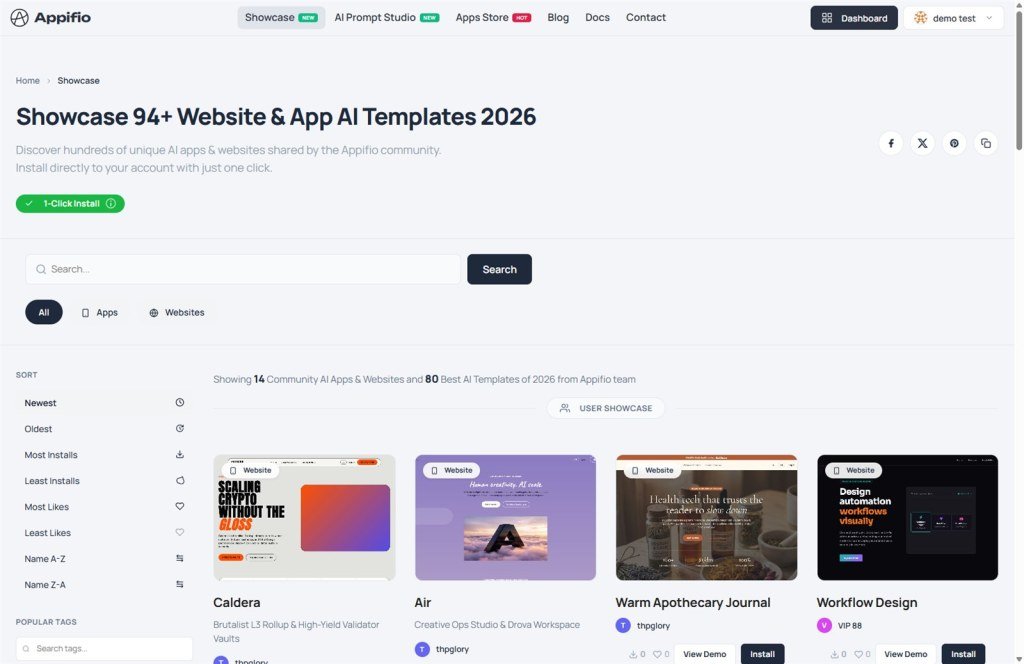
The Showcase is Appifio's public gallery, featuring the best AI websites, apps, and prompts from the community. It serves as a creative hub for learning from others and reusing successful design patterns.
Benefits of the Showcase
- Discovery: Explore thousands of real-world projects for inspiration.
- Experience: View live demos before installing.
- Time-saving: Install project prototypes with a single click.
2. Showcase resource categories
The Appifio Showcase categorizes resources into two main groups for easy selection:
System templates
- Origin: Designed and optimized by the Appifio expert team.
- Characteristics: Highly stable, integrated with the latest features, and often includes detailed guide articles.
- Advanced Install: Supports the Advanced Install button for paid plans to enable Aura CMS (Aura storage).
Community showcase (User Showcase)
- Origin: Created and shared publicly by the Appifio user community.
- Characteristics: Diverse styles, highly practical for various industries.
- Trust metrics: Displays the number of Installs and Likes to gauge quality.
- Author identity: Includes a direct link to the creator's Profile page.
3. Exploring the design detail page
Clicking on any design takes you to a detail page with powerful features:
Multi-device live preview
More than just static images, Appifio allows you to interact directly with the design through the Preview pane:
- Laptop mode: View the computer display at standard resolution.
- Mobile mode: Simulate the smartphone interface to test responsiveness.
The "Design.md" button - Connecting with AI Prompt Studio
This unique feature, exclusive to Appifio community templates, bridges the gap between design and instruction:
- Meaning: The Design.md button opens the "linguistic source code" (Prompt) used to generate that specific design in the AI Prompt Studio.
- Benefits: You can learn prompt engineering techniques, understand the author's logic, or reuse the prompt to create your own variation.
Technical info and metadata
The detail page provides full context: Creation date, last update date, Category, and the design's approval status.
4. How to submit projects to the Showcase
To share your achievements with the community, follow these steps:
Display Settings
- Go to the Dashboard, select the project you want to share, and click Edit.
- In the Settings tab, scroll down to the Public on Showcase section (located at the bottom of the page).
- Enable the Public on Showcase toggle.
- Click Update to save your settings and submit for approval.
Critical Note on Approval
All products submitted to the Showcase must undergo an Approval (Approved) process by Administrators to ensure content quality.
Re-approval Mechanism: If you make any changes (such as editing content or updating settings) and click "Update" for an already approved link, the system will automatically reset the status to "Pending" and temporarily hide it from the Showcase until it is reviewed again.
5. How to Install a Template
The Showcase is divided into two zones: User Showcase (community-driven) and Templates (system standards).
Installation Workflow
- Select a template you like and click Demo.
- Click the Install button.
- Name your new project in the confirmation window.
- The system will automatically clone the entire structure and source code into your account.
6. Personal Showcase Profile
Your public Profile page is where you build your personal brand on Appifio. It displays:
- A list of all Websites, Apps, and Prompts you have shared.
- Reputation metrics: Total installations and likes.
- Your identity information and skill badges.
You can use this profile link as a Portfolio to showcase your work to clients or partners.
© 2026 Appifio Creator. Community Showcase feature guide.
