
- 1. Global dashboard architecture
- Top navigation bar (Navbar)
- Left sidebar menu
- 2. AI command center (AI Header)
- 3. Quick action groups
- Group 1: Create new AI resources
- Group 2: Management & optimization
- Group 3: Data & Analytics
- Group 4: System & Account
- 4. AI Wizards
- Biolink AI Wizard AI
- Website AI Wizard AI
- App Builder AI Beta
- 5. Advanced resource management
- Resource types
- Toolbar & Filters
- Per-resource actions
- Data export
- 6. Analytics & Insights
- 7. Personalization & Community
- 8. Professional design services
- 9. Security & Multi-tier support
- 10. Creative studio & Community
- 11. Project & Data management
- 12. Domain & Team management
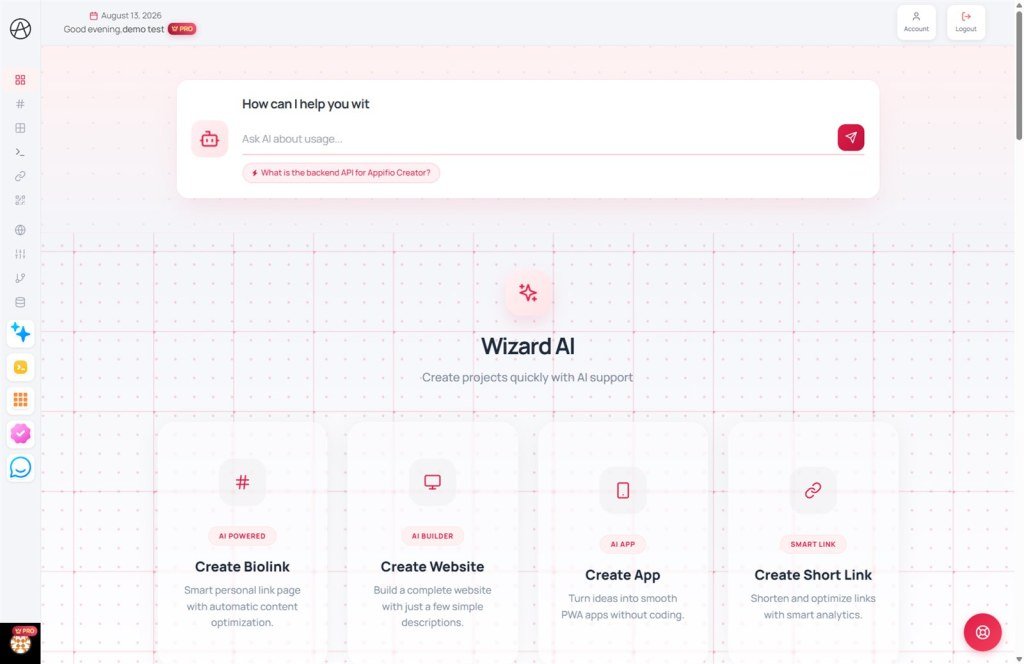
A comprehensive guide to managing core link types: Biolink, AI Website, AI Webapp, and Shortlink.
1. Global dashboard architecture
The Appifio interface is built with an intuitive layout designed to give you a complete overview of your entire digital ecosystem.
Top navigation bar (Navbar)
The navigation bar serves as the command center, connecting you to core services and account tools:
Left sidebar menu
Your primary management hub for all system functions:
Sidebar footer & dropdown menu: Click your avatar to access system-wide settings:
- Account settings: Update your personal profile.
- Subscription plans: Upgrade your plan and check resource limits.
- Billing: Manage invoices and transaction history.
- Affiliate program: Track your referral commissions.
- Teams: Manage collaboration and permissions.
- Logout: Securely sign out of the system.
2. AI command center (AI Header)
The creative heart of your Dashboard, located right at the top.
3. Quick action groups
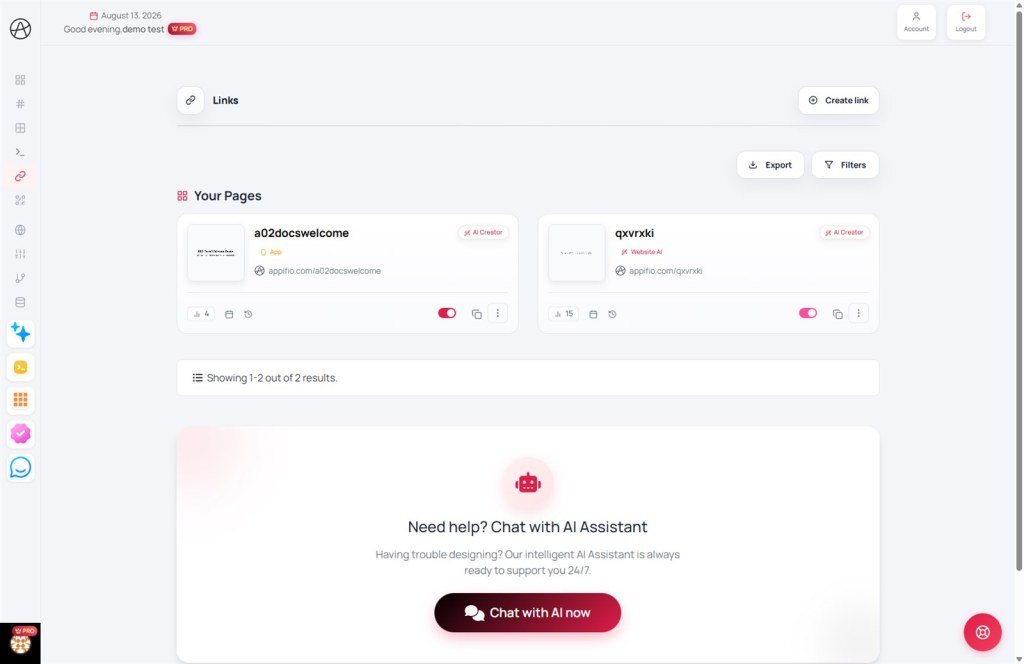
Rapidly access your core links and management functions.
Group 1: Create new AI resources
- AI Website: Build professional landing pages and sites.
- AI Biolink: Create smart personal profile pages.
- AI App builder: Build mobile-ready webapps.
- Shortlink: Quickly shorten any URL.
Group 2: Management & optimization
- My Prompts: Your personal library of AI instructions.
- QR Codes: Generate QR codes for any link.
- Custom Domains: Configure your branded web address.
Group 3: Data & Analytics
- Tracking Pixels: Integrate marketing codes (Facebook, Google, etc.).
- Customer Data: Manage information collected from your sites.
- Projects: Group resources by specific campaigns or goals.
Group 4: System & Account
- Billing: View invoices and payment history.
- Teams: Manage collaborative workspace access.
- Subscription: Monitor and upgrade your plan limits.
4. AI Wizards
Transform your ideas into reality in seconds with our full-screen AI-powered creation engines.
Biolink AI Wizard AI
Process: Select a topic -> Customize style & button types (Rounded, Square, 3D, Pill, Outline, Shadow) -> Enter description. The AI automatically designs your complete page.
Note: You can always select "Manual Create" for full control in traditional mode. See the Manual Biolink guide for more details.
Website AI Wizard AI
Create professional landing pages or portfolios. The AI suggests everything from content structure to conversion-optimized imagery.
Source options: Start from a Blank page, use a Default template, or import designs from a specific Showcase ID.
App Builder AI Beta
Generate Android source code (Kotlin) and mobile webapps (PWA) from simple functional descriptions.
5. Advanced resource management
Powerful tools to help you organize and manage thousands of links scientifically.
Resource types
The system focuses on managing four primary link categories:
Toolbar & Filters
Per-resource actions
Every link in your list includes quick-access functionality:
Data export
Export your resource list into popular formats for backup or reporting:
6. Analytics & Insights
Make data-driven decisions with our visual reporting system.
7. Personalization & Community
8. Professional design services
If you need a fully custom solution, Appifio is here to help.
9. Security & Multi-tier support
Appifio ensures your data is protected while providing instant support solutions.
10. Creative studio & Community
Connect and unlock the infinite potential of AI with the Appifio community.
11. Project & Data management
Organize your work scientifically and manage customer information effectively.
12. Domain & Team management
Elevate your brand and collaborate professionally with your colleagues.
© 2026 Appifio Creator - Empowering your creative journey
