
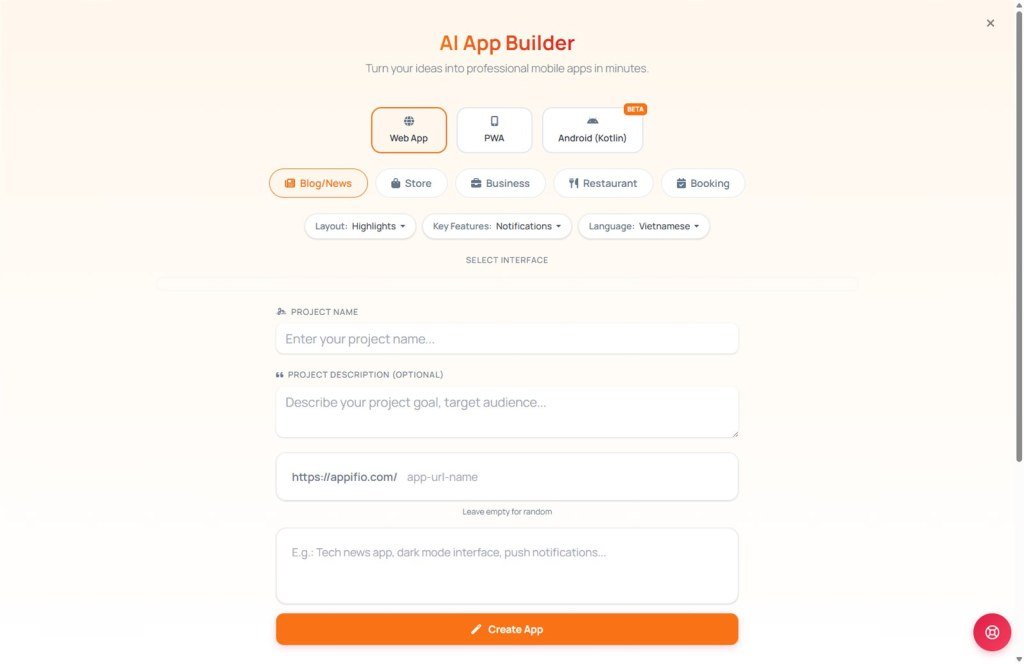
Next-Gen App Builder
Turn your business concepts into modern mobile and web applications.
1. What is App Builder AI?
This is a premium creation engine ngay tại Dashboard that helps you build Web Apps, Progressive Web Apps (PWA), and native Android applications. Instead of hiring a developer, you simply describe the functionality you need, and our AI handles the rest.
2. The 4-step creation process
Select your platform
Decide where your application will live:
Choose an app category (Topic)
The AI is pre-trained on successful business models found in our Apps Store:
- News/Blog: For digital newspapers or online magazines.
- Store: E-commerce apps for product management and sales.
- Business: Internal tools or professional service showcases.
- Menu: Digital menus for restaurants and cafes.
- Booking: Scheduling tools for spas, clinics, or hotels.
Define your design style
Just like our other wizards, you choose your favorite color palette. The AI automatically crafts a Mobile-First user interface (UI) based on your selection.
Describe functionality
List the features you want. Example: "Create a barbershop booking app with a staff list, price table, and customer appointment form."
3. The "Rewrite Prompt" mechanism
To ensure your application has accurate operational logic, App Builder AI uses the "Rewrite" feature to transform raw ideas into technical specifications:
- Design token integration: Mobile design parameters (colors, border radius, typography) are embedded into the prompt to ensure a modern UI.
- User flow simulation: The system automatically adds User Experience (UX) instructions, such as navigation methods, notification displays, and data storage logic.
- Intelligent rewriting: The AI upgrades your description. For example: "Food ordering app" becomes "Build a mobile-first food delivery application for a restaurant, featuring a cart system, delivery address form, categorized menu, and smooth page transition effects."
Thanks to this process, the resulting app is not only visually appealing but also structurally sound from the very first build.
4. Important notes and tips
© 2026 Appifio Creator - App Builder AI User Guide
